HOME | DD
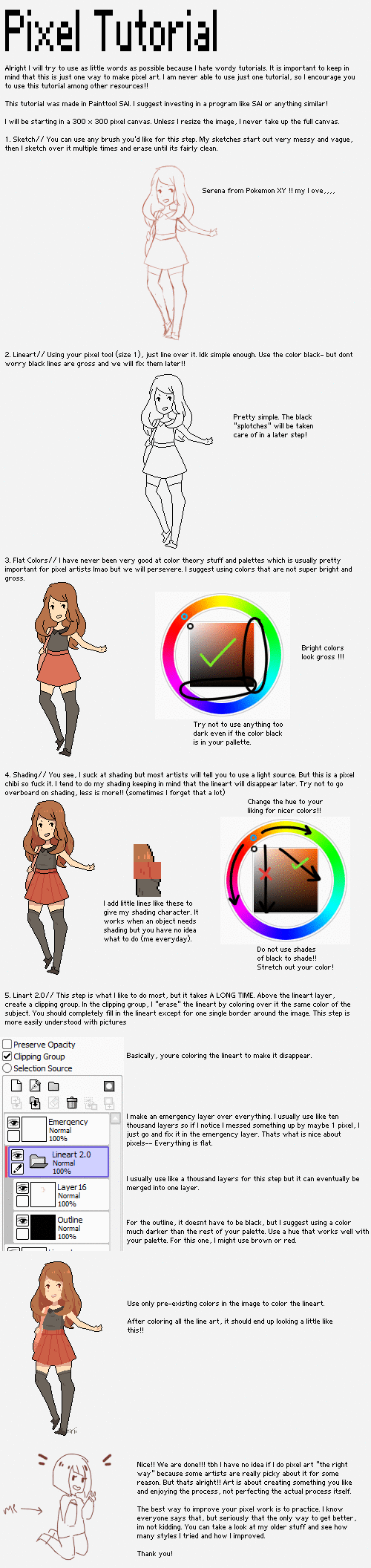
 1000butts — Pixel Art Tutorial for SAI

Published: 2013-06-13 09:33:24 +0000 UTC; Views: 4612; Favourites: 50; Downloads: 74
Redirect to original
Description
ALSO, if you want to save your picture as a transparent file, a good way to do it (or at least how i do it), is save the picture as a photoshop file, go into photoshop or fire alpaca, and save it as a png!A friend of mine is making a horror game, and they asked me to show them how I do pixels. I decided to make a little tutorial! c:
Related content








Comments: 5

How did you enlarge the image without it going blurry? ;^;
👍: 0 ⏩: 1

Oh, i never actually enlarged the image, i just zoomed in in my drawing program and took a screenshot.
👍: 0 ⏩: 1
Aaaah cool c: thankyou. It's just when I tried to enlarge it, it went really blurry. Thankyou though 
👍: 0 ⏩: 0

