HOME | DD
 AlexandrePh — Dusky orb
by-nc-sa
AlexandrePh — Dusky orb
by-nc-sa
Published: 2012-08-16 08:04:25 +0000 UTC; Views: 52400; Favourites: 343; Downloads: 12872
Redirect to original
Description
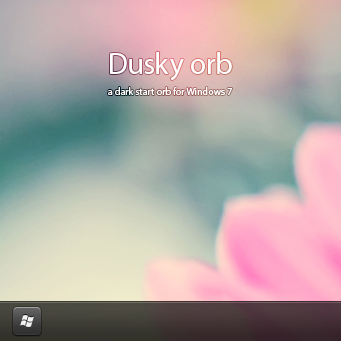
Dusky orb, a start orb for Windows 7.BMP and PNG included
Preview made with :
Windows theme : Work in progress
Wallpaper not included : .184 by ~bo0xVn
HOW TO CHANGE YOUR START ORB :
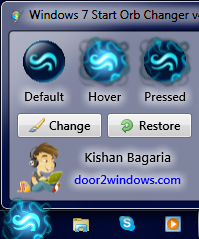
Use this tool to change the picture : Windows 7 Start Orb Changer or Windows Theme Installer by Kishan-Bagaria.
Or you can use a resources hacker like ResHacker or Restorator in order to change the picture inside your explorer.exe (safest method !)
(C:\Windows\explorer.exe)
HOW TO CHANGE ICONS ON THE SUPERBAR :
First, place your shortcut on the desktop, change icon by : right-click > Properties > Change icons > browse..... > OK > OK
only then place this shortcut on the superbar,
and now it works.

I hope you like it !
Check my other start orbs
Related content







Comments: 30

Just wanted to say "nice work" and thank you for the new start button. Looks great with my current theme.
👍: 0 ⏩: 0


Good one
Its perfect for my current desktop theme
👍: 0 ⏩: 0


It was a work in progress, as said in the description, but I'm not working on it anymore

👍: 0 ⏩: 0


Want. Theme. NOW.
Ha ha... really though--take your time. Good stuff as always.
👍: 0 ⏩: 0

Génial, tes créations sont celles que je préfère, content de savoir que tu travail sur un thème en plus de ça.
👍: 0 ⏩: 0


Looks really good
👍: 0 ⏩: 0

I absolutely love black incorporated into the task bar. Its a very modern feel as it matches any wallpaper or background. Awesome work!
👍: 0 ⏩: 0

How'd you get your task bar so dark? Mine only goes as far as a pretty light shade of grey.
👍: 0 ⏩: 1
It's a custom theme, and I can do whatever I want with my png under Photoshop
👍: 0 ⏩: 0


Nice Orb.
HOW TO CHANGE ICONS ON THE SUPERBAR: you can change the icons from here >>> C:\Users\%user%\AppData\Roaming\Microsoft\Internet Explorer\Quick Launch\User Pinned\TaskBar
👍: 0 ⏩: 1
Yes and thanks for the heads up. Now this method doesn't refresh the icons in the taskbar directly, so many people will think this doesn't work (based on my experience and the messages I receive ^^). It's almost like changing the icons directly on the taskbar itself (right-click on the shortcut, etc...)
Thanks
👍: 0 ⏩: 1
Hmm j'ai l'habitude de kill et relaunch explorer.exe après donc j'y avait pas vraiment pensé...
👍: 0 ⏩: 0


Excellent Start Orb. I think the theme will be released soon
👍: 0 ⏩: 0