HOME | DD
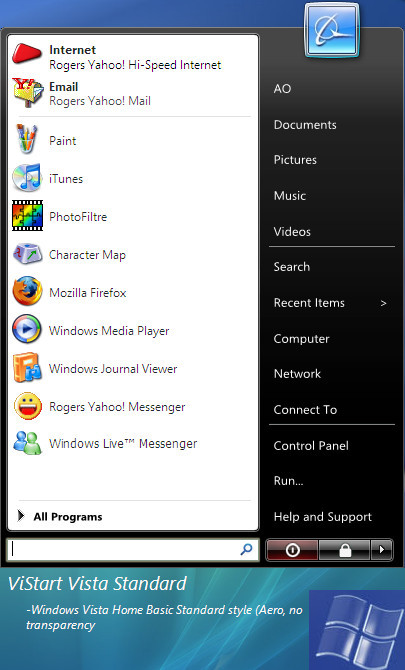
 Auron2 — ViStart Standard
Published: 2007-06-18 00:09:04 +0000 UTC; Views: 2197; Favourites: 0; Downloads: 653
Redirect to original
Description
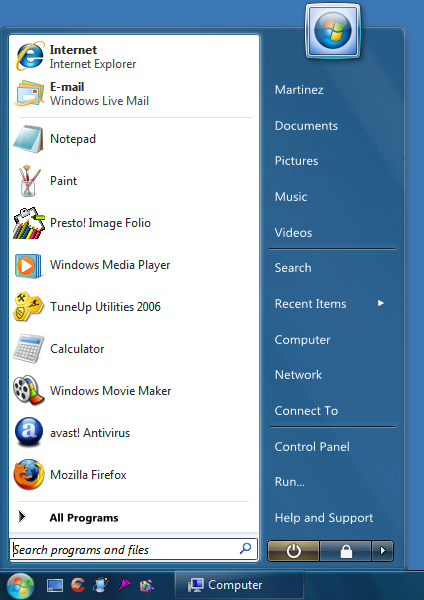
A remake of ViStart Aero skin only with no transparency, for thos who are low on RAM and want to enjoy feats of ViStart and Vista visual style. Basically Aero structure, no transparencyIncludes:
ViStart Standard
ViStart Beta 5 (Upgrade whenever possible)
ViStart belongs to Windows X and Lee Matthew Chantrey (C) 2007 Windows X
Related content












Comments: 17

I alredy had a crazy idea how to fill the empty spot, but it was stupid (to add a image of any program it fits perfectly) And it was not bad, but when I pressed all programs...

👍: 0 ⏩: 1

uhh okay... if you have windows vista, you can access a non transparent version of aero, and thats it's matching start menu. OMG do i have to propel this idea to everyone?>
👍: 0 ⏩: 0

that looks great, but does not look like the basic one
well, the basic one has the black area covering over the user pic..
but it is still great
👍: 0 ⏩: 2
BTW opaque version of aero, structure of aero, no transparency, known as Standard, not Basic. I know. I have Vista Ultimate (the real thing)
👍: 0 ⏩: 1
nop it is basic and as i said the black background goes from the bottom and ends above the user pic!!
👍: 0 ⏩: 1
oh god do you have the real windows vista? or are you running xp still? in vista, you can have a non transparent version of aero, and THATS the start menu for it
👍: 0 ⏩: 1
i know iv got both XP and VISTA. im just saying that the transparent one is the same as the original vistart skin
but the basic (non transparent) looks like this one but the black area more stretched to the top, to over the user image!!
👍: 0 ⏩: 2
BT for the last damn time this is called "vista STANDARD" not BASIC! They're two different damn things!!! Standard is opaque aero and Basic is the light blue one similar to XP
👍: 0 ⏩: 1
im talking about the two vista versions of the start menu and not your version of vistart skins
👍: 0 ⏩: 1
okay calm down... tell me what edition you have of vista, if home prem. and up, right click desktop, click personalize>window color and appearnce and uncheck "enable transparency" for that opaque aero, and you'll see the start menu that goes with it is THIS.
👍: 0 ⏩: 1
ok ill see what i can do. did i put a colored windows flag or a glass flag on the preview? if glass flag, it means "beta" and I might revise it later on.
👍: 0 ⏩: 1
That maybe the easyest way to fix the empty spaces, it isn't like original thing, but good, i've made sth like that when I instaled msstyles skin.
👍: 0 ⏩: 1
opaque version of aero, no transparency, known as Vista Standard, not basic.
👍: 0 ⏩: 0