HOME | DD
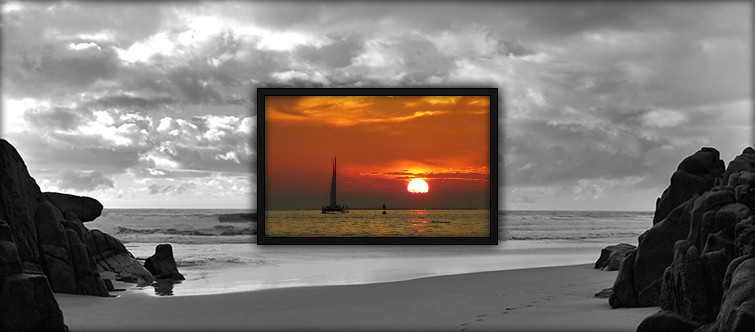
 Bgd69 — ABP Slideshow+
Published: 2011-06-24 18:34:14 +0000 UTC; Views: 37474; Favourites: 58; Downloads: 7059
Redirect to original
Description
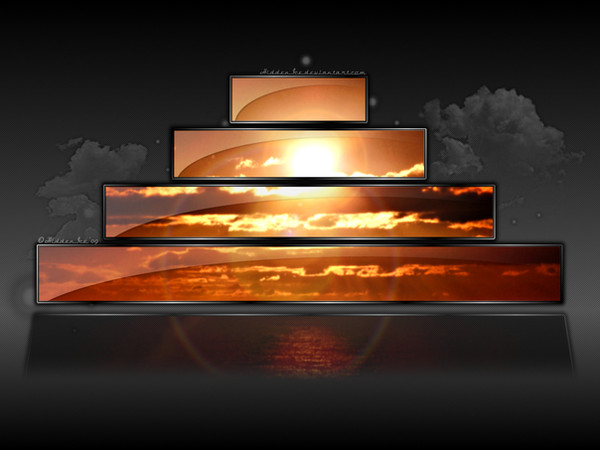
This is just simple Slideshow+ based on ABP Rainmeter skin, which match my taste. Tested on XP SP3 & Rainmeter 2.0+.Tnx to jsmorley (for .lua), poiru & other nice guys.
You can preview skin on my desktop HERE
Enjoy

P. S. Before you start using Slideshow+ open Slideshow+.ini and change paths to your favorite picture folder.
 UPDATE (18.07): Reduced shadow + added Open path & Exit skin options.
Related content










Comments: 28

Did a slight mod of this several years ago with increased dimensions thought I'd share it if anybody is interested.
Still need this program to use my slight mod. www.mediafire.com/file/xhekb15…
Dimensions are 384x240. Refresh all to use the script after placing the stuff to the ABP slideshow+ folder.
Modify to your liking.
👍: 0 ⏩: 0

guys...i changed he path to where i want but why arent the pic opeing for me....all pics format are.jpg
👍: 0 ⏩: 0

Love it! Just used it here: magnusgk.deviantart.com/art/De… ?
👍: 0 ⏩: 1

Nevermind. Actually had to go in and change the file path to make it work.
👍: 0 ⏩: 0

Hey, how can I disable the hovering option? I want it to be just a slideshow without any options popping out. Thanks!
👍: 0 ⏩: 1
Nevermind, I switched the "show" in the Mouseover to "hide." I got it. Again, good job for such a great skin!
👍: 0 ⏩: 0

is there a way i can change the resolution and the image size it shows. i've looked through the code and tested some stuff but i dont wanna go to far and mess up the entire thing.
i know its says its set to my screen resolution (1920x1080) but the skin doesnt actually look like my screen ratio 16:9 (if its supposed to?)
and i know the border bg and inner shadow wont fit if i change the size, but thats ok.
basically i want the skin to be 420x236. can you help me out by any chance?

👍: 0 ⏩: 1


It's the most useful slideshow I've ever seen!
The only bug(?) I can't fix is the filename display. I just can't get it to work.
FAV!
👍: 0 ⏩: 1

"Filename" is also stop working for me, with latets BETA (2.3.xxx). They totally mess up Rainmeter's lates builds, and I can't wasting my time any more with RM.
You can ask them for help, here [link]
Tnx.
👍: 0 ⏩: 1
Thanks for the tip.
I'll tell you if I've got something since I'm already workin' on my solution.

👍: 0 ⏩: 0


Is there a way to make the border the same as all other skins in the ABP Theme? It just does not seem to go with the theme IMO. Also for anyome that wants to turn off Auto Fit change the following
PreserveAspectRatio=0
to
PreserveAspectRatio=1
This way your images are not strectched and they will not look distorted.
👍: 0 ⏩: 0
Hi, I wanted to know if I can get some bit of help.
Is there a way to anchor the slideshow while going through sub-folder to the top-right corner instead of it's default left. I like to have the slideshow to the top-right corner of my desktop.
I ask because under [Image] I leave "W= " with no number there so it's stays consistent and "H= to 141"
👍: 0 ⏩: 1
You don't need to edit skin, just drag & drop (with mouse) Slideshow+ to the top right corner of your desktop. If I understood your question correctly. lol
Btw, Rainmetar skins are draggable, so you can move them all over your desktop
Hope that helps!
👍: 0 ⏩: 1
No you didn't understand. Under the settings code:
[Image]
MeasureName=RandomImage
etc
Leave "W=" blank while leaving "H=X" to whatever (141 default). Images that are Wide will fit the frame perfect but not those that aren't Wide but large by Height.
The issue I have is I wish to put it on the top-right of PC screen BUT as you may see if you test it the Height images go left each time it reloads another image, I want to stop that and put it to the right thus anchor it.
👍: 0 ⏩: 1
I understand now what you mean
But don't get it your reason to change "W=" under [Image]? What's the purpose?
Or you want to add skin exactly to be leaning on screen edges (now have a 5-6mm space between screen & skin edges) in top-right corner? If this is the reason, you need to cut Bck.PNG, cose space around frame don't let him leaning exactly to screen edges. And of course, to rewrite hole skin after that

👍: 0 ⏩: 1
The reason I change "W=" and leave it blank is to leave the image without being restricted except by Height. I also take out the frame you have originally since it will go past frame but I leave the buttons & bg.
Taking ImageName=BckH.png won't help me even when I edit it because it will go left each time it loads next picture.
How would you write it so instead of going left within the frame it goes right instead?
I really would like to replace my Yahoo Widget "ImageView" with this slide but have no idea how to code it. AlignRIGHT doesn't work I am stumped.
👍: 0 ⏩: 1
And don't think is possible to restrict image partially, but I'm not really sure.
I suggest u to post this question to RM forum here: [link]
I really can't get the point, sry
👍: 0 ⏩: 0

can u make a light version ? like a white or gray border ?

👍: 0 ⏩: 1
Here you go mate [link]
Just chose/replace exiting one in skin folder.
👍: 0 ⏩: 1


