HOME | DD
 blurokr — United Colors for WindowsXP
by-nc-sa
blurokr — United Colors for WindowsXP
by-nc-sa
Published: 2013-02-22 15:21:37 +0000 UTC; Views: 22633; Favourites: 85; Downloads: 3940
Redirect to original
Description
UNITED COLORS UI is here!
! UPDATE 03.01.2013: For some reason download button sometimes doesn't show. Just in case, here's the download [link] .
! UPDATE 02.26.2013: Sta.sh finally let me upload the .rar file, so now you can download it directly from here

Hey guys, i'm back again! First of all, sorry to all waiting for me to do this, i've been quite busy, but it's finally done.
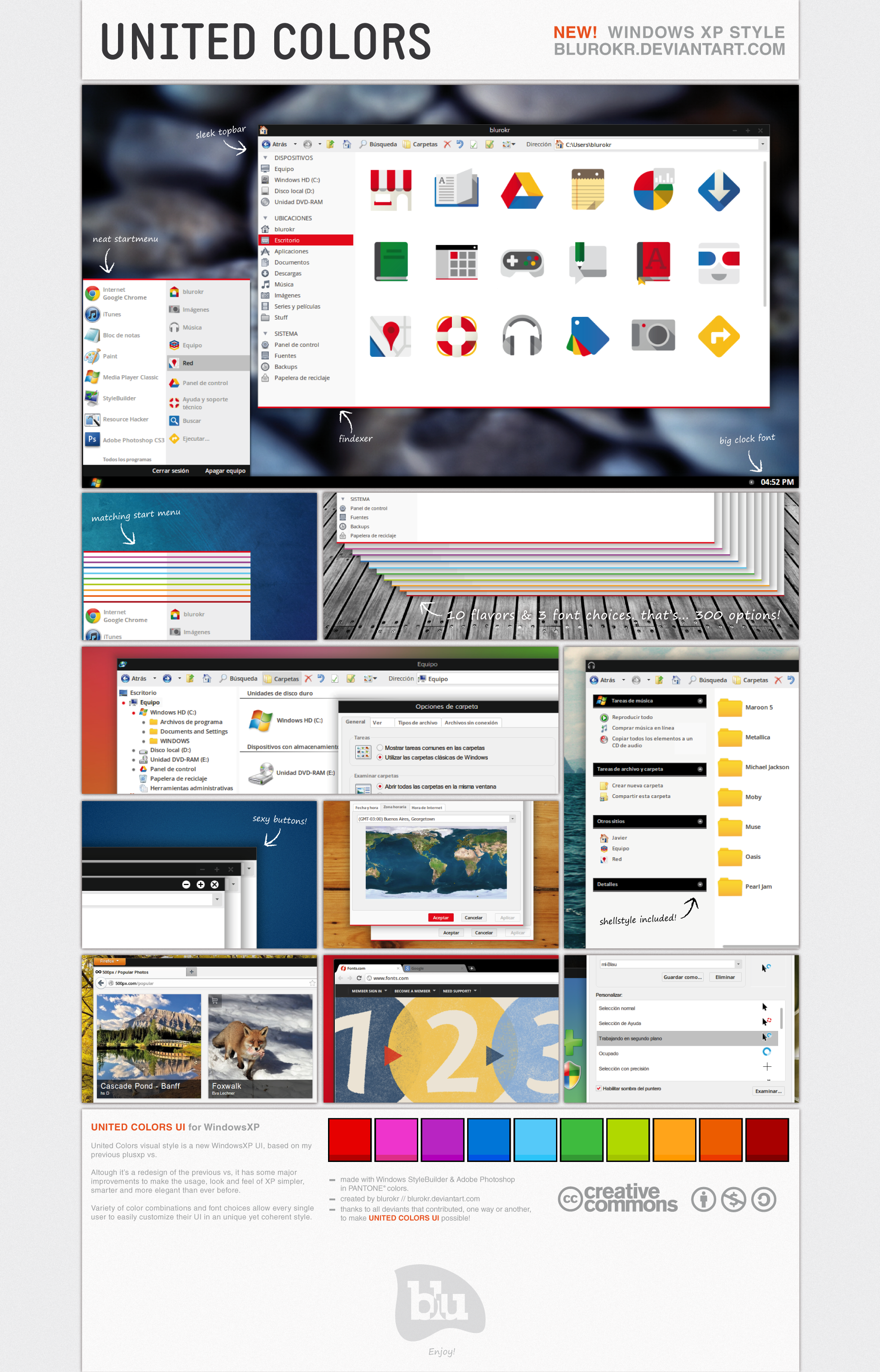
It's been almost a year and half since i shared plusxp, my previous vs on which United Colors is based. This new visual style is almost a total redesign of plusXP, including some features missing and all suggestions received from you guys: (there are A LOT of changes, some noticeable, some not so much):
· 10 underline color options & 3 font choices (that makes 300 possible combinations!)
· a shellstylle.dll is now included (that was the most annoying lack of plusxp), which makes a perfect match for the style
· new menubars, startmenu, buttons, dialogs, scrollbars...
· instructions to get EXACTLY what you see in the preview, in your computer.
· a guide for customizing Findexer in the United Colors way.
· additional software recommendations (Findexer, Chrome & Firefox themes, some tweaks...)
· and much more!
What's inside the package?
· Visual Style
· Fonts
· Instructions & Guides
What's not inside the package?
· Wallpapers
· Icons
· Cursors
· Additional software (but direct download links are provided
)Credits & acknowledgments:
· Cursors in the preview are mlBlau [link] by ~yethzart .
· Icons in the preview are my mod (NFR… yet) of Google JFK Icons [link] by ~carlosjj .
· Thanks to ~cydonian-knight , ~4nt1p0p , ~scarcr , ~ppppL0 for their suggestions. Thanks to ~TheSmurth & ~dvkndn for their help and sharing some resources to make United Colors possible.
· AND THANKS TO THE +10.000 DEVIANTS WHO DOWNLOADED MY PREVIOUS VS!!!
License
Creative Commons Attribution-Noncommercial-Share Alike 3.0 License [link]
Any problems, comments or doubts, feel free to contact me via comments or notes. But before asking, be sure to read the "readme" file included. You'll find precise instructions for almost everything related to the style there.
Enjoy!
Related content








Comments: 87

Wow! very nice looking!
i just can't believe u can do this to XP.
Well done
👍: 0 ⏩: 0

doesn't download... it just takes me back here.... -_-
👍: 0 ⏩: 1

Are you using the "download" button in the top right corner? It works just fine here...
👍: 0 ⏩: 0

Instructions are included in excruciating detail in the Readme file.
Enjoy United Colors!
👍: 0 ⏩: 0
Thanks for your comment! I'm thinking about an United Colors version for Windows 10... what do you think?
👍: 1 ⏩: 1

I think that's definitely a great idea, especially since modern icons will most likely fit more with this type of theme. If you are going to make one, good luck with it

👍: 0 ⏩: 0

That's really beautiful, it wouldn't happen to work on 7 would it?
👍: 0 ⏩: 2

👍: 0 ⏩: 0
thanks! No, it won't work on 7, only xp... :/ but take a look around the Windows 7 VS section, there are some really amazing styles there, which are basically everything United Colors for 7 would be
👍: 0 ⏩: 1
take a look at this aaron-a-arts.deviantart.com/ar…
👍: 0 ⏩: 0

it's made for XP mate, so use it
👍: 0 ⏩: 0

LOVE IT!!!!
I 
BUT, if you listen suggestions:
1- A dark start menu. the whole menu.
2- Always visible Caption buttons.
3- instead a black style (wich one i use couse i prefer darkish interfaces), a darkish grey style. to apreciate more legibility and states.
However, it's a great job and it deserve my
CHAU!!! from Argentina.
👍: 1 ⏩: 1
Thanks for your critique, which is of course welcomed! I always found the regular tray clock too small, so when designing the style i figured "why not making it much bigger?". At first, the idea was to make actually two styles, a dark one and another, much brighter. But finally i decanted for making just one, which i thought represented much better the guidelines i was pursuing. About caption buttons... i always found annoying, when having several windows opened, seeing thousands of captions buttons all across the screen, so i think (i still do actually) the only important ones are those on the current window. Anyway (you surely found that out after some minutes using the style) hidden captions buttons are always there just waiting for you to hover them hahaha! And finally, yes, now i realize a really (reeeealy) dark gray would've been better. But over these years using DA (i've been around since 2005... wow, that's really a long time!) i've always looked for, but never actually found a plain black theme that really suit me, so i guess i made it black instead of grey for my personal benefit, too (i've been using this theme since a few days before posting it here, and i still do).
Aaaaaaanyway, thanks, A LOT, for your words, your critique and your thorough analysis and comment, i really appreciate that.
PS: Como seguramente habrás visto en mi perfil, yo también soy de Argentina jajaja preferí escribir en inglés porque nunca falta el usuario que no entiende un pomo cuando escribo en español, y por lo visto, a pesar de lo que dice tu firma, entendés más que bien el inglés
👍: 1 ⏩: 1
A tooodo esto, si en algún momento llego a hacer una nueva versión de esto, para el sistema que sea, voy a tener en cuenta tus sugerencias
👍: 0 ⏩: 0

yeah, maybe there will be another version with some improvements, but i don't see windows 8 or 7 support coming. sorry :/
👍: 0 ⏩: 0

I never thought someone would even try to make a Google-style theme!!! This is amazing!!! But it does not have the new windows logo!!!
I always wanted to install this and some other VSes but I don't like messing with some important DLLs!!! So , is there a safe way of installing/uninstalling this!!!???
And , btw , does this only work for XP!!!???
👍: 0 ⏩: 1
Thank you! I've made a google-ish vs some time ago, search "google plus xp" and you'll find it. And it doesn't have the new windows logo because i really hate it! I guess they could've made an amazing new logo following their new design guidelines, but that one, I really hate it. I like the new Microsoft logo though.
And don't worry about DLLs, you can safely install the vs alone following the instructions in the "readme" file. I suggest installing Isso multipack in order to get the new W7 icons (I've been using it for years and I never had any trouble), but if you like XP icons, you could just use the vs. The only necessary patch you must have is the uxtheme.dll patch, if you don't have it you will never be able to use third party VSs like this one. But don't worry, there is absolutely no risk in patching it. Follow the instructions in the readme file and you'll get it. Thanks again!!
👍: 0 ⏩: 0

Thank u! but since I'm not a W8 user, I don't see it coming soon... maybe when I change to W8 I'll make a new version, but you may want to look some other styles, there are a few quite similar, or at least similar to what a version of United Colors for W8 would be. Thanks again!
👍: 1 ⏩: 0


and by the way, you don't need resource hacker or any other software in order to change the shell. Just follow those instructions and contact me if u still need help
👍: 0 ⏩: 0
You should read the instructions in the readme file. But just to simplify, copy the "United Colors" folder into Windows theme folder (/Windows/Resources/Themes). Then it should work propperly. If u still have any doubts or problems, feel free to contact me via messages. Thanks for trying United Colors!
👍: 0 ⏩: 0

One of the best skin for Windows XP. Nice.
Just for your info, the minimize, maximize, and close buttons look weird when we use Firefox without Menu bar.
[link]
Overall, it's very nice. You're a great artist/designer.
👍: 0 ⏩: 1
thanks so much! Yeah, i've noticed that... but it's actually an issue of that particular firefox theme. You may try some other black styles available in the theme page, i've tried a few more and the buttons work and look fine. Once again, thanks for your words
👍: 1 ⏩: 0


you're welcome! and thanks for the
👍: 0 ⏩: 0

well done
really glad to see someone making WinXP VS in recent days.
though i have Win7, but i prefer to customize my XP.

👍: 0 ⏩: 1
thank you! Tough i think W7 is a quite better system than XP (or at least, W7 is now as good as XP was when it was released), XP has some customizing capabilities 7 just doesn't have. Glad to see you like United Colors!
👍: 0 ⏩: 0

Its nice to see that there are people like you that are still making styles for xp and I thank you for yours...BUT honestly your style pales in quality compared to some of the visual styles that have come out in the last few years..Your buttons,hover effects and colors are really no big deal..I really dislike the grayed fonts on the start menu and all programs menu until you hover on them to light them up..And the start menu itself is rather large and plain instead of being small and compact with a fresh new look..Please dont take offense to what Im saying but I just cant believe that 47 people have written in saying how nice this is..I know how much time you spent on this and once again THANKS for putting this together and sharing it but after looking at hundreds of styles over the years this is just another middle of the pack visual style...
👍: 0 ⏩: 1
Well, first of all, thanks for your critique. I never said this was "the" style, or the "ultimate style" for xp, it is just another style made following my personal taste guidelines, just because I have never found in DeviantArt (over all these years I've been around here) a style that completely fits me. It was made simple on purpose, without shimmering effects, transparency or other stuff because I wanted it to be that way.
About the start menu, where is it written that a modern vs should have a super compact start menu? You say "...instead of being small and compact, with a fresh new look". There a ton of compact start menus out there, so... would it really have had "a fresh new look" if I made it that way? If you read the comments here, once I said one of the goals of this style was to make a simple one that everyone could easily use. There are a lot (a loooot) of styles with awesome menus with virtually nothing on them. Tough they may look great, and you, me and all fellows customizers could figure out how to use them, some other people (not customizers, just regular pc users) may not find it as easy to use as us. I always liked to picture an old lady using a pc for the first time. Do you thing she would like a super visually stunning style or something quite simpler, where she can locate instantaneously what she's looking for? I think she would prefer that second option. But of course, that's just my opinion.
And you should believe 47 people really liked this one, for the simple fact that they like a balance of nice appearance and usability. Besides, this is where apps design is heading to, not 7-ish things anymore, but something like Google or Microsoft are doing: nice, simple and usable.
But of course, there A LOT of styles much better than this one, and this one is a little bit better than some other ones. And really, thank you for taking the time writing your critique, and most of all, for trying it out, as you obviously have.
👍: 0 ⏩: 1
BTW, I think I need to point this out, I do not like Microsoft choice of vs design at all... tough some things are nice in the new W8 look, i think it's pretty ugly in the overall look. I prefer much more what Google guys are doing.
👍: 0 ⏩: 1

Massive feedback there I noticed, which overall can really be reduced to what PeterRollar said, and you want to trust that person when it comes to modding. Personally I appreciate all this, the idea & the design, the attitude & a thorough instruction, hard work non the less, and in XP category this one definitely is a work for an A+
👍: 0 ⏩: 1
thanks man, i really appreciate your words.
👍: 0 ⏩: 0
thank you! you're still using xp? so... i'm not the only one! hahaha thanks buddy
👍: 0 ⏩: 0


VERY nice...wish I had found this when I was still on XP. Nice work!
👍: 0 ⏩: 1
yeah, there's fewer and fewer people using XP everyday, but i still wanted to do this
👍: 0 ⏩: 1
There are times I wish I still was on XP..MUCH easier to build themes and modify to fit your needs.
OMG...I sound like an old man, recalling the glory days.!
👍: 0 ⏩: 1
I never tried building a vs for 7, but i guess it must be harder... And you're not alone, we are two old men looking back to when XP was the cutting-edge OS my friend 
👍: 0 ⏩: 0

| Next =>