HOME | DD
 brbk — World Time Rainmeter
by-nc
brbk — World Time Rainmeter
by-nc
Published: 2010-03-23 19:08:07 +0000 UTC; Views: 59397; Favourites: 48; Downloads: 7691
Redirect to original
Description
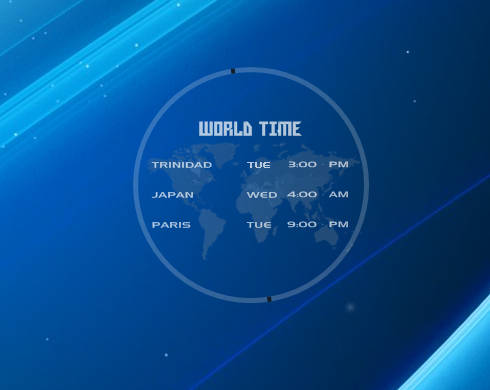
Please install the font in the zip file and restart rainmeter.Simply world clock for use on dark backgrounds, i would like any feed back on how i should improve. this is how i used it on my desktop [link]
Related content










Comments: 19

Hi. How should I change the DST settings? I am pretty confused as to how it works.
👍: 0 ⏩: 0

Im new to rainmeter, how do I get this to work? I installed the font and restarted rainmeter, but nothing happened.
👍: 0 ⏩: 0


can any tell me how to change time zone in this skin ? i want to use different time zone for two clocks.
[Rainmeter]
Author=FenGenzus
Update=1000
;=============================================================================================
[Clock&Date]
Meter=IMAGE
ImageName="#SKINSPATH#\Brown and Black Leathern Launchers\Brown\Clock & Date\Pictures\Wooden-Clock-&-Date.png"
X=0
Y=0
;------------
; - |Measure's| -
[MeasureTime]
Measure=Time
Format="%H:%M:%S"
[MeasureMinutes]
Measure=Time
Format="%M"
[MeasureSeconds]
Measure=Time
Format="%S"
; - || -
[Hours]
Meter=BITMAP
MeasureName=MeasureTime
BitmapImage="#SKINSPATH#\Brown and Black Leathern Launchers\Brown\Clock & Date\Pictures\Numbers.png"
BitmapFrames=10
X=22
Y=27
BitmapExtend=2
BitmapDigits=2
[ClockSeparator(1)]
Meter=IMAGE
ImageName="#SKINSPATH#\Brown and Black Leathern Launchers\Brown\Clock & Date\Pictures\Clock-Separator.png"
X=24r
Y=26
[Minutes]
Meter=BITMAP
MeasureName=MeasureMinutes
BitmapImage="#SKINSPATH#\Brown and Black Leathern Launchers\Brown\Clock & Date\Pictures\Numbers.png"
BitmapFrames=10
X=0R
Y=27
BitmapExtend=2
BitmapDigits=2
[ClockSeparator(2)]
Meter=IMAGE
👍: 0 ⏩: 0

Just the thing I was looking for. Thank you so much for this..
👍: 0 ⏩: 0

Well, very nice work. I downloaded it because I have some
family in Miami, Italy, and some acquaintances from Mexico.
I just made up some possible improvement: see, would it be
cool if you could make some flat world map and make it
interactive like when you click a country it shows up the right
time? It is not necessary to be on every country, but as you
know there's some countries that share the same time zone,
so you could make clickable every time zone instead of every
country. From my point of view it would be awesome.
👍: 0 ⏩: 0

i have a question, how can i change the font?, I try the metername >>> fontface>>>NOT WORK!!!! Can you pls help me? Thnx
👍: 0 ⏩: 1

u are on the right track, open the font u want to use and u will see font name put that name exactly fontface=fontname
👍: 0 ⏩: 1

Nice and simple!
Is it possible to change the hours to 24-hours?
I just installed Rainmeter so are still new to it

👍: 0 ⏩: 1
yes u can change to 24hrs just right click the skin then click on edit skin and look for this Format="%#I:%M · %p" change it to Format="%H:%M · %p" hope that helps
👍: 0 ⏩: 1

Sorry, but I don't understand how to make it work... Could you help me to install it on my computer? Thanks a lot.
👍: 0 ⏩: 1
u need to download and install rainmeter 1.3 or 1.4 beta, once it is installed you just download and put in ur rainmeter skin folder in my docs
👍: 0 ⏩: 0

you made this clock in london didnt u?
well, this is great!
👍: 0 ⏩: 1

