HOME | DD
 brcu — Statica Color
by-nc-sa
brcu — Statica Color
by-nc-sa

Published: 2010-01-02 22:55:52 +0000 UTC; Views: 32420; Favourites: 42; Downloads: 10161
Redirect to original
Description
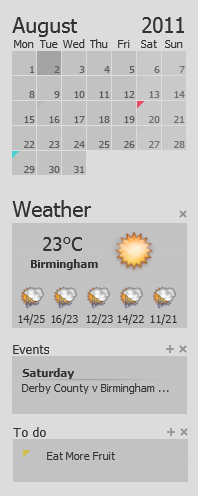
Statica Color is based on work by TraversFX and Death of RatsThis is a mod of [link]
So far this mod has changed -
Fonts, event images, weather images, layouts/sizing.
Added -
Countdown window.
File window.
Moonphases window.
Photos window.
Time window.
RSS window.
Coloured event icons now display in event/todo windows.
New buttons below the calendar.
Countdown calculates downwards to a specific date. You can set the target day and the title from the skin's settings.
File displays contents of a text file. The widget is automatically updated when the file changes.
Moonphase shows the current phase of the moon.
Photos shows interesting images from Flickr. You can define how often the image is reloaded and if it's done randomly or not in the skin's settings. Note that this works quite poorly with copy transparency enabled.
RSS will show the rss feed from a given url. By default it shows the latest posts to this forum but you can define the location in the skin's settings.
Weather displays current conditions and the forecast for the given location. To change the location go to weather.msn.com, find your town and click on the rss-feed icon in the weather page and copy the url to the weather location field in the skin's settings.
If you want to edit this skin just change the filetype from .r2skin to.zip and unzip it.
Note that you need build 82 or newer to run these as this skins uses Addons.
[link]
***********************************************
Updated 12 Jan 2010
Have updated Photos, Moonphases and File to keep the style the theme consistent.
***********************************************
Updated 5 April 2010
Fixed Countdown display bug as posted by *themapper.
***********************************************
Updated 25 April 2010
Removed some buttons below the calendar as they clashed with certain months displayed on the same row.
**********************************************
Statica Color Inverted available [link]
This helps if you are using a bright wallpaper.
Related content








Comments: 32

Excellent skin, just what I was looking for. Thanks! The alarm buttons don't work anymore, but you can control the alarm with hotkeys. You need to add an LUA file to the scripts folder as Snooze and Dismiss are not listed in the drop down menu. Here is how to do it... www.rainlendar.net/cms/index.p… OR you can just choose a different alarm window from another skin.
👍: 0 ⏩: 0

It has many functions and I love it !!!! Thank you !
👍: 0 ⏩: 0


I think that Msn Weather doesn't have rss anymore (or at least it's very hard to find). Any tips?
I use this skin BTW!
👍: 0 ⏩: 1

That odd as mine still works.
Looks like US MSN weather site has changed, try the UK MSN weather site (choose your location then copy the RSS link).
[link]
👍: 0 ⏩: 1

oh yeah i got a bug too, or something. I have an event in the window, and its listed as "Monday next week" and it overlaps on the date. Also im not sure how to set colors for things. Is there anythign else you need for a bug report?
👍: 0 ⏩: 1
If you could post a pic I will see what I can do.
👍: 0 ⏩: 1
Yep that link worked fine. Have you tried alter the advanced settings (to removed the day next week bit)?
Here's how I have mine [link]
👍: 0 ⏩: 2

Your Photobucket link has expired, I can't find any setting for removing 'the day next week bit'. Can you rehost it, please?
👍: 0 ⏩: 1
Not been on DA for a while so you may already have it sussed but here it is [link] just incase.
👍: 0 ⏩: 0
oh yeah now i see. I just removed the date. put a space in there instead of anyhting, cause without an entry it reverts to the default.
thanks XD
👍: 0 ⏩: 0


nice skin man!
are we able to use www.weather.com?
cause the original one didnt work with it. as msn weather sucks imo.
👍: 0 ⏩: 1
I don't think you can use weather.com but I may be wrong.
👍: 0 ⏩: 0

Really enjoy this one. Am new to Rainlendar, but can see the utility.
One bug for you - the countdown appears to overlap, numbers on top of letters. e.g., "195" overlaps "days", though numbers with only 1 or 2 digits seems okay.
👍: 0 ⏩: 1
Glad you like the skin, I will fix the bug soon !
👍: 0 ⏩: 2
Countdown display bug now fixed (hopefully) !
👍: 0 ⏩: 0

Thank you for this! But I can't find any colored icons on the 'to do', 'Events', or 'Calender' when I change Rainlender's language into "English". When I change into the another language, the colored icons appear. I don't know what happen on it. What should I do? I want to use this for English version!
👍: 0 ⏩: 1
I use the English version and it works fine for me.
I'm not sure why it doesn't work for you, are you using the latest version of Rainlendar ?
👍: 0 ⏩: 0


Awesome work! Can you give me more info about the TV "window"? Does it work like some kind of RSS? I managed do ->zip-> unzip -> edit clocks names and times in the xml file, but I think that the tv needs something changed in the script folder, wich is beyond my knowledge. Can you give me some help? It would be much appreciated, ty. Keep up the excellent wok, looking forward to see the next mod!
👍: 0 ⏩: 2
Am still looking if anything can be done with the TV window (it is the only window that needs updating now - I think !).
👍: 0 ⏩: 1
Loved the update, much more aesthetic now. It fits my screen perfectly!

👍: 0 ⏩: 0
Thanks for the kind words.
The mod includes add-ons which are available here [link]
Listed below are 3 add-ons included in the mod but are in there original form and I'm unsure whether to change them or if I can do much with them (File and Moonphase could be changed to keep them in style with the theme but am no so sure about tv.)
"TV - shows current Finnish tv programs. This probably isn't very useful if don't live in Finland but I released it anyway as an example of a somewhat more complex script.
Moonphase - shows the current phase of the moon.
File - displays contents of a text file. The widget is automatically updated when the file changes."
👍: 0 ⏩: 1
Plus the photo add-on is included but is not finished !
"Photos shows interesting images from Flickr. You can define how often the image is reloaded and if it's done randomly or not in the skin's settings. Note that this works quite poorly with copy transparency enabled."
👍: 0 ⏩: 0
