HOME | DD
 caeszer —
FlureVS::Final::
by-nc-nd
caeszer —
FlureVS::Final::
by-nc-nd
Published: 2010-04-13 16:58:31 +0000 UTC; Views: 133551; Favourites: 438; Downloads: 23123
Redirect to original
Description
Recents Updates:-*Added normal hover taskband button on taskbar
*Enlarged the logoff button+arrow glyph
*Added arrow glyph at the edges of the scrollbar
See the preview in action here:[Link ]
Introductions:-

It's been a long time..at last I can finish this theme perfectly. If you found some bugs, just tell me..it'll be updated asap^^..
_______________________
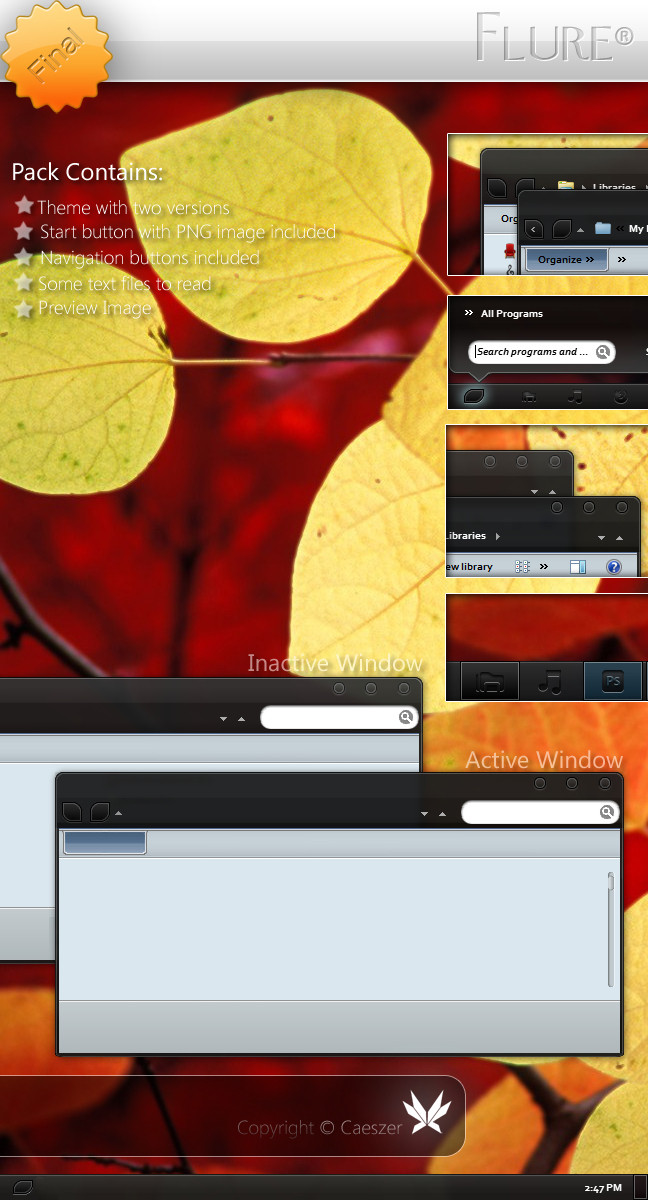
Pack Contains:-
*Themes: Flure theme
*System Files: Explorer/ExplorerFrame.dll(32bit & 64bit)
*Notes: Installations Guide/Copyright Note
*Preview Image
________________________
Installations Guide:-
To apply the theme,
1. Copy all the items in the folder 'Theme' to c:Windows\Resources\Themes
2. Then, right-click on the desktop & choose 'Personalize'
3. Choose the 'Flure' theme in the 'Installed Themes' section.
32bit:
Right-click, take ownership for the original system files.For the explorer, just copy it into the folder windows & the others just copy them into the system32 folder.
Then,restart your computer.
64bit:
Right-click, take ownership for the original system files.For the explorer, just copy it into the folder windows. The others just copy them into the system32 folder.
Then,restart your computer.
Notes:You're advised to make a backup of your available\original components before replace them with the components provided in the pack.
________________________
System Requirement:-
*Now, this theme available for both Windows 7 64-bit\32-bit.
*Makesure you've installed a good graphic card to enable transparent part to be seen
_______________________
Notes:-
Now this theme works fully in both Windows 7 32-bit & 64-bit, ENJOY!!
_______________________
Another Links:-
Author's Website:[link ]
Author's Gallery:[link ]
Watch Author:[link ]
_______________________
copyright ©caeszer~2010
Related content










Comments: 260


Nice. But I hope the edges and buttons are not so pixelated...
👍: 0 ⏩: 1
Also, under start menu there's blue color box. Why? See: [link]
👍: 0 ⏩: 0


i love it - any media player/firefox etc skin 4 this ? 
👍: 0 ⏩: 0

I'm having issues... I try to copy explorer & shell. But when I do it. it says they're in use? :S
👍: 0 ⏩: 1

You won't be able to replace the various dll's that programs use while they're running, that's just silly. Either use one of the many, many dll replacers out there or boot into linux mint (or some other distro that mounts the windows partition) via liveusb and replace the files that way.
👍: 0 ⏩: 0

how do you apply the task bar to the theme? i have the theme, however, i cant seem to figure out how to apply the task bar!! help me please 
👍: 0 ⏩: 1

strange, once you apply the theme, you'll definitely see all the changes. It's not possible if you haven' apply the patch yet
👍: 0 ⏩: 0

Hi. I commented on here a while ago about a bug I'd found in your theme - the odd coloured gap that was between the taskbar and the start menu if you used the top taskbar theme. I didn't really understand your answer to my comment, but I asked if you'd fix it and you never replied. Now, it's been some time since that comment and I've noticed that bug has gotten worse. The gap is now a dark blue, as opposed to the light blue it started out as. Here's the link of what it looks like: [link] If you could figure out why this is happening I'd much appreciate it.
👍: 0 ⏩: 1
right-clicking on the desktop>select Personalize menu>select Window Color>choose Sky color & make sure you move the Color Intensity indicator to the most right until the end.
👍: 0 ⏩: 1
Okay, will try that. Thanks!

👍: 0 ⏩: 0

can you help me with this: [link] ? please, i want to edit my start menu but i have no idea how do it.
👍: 0 ⏩: 0

I've made a matching theme for Google Chrome with a favorites bar like the toolbar in your Flure theme explorer. Would you mind if I called it Flure Chrome, or Flure for Chrome; something to that effect? I think you'd be pleased if you saw my result.
👍: 0 ⏩: 1


wow, looks very good 
where do you get the background?
👍: 0 ⏩: 1
That's default win7 wall
👍: 0 ⏩: 0
Hi. Can I just say, great theme! This is a fantastic theme - clean and looks great. However, I've found a bug with the Flure theme for the top taskbar... I know from using the bottom taskbar theme for a long time the little section between the taskbar and the bottom of the start menu is supposed to be slightly blurred (which looks fantastic). However, when using the top taskbar theme this isn't the case. Instead, the blurry area is light grey. Here's a picture to show you what I mean - it compares both the top and bottom taskbar themes. [link] - I hope this clears up things. Thanks once again for a GREAT theme, and I'm looking forward to this being updated.
👍: 0 ⏩: 1
I see..when I tried to make the top startmenu like that, it seems too odd when the gradient of the colour is bright from above.
👍: 0 ⏩: 1
Do you know what it is that causes it? If you could fix it that would be really great.
👍: 0 ⏩: 0


Hi can I get your help, the theme is great but I'm having trouble when swapping to other styles. When I change to another style everything changes but the back and next navigation buttons on the top left of menus(the two squares with two curved edges). Even going back to the default it stays the same, im not sure what files I need to change. Ide be really greatful for your help, im also having problems with a custom orb(start button) that I cant change back to default although thats from a different theme lol.
👍: 0 ⏩: 2

replace shellstyle.dll and explorer.exe, search for it on the mighty google.
👍: 0 ⏩: 1
thanks I got it sorted ages ago, what was weird is that i kinda changed back to normal over time. Anyway got all the original files back and will be more careful next time.

👍: 0 ⏩: 0


This Visual Style Is Exceptional & Looks Really Awesome!

👍: 0 ⏩: 1

simply gorgeous- i could drink it up- goddamn i need to upgrade from xp to 7

👍: 0 ⏩: 0


ok...i read some of the comments...now i know
btw - fantastic theme, i love it, keep it up
👍: 0 ⏩: 1
still there [link] but i'm sure you will get it right some day
btw. for me it's the best win7 vs at the moment, nice and usable [link]

👍: 0 ⏩: 0
there's something weird between taskbar and start menu [link] [link]

👍: 0 ⏩: 0

I see wrong sizingmargin on close caption button(at preview so don't now if this is already fixed in theme itself)
👍: 0 ⏩: 1
| Next =>