HOME | DD
 caeszer — LeopardInspirat::Final::
by-nc-nd
caeszer — LeopardInspirat::Final::
by-nc-nd
Published: 2010-01-11 19:36:14 +0000 UTC; Views: 181688; Favourites: 202; Downloads: 57679
Redirect to original
Description
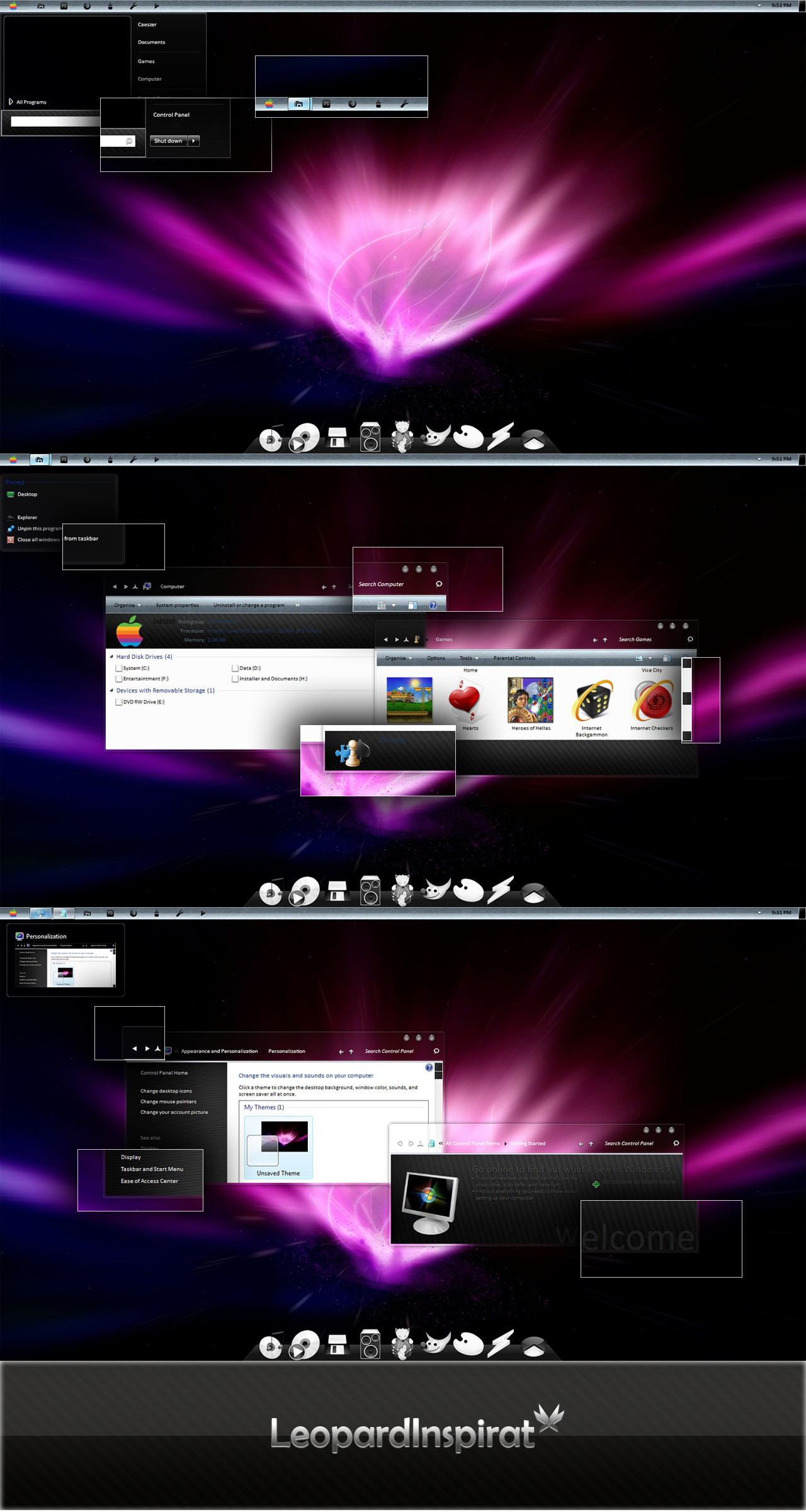
Recent Updates:-*Full support 64bit/32bit
*Taskbar image changed
*Glassy startmenu
*Font turned smaller
*Minimize/restore/exit button changed
*Apple button getting smaller
*Glassy jumplist
*Scroll bar changed
Introduction:-

Since I've released my first Win7 themes, Darkclear 7, I've started a new themes that called Leopard Inspirat®. This theme is almost similar to the leopard official theme. I'm getting tired of using the leopard theme that was looking dull or not attracted for some people. Otherwise, I tried to put some new looks and modifications to the basic aero theme and made it 70% leopard looks with a new style in certain parts. Anyway, I took about 5 days to finish this.
_______________________
Pack Contains:-
*Themes: Leopard Inspirat Visual Style with Aurora Wallpaper Reloaded.
*System Files: Explorer/Shell32.dll/OobeFldr.dll/ExplorerFrame.dll
*Notes: Installations Guide/Important Note/Copyright Note
*Preview Image
________________________
Installations Guide:-
To apply the theme,
1. Copy all the items in the folder 'Theme' to c:Windows\Resources\Themes
2. Then, right-click on the desktop & choose 'Personalize'
3. Choose the 'LeopardInspirat' theme in the 'Installed Themes' section.
32bit:
Right-click, take ownership for the original system files & move it to the other folder as backup.For the explorer, just copy it into the folder windows & the others just copy them into the system32 folder.
Then,restart your computer.
64bit:
Right-click, take ownership for the original system files & move it to the other folder as backup .For the explorer, just copy it into the folder windows. The explorerframe just copy it to sysWOW64 & the others just copy them into the system32 folder.
Then,restart your computer.
Notes:You're advised to make a backup of your available\original components before replace them with the components provided in the pack.
Notes:You're advised to make a backup of your available\original components before replace them with the components provided in the pack.
________________________
System Requirement:-
*For Windows 7 64bit\32bit.
*Makesure you've installed a good graphic card to enable transparent part to be seen
_______________________
3rd's Party Applications & Resources In The Preview:-
*Applications:
Object Dock:[link ]
Yahoo Widget:[link ]
Uxstyle Core:[link ]
*Image Resources:
Leopard Official Icons:[link ]
*Skins:
Leopard Object Dock Skin:[link ]
Macdrive For Yahoo Widget:[link ]
_______________________
Another Links:-
Author's Website:[link ]
Author's Gallery:[link ]
Watch Author:[link ]
_______________________
copyright ©caeszer~2010
Related content







Comments: 185


awesome! But..
I guess yew killed the beauty of leopard's taskbar
👍: 0 ⏩: 0


I LOVE this skin man! but is it possible that i can make the windows task bar transparent??
👍: 0 ⏩: 0

great.....why the new themes..we need activation???please somebuddy answer me....
👍: 0 ⏩: 0

I have some problems. I don't know what now, when I copy all in c:Windows\Resources\Themes and go to personalize and click that theme I've got this:
[link]
How can I solve that?
👍: 0 ⏩: 0

Hey. i dont know how to "take ownership for the original system files" i can't copy the files like explorer.exe and other things..when i copy it it say "Destination Folder Access Denied" Please Help me..
👍: 0 ⏩: 0


Trying to install, but can't get access to windows folder, please help (64bit)
👍: 0 ⏩: 1

do 'takeownership' of your windows folder
👍: 0 ⏩: 0


i like the look of it but the only thing is could your make the taskbar look like snow leapords that would look cool
👍: 0 ⏩: 1
Well, maybe i should update it & turn completely looks like a mac

👍: 0 ⏩: 0

hey Akmal....this theme is again the result of your excellent work! 
I think i'm now addicted to your themes. I've been using your 'blaque' for more than half of the year & now i chose this one as my next theme And when i applied this theme everything worked gr8 but after the restart my details pane has shifted to top, it had also happened earlier when i started using 'blaque'. You told me to edit shell32 or something like that (i dont remember exactly), can u please help me again...i really want it at the bottom.
Also if possible can u PLEASE 

Any help would be appreciated.....thanx in adavance and also for this wonderful theme

👍: 0 ⏩: 1
Don't you just replace the shellstyle with aero's original one..it 's working as well..

👍: 0 ⏩: 1
i'm extremely sorry for not replying......actually i was super busy due to examz!
anywayz...r u sure it won't compromise the looks of the theme by any percent??
And hey..can u plz plz plz tell how did u changed the default computer's icon with the colorful apple one (same as start orb) in the details pane! I didn't observed it until now & now i m really desperate to know the trick......again thanx in advance buddy!
👍: 0 ⏩: 1
sorry....i forgot to ask one more main thing: My User Picture has disappeared permanently when i click on start button....I think it is due to the theme, can u help me about it!???

👍: 0 ⏩: 0


Is there any way you could post the older version of this theme where the minimize/maximize and close buttons are colored and the start menu isn't silver?
👍: 0 ⏩: 1


nothing seems to be working except the wallpaper
1. i replaced the files (Explorer/Shell32.dll/OobeFldr.dll/ExplorerFrame.dll) into their respective folders (windows and system32), not the whole folders, is it right?
2. the taskbar is set to classic windows when i click on the inspirat theme.
3. i renamed the original files to be replaced (Explorer/Shell32.dll/OobeFldr.dll/ExplorerFrame.dll) to .bak. is it right?
please help here, i really loved ur theme
👍: 0 ⏩: 0
hi, i tried adding the themes but nothing seems to be working except for the wallpaper
1. the taskbar and all did not change a bit
2. i copy the files (shell32.dll, explorerframe.dll, and OobeFldr.dll) into the folder system32 whilst (explorer) into the windows folder. is it right, or i just need to copy the folders (welcome center, control panel, navigation bar, and start button into their respective folders?
3. i replace filename of the original files to .bak. is it right or wrong?
please help here, i am lost.
👍: 0 ⏩: 1
1.Not sure,please try reapply the theme..did you have already applied the patch?
2.Just copy the system files, not including their folders.
3.Place "()" in the right & left bak
👍: 0 ⏩: 0


cAN YOU MAKE IT FOR x64 but please please this is great but cant runit on mine???
👍: 0 ⏩: 1


awww, Every day I see soooo many themes I love!! why cant they just change every 30 mins like the win7 wallpaper!
👍: 0 ⏩: 1
lol..just ask Bill Gates to do that!
👍: 0 ⏩: 1
Yeah... apple refuses to put flash on an iPad, microsoft has been holding off customizing the GUI ever since it was invented. not gonna happen unless someone codes it. there is a sweet theme changer that replaces the shell and .msstyles files so you dont have to go crawling through windows to replace them. I might see if i can get the source off the developer and try putting a change script into it
👍: 0 ⏩: 0

Really good. Am using it now, but the aero peek is completaly transparent. I the Windows Color scheme won't apply to it with this skin. It's just that but otherwise it's all good.
👍: 0 ⏩: 0

its another soothing & cool theme from you, i'm sure MAC lovers who r still using window's will reallu love it......
& plz can u tell, what 'Uxstyle Core' does?, i mean what is its purpose? what does it do?...........thanx in advance
👍: 0 ⏩: 1
| Next =>