HOME | DD
 Caldera-Ranch — [Part 3] Error 404
#forest #fusion #hybrid #ms #msp #mspaint #paint #pokehybrid #pokemon #variant #pokefusion #deltarune
Published: 2019-02-18 13:24:22 +0000 UTC; Views: 683; Favourites: 15; Downloads: 0
Redirect to original
Description
[PREVIOUS PART ] [NEXT PART ]
WAIT THERE'S A LITTLE MORE TO THE STORY, click this link for background music then continue reading: www.youtube.com/watch?v=q1W4-O…
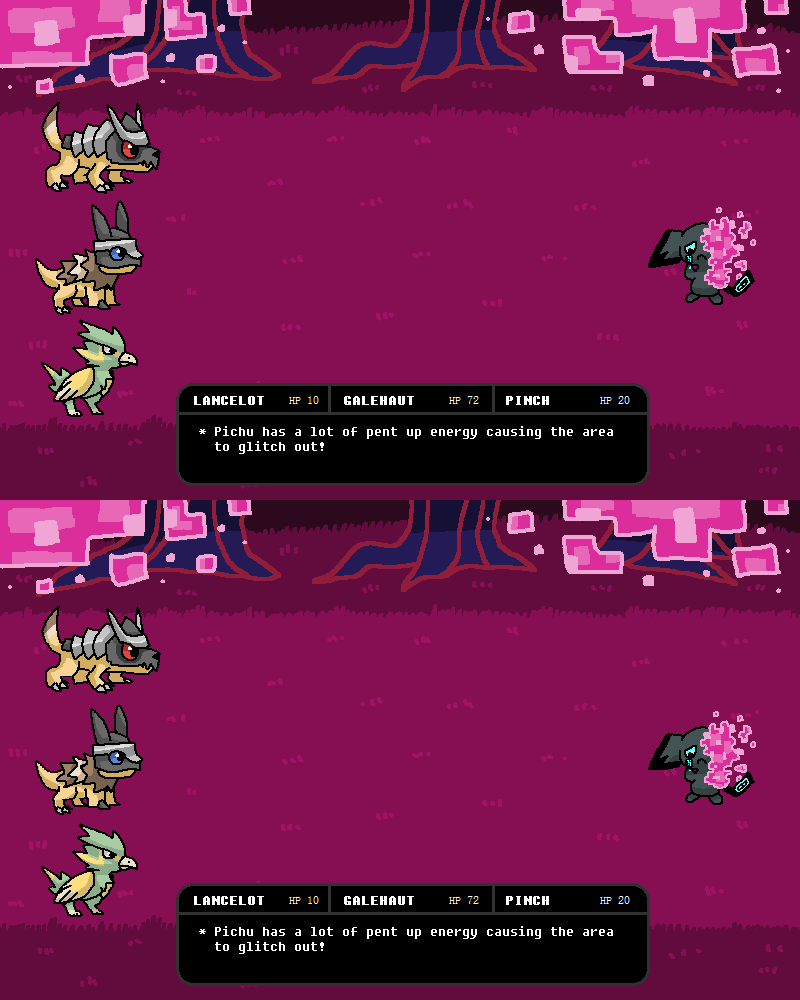
* Pichu's stress is building, the landscape keeps glitching out.
Lancelot: This can't be good, Galehaut let's attack it!
Galehaut: Wait brother, fighting isn't always the answer.
Lancelot: Then what else can we do?
Pinch: Well there's an option here to... flirt?
Lancelot: Oh... uh *ahem* you look very cute with only half your face showing Pichu, it's very mysterious...
Galehaut: -_-;;
Pinch: You've got to be joking.
* The poor attempt at flirting causes Pichu to unleash all of its pent up electricity!
Lancelot: AHHHH!
Galehaut: !!!
* Pinch's Lightning Rod ability absorbed the attack.
Pinch: You're welcome.
Whether the Pichu let off electricity from feeling embarrassed, disgusted or laughing hysterically is up to your interpretation xD Initially I wanted to do add the dialogue above into the animation but this already took 2.5hrs so I left it as is. For those who haven't played Undertale or Deltarune, basically you have options in battles to not fight but instead do "acts" such as flirt which this is a big reference to (including the rough background and layouts and chosen music).
Lancelot the Shieldon/Zigzagoon
Levels gained: chibi (1) + shading (2) + background (2) + event bonus (2) + simple animation (2) + creativity bonus (5) = 14 levels
Galehaut the Shieldon/Zigzagoon
Levels gained: chibi (1) + shading (2) + background (2) + event bonus (2) + simple animation (2) + creativity bonus (5) = 14 levels
Pinch the Spearow/Electrike
Levels gained: chibi (1) + shading (2) + background (2) + event bonus (2) + electric-type bonus (2) + simple animation (2) + creativity bonus (5) = 16 levels
Related content




Comments: 24

Congrats! You have been awarded the creativity bonus! This comment will act as proof of earning the bonus ^_^
👍: 0 ⏩: 1


A piece of the world is Missing. >:3
www.youtube.com/watch?v=IQgUXE…
👍: 0 ⏩: 1

That's how everything's glitching away!
👍: 0 ⏩: 1
Huuuuuummmmmmmaaaaaaaaaaaaaannnn!~ >:3
👍: 0 ⏩: 0

(it loaded when i clicked on it but i thought it was so fitting 😂)
also fun entry, i like the little dialogue!
👍: 0 ⏩: 1
I'M GETTING THE SAME THING! After making a preview image especially for it too. Funny though, if I didn't have the "[Part 3]" in there it would definitely look like an actual error xD
And thank you!
👍: 0 ⏩: 0

Man and you do this all in MSPAINT.... that’s some crazy dedication, all of your entries so far have been super lovely!! <3
👍: 0 ⏩: 1
Thanks, I swear it's pure laziness that stops me from moving onto other art programs xD I tried out Photoshop, SAI and GIMP which was pretty cool... but took too long to figure out and there's just so many options on how to do stuff so I like keeping it simple and kick with mspaint!
👍: 0 ⏩: 1
OOF yeah i gotcha, it does take some time!! sai seems like a reliable program, but i can't say i've tried photoshop and gimp, I'm unfortunately too broke 👍: 0 ⏩: 1
Yeah I only got Photoshop thanks to school and that'll be running out soon (not that I use it much for hobby drawing anyway), I might try Paint.Net because I hear it has a lot of powerful plugins, else there's also Clip Studio Paint which still needs to be purchased but it's priced like SAI which is heaps cheaper than monthly-payment-photoshop why must they be so money hungry ;_;
👍: 0 ⏩: 0

Nnnngggg I love this SO much! You're making me want to try pixel art now Ely.. ;A;
👍: 0 ⏩: 1
Now you can suffer with me in the pixels ehehehe xD Honestly I think I'm just missing the arcade event from years back, video game references is just too fun!
👍: 0 ⏩: 1
They really are too much fun >v<
👍: 0 ⏩: 0

Man this is cool! you have to teach me how you do this someday x3
👍: 0 ⏩: 1
Thanks! And there's not really that much to it so I can just describe the steps I went through xD
- The animation consists of two frames, same background used, these two frames are separate files
- You might've saw on discord how I was making a mini sprite sheet separately, I make the normal pose, then a second one which is just the same thing but squished
- I place the normal poses on file 1 then the squished poses on file 2 in the same position (can take some back and forth and undos)
- I put the two images through ezimba.com's frame animation option which makes it into a gif
- viola!
Because it's mspaint though I can't do any super fancy/fluid animations without immense time and pain, so if I do more gifs in the future they'll be super simple like this or two separate poses put together
👍: 0 ⏩: 1
Maaan I didn't expect such a detailed explanation x3 thank you so much <3
I will try sometimes ^^
👍: 0 ⏩: 1
All good 
👍: 0 ⏩: 1
I will for sure ^^ Thanks again for all the advice, I wanted to make a little gif for sooo long but I didn't know how to x3
👍: 0 ⏩: 1
Same! I only found out because I saw another person make a gif with it xD It's not as easy as, say, photoshop where you can just convert layers into an animation but this works just fine for simple stuff.
👍: 0 ⏩: 0

Eyy thanks! I cannot resist video game references when the change presents itself xD
👍: 0 ⏩: 0