HOME | DD

calleena β€” Random brushes

Published: 2009-11-30 13:24:08 +0000 UTC; Views: 146608; Favourites: 1869; Downloads: 43811
Redirect to original
Description made in CS2 so they might not work on the lower versions
.JPG file if they don't work on your PS version here -> [link]

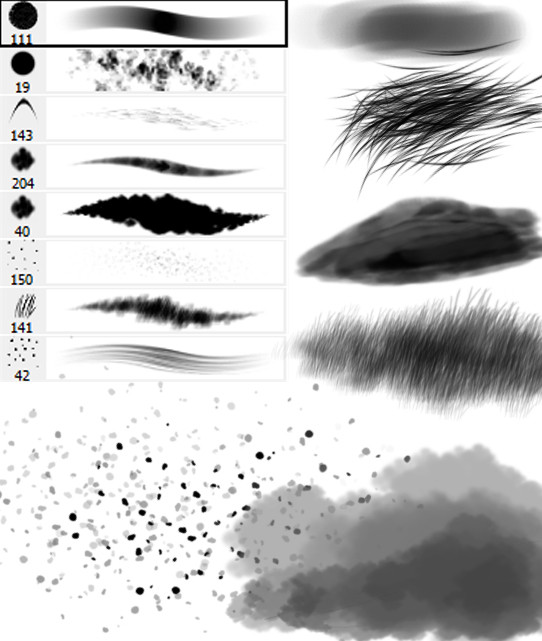
it has
a brush I usually use for for most of the things
a random texturing brush
a fur brush (amaaazing, I'm telling you)
a snow brush (snow already on the ground, not falling)
a falling snow flakes brush
a fog(mist)/smoke brush
a grass brush
a wood brush

I must say I love how the furr brush came, you just have to be careful in which direction you'r moving it and you get a realistic result, it's aweesome

Please don't redistribute these brushes. A credit would be nice but I won't get angry if you don't since I myself don't remember who made each brush I have in my PS xD I'll understand if you forget or something.
Related content
Comments: 172

Clark2022 [2022-03-04 11:57:16 +0000 UTC]

πŸ‘: 0 ⏩: 0

463art [2021-04-26 19:30:51 +0000 UTC]

πŸ‘: 0 ⏩: 0

brotherson34 [2020-10-22 20:15:43 +0000 UTC]

πŸ‘: 0 ⏩: 0

vcxz500 [2018-04-04 22:44:54 +0000 UTC]

Thank you!

πŸ‘: 0 ⏩: 0

Grace-love-kindness [2017-09-23 04:30:37 +0000 UTC]

Thank you so much.

πŸ‘: 0 ⏩: 0

lnb98 [2017-04-08 07:07:47 +0000 UTC]

thank you.

πŸ‘: 0 ⏩: 0

Craftlea [2017-03-26 20:24:32 +0000 UTC]

Killer fog, thank you! Β I used it here: Β craftlea.deviantart.com/art/Gi…

πŸ‘: 0 ⏩: 0

ODDnode [2017-01-17 08:01:41 +0000 UTC]

Thank you!Β  I love these Β 

πŸ‘: 0 ⏩: 0

bakobaki [2016-12-14 13:03:41 +0000 UTC]

Thanks

πŸ‘: 1 ⏩: 0

M00nArtz [2016-05-25 06:09:52 +0000 UTC]

does this happen to work with firealpaca by any chance? they look like really useful brushes

πŸ‘: 0 ⏩: 1

calleena In reply to M00nArtz [2016-05-27 16:11:38 +0000 UTC]

I have no idea, this is why I included a jpg version with instructions, perhaps you can make it work thereΒ :thumb145271080:

πŸ‘: 0 ⏩: 0

philippeL [2016-05-18 04:13:33 +0000 UTC]

Very nice set! thanks for sharing!

πŸ‘: 0 ⏩: 0

DigitalDreams-Art [2016-04-26 09:42:13 +0000 UTC]

used here :
digitaldreams-art.deviantart.c…

Thank you

πŸ‘: 0 ⏩: 0

galaxycuty [2016-04-08 16:08:31 +0000 UTC]

thank you so much
>_<
Β 

πŸ‘: 0 ⏩: 0

suicidalbandz [2015-11-29 04:54:33 +0000 UTC]

Thank you for providing these brushes.Β 
I used one of them here:Β suicidalbandz.deviantart.com/a…

πŸ‘: 0 ⏩: 0

policegirl01 [2015-10-29 17:04:19 +0000 UTC]

Used here: policegirl01.deviantart.com/ar…

πŸ‘: 0 ⏩: 0

VERTIGOSEIYA [2015-08-21 21:38:27 +0000 UTC]

Β Aqui use la brush..#143 Es muy buena para los pelillos del cuerpo. Photoshop cs4 !GRACIAS!
Β  Β  Β  Β  Β  Β  Β  Β vertigoseiya.deviantart.com/ar…

πŸ‘: 0 ⏩: 1

calleena In reply to VERTIGOSEIYA [2015-09-16 10:30:48 +0000 UTC]

Por favor

πŸ‘: 0 ⏩: 0

AwesomeSauce5Yolo [2015-06-20 18:27:47 +0000 UTC]

hey, can this work for firealpaca?

πŸ‘: 0 ⏩: 1

calleena In reply to AwesomeSauce5Yolo [2015-07-17 21:45:32 +0000 UTC]

sorry what? if you want to use it you can, no problem

πŸ‘: 0 ⏩: 0

dave62 [2015-06-04 11:57:45 +0000 UTC]

Thanks for creating and sharing these brushes. Very useful.

πŸ‘: 0 ⏩: 1

calleena In reply to dave62 [2015-09-16 10:31:09 +0000 UTC]

Happy to help

πŸ‘: 0 ⏩: 0

pepperotti [2014-12-03 12:37:33 +0000 UTC]

Thanks!!!

πŸ‘: 0 ⏩: 0

ClaudiaDigitalGraphs [2014-11-06 17:18:53 +0000 UTC]

Hi I used your wonderful stock here: mysticserenity.deviantart.com/…

Thank you!

πŸ‘: 0 ⏩: 0

TakingYourBreath [2014-03-14 05:02:51 +0000 UTC]

Downloaded thank you for sharing. <3

πŸ‘: 0 ⏩: 0

UnimatrixMuffin [2013-10-05 12:15:04 +0000 UTC]

I'll credit you if I remember xD
Thanks for shariong those

πŸ‘: 0 ⏩: 1

calleena In reply to UnimatrixMuffin [2013-10-07 09:16:06 +0000 UTC]

you don't have to remember, but I insist that you show me what you did with them that's all the pleasure

πŸ‘: 0 ⏩: 0

Sheamky-Chan [2013-06-15 22:30:49 +0000 UTC]

Thanks a lot ! And thanks for sharing.

πŸ‘: 0 ⏩: 0

Schmengee [2013-05-19 21:06:47 +0000 UTC]

i'll try my best to remember to credit you for the brushes XD if you want i can send you the link of the digital painting i'll be using them for when its finished!

πŸ‘: 0 ⏩: 0

oldacountitsgoingawa [2013-04-14 18:28:56 +0000 UTC]

i used your stock , thanks for sharing here is link [link]

πŸ‘: 0 ⏩: 1

calleena In reply to oldacountitsgoingawa [2013-04-16 09:43:19 +0000 UTC]

thank you, I love seeing what people make with it, thanks for sharing :*

πŸ‘: 0 ⏩: 0

gisela1910 [2013-03-25 22:00:45 +0000 UTC]

Thank you for your generosity in sharing your brushes it is much appreciated!

πŸ‘: 0 ⏩: 1

calleena In reply to gisela1910 [2013-03-27 16:11:57 +0000 UTC]

welcome

πŸ‘: 0 ⏩: 0

Aeglys [2013-02-17 17:52:12 +0000 UTC]

Hi, thanks for your stock - I used it here [link]

πŸ‘: 0 ⏩: 0

zuln [2013-02-08 11:14:08 +0000 UTC]

that is the best fur brush I've ever used
thank you~

πŸ‘: 0 ⏩: 0

Silversadopts [2013-02-01 01:26:40 +0000 UTC]

Holy crap, the fur brush is amazing. That is honestly the best fur brush ive used

πŸ‘: 0 ⏩: 0

Michel-le-fou [2013-01-21 07:25:26 +0000 UTC]

I think I have used your sets before. Nothing wrong with them.

πŸ‘: 0 ⏩: 0

9303kaha [2013-01-02 18:33:23 +0000 UTC]

used as fur in [link]
and
used as grass in [link]
and i use them in other arts as well 'cause these brushes is really cool
(and i'm lazy)

πŸ‘: 0 ⏩: 1

calleena In reply to 9303kaha [2013-01-04 11:54:53 +0000 UTC]

I'm the master of lazy, taht's why I made them in the first place

πŸ‘: 0 ⏩: 1

9303kaha In reply to calleena [2013-01-05 21:29:33 +0000 UTC]

haha okey
well then, i have to thank you for your laziness

πŸ‘: 0 ⏩: 0

arcanEnigma [2012-12-25 18:21:00 +0000 UTC]

Thank you very much for these brushes~!

πŸ‘: 0 ⏩: 0

SercanSalkir [2012-11-24 19:53:33 +0000 UTC]

looks awesome. thanks a lot!

πŸ‘: 0 ⏩: 0

DiloTheSeaDragon120 [2012-10-06 13:32:57 +0000 UTC]

How do you open an abr file?? I just got photoshop and I can't find a way to import them onto there :/

πŸ‘: 0 ⏩: 2

just-lc In reply to DiloTheSeaDragon120 [2012-10-12 03:54:35 +0000 UTC]

Which version of photoshop do you have? I can help you if you have cs5.

πŸ‘: 0 ⏩: 1

DiloTheSeaDragon120 In reply to just-lc [2012-10-12 11:20:16 +0000 UTC]

Umm I think cs4

πŸ‘: 0 ⏩: 1

just-lc In reply to DiloTheSeaDragon120 [2012-10-12 14:59:03 +0000 UTC]

Here's a tutorial that can explain it better than I can.
[link]

πŸ‘: 0 ⏩: 1

DiloTheSeaDragon120 In reply to just-lc [2012-10-13 12:35:42 +0000 UTC]

Thank you!! That helped very much!

πŸ‘: 0 ⏩: 1

just-lc In reply to DiloTheSeaDragon120 [2012-10-13 13:00:47 +0000 UTC]

My pleasure!

πŸ‘: 0 ⏩: 0

calleena In reply to DiloTheSeaDragon120 [2012-10-06 18:30:56 +0000 UTC]

soo, you can just drag and drop, or you go to edit>brush presets>load or next to the brush list you had a (>) button, it opens the load option too, unless you have elements then you can't do it all

πŸ‘: 0 ⏩: 1

DiloTheSeaDragon120 In reply to calleena [2012-10-07 01:12:51 +0000 UTC]

ok I'll try that

πŸ‘: 0 ⏩: 0


| Next =>