HOME | DD
 chain — Pro Sharpening Actions
Published: 2010-08-08 11:37:58 +0000 UTC; Views: 13273; Favourites: 81; Downloads: 3663
Redirect to original
Description
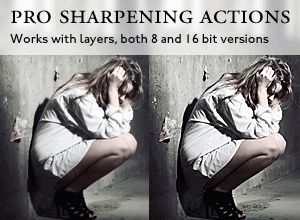
Includes several sharpening techniques including the common desaturated High Pass. Versions for both for 8 and 16 bit images.Tested in CS3, CS4 and CS5.
The sharpening (user chooses radius) is placed on a new layer, and opacity can then be adjusted to increase or decrease the strength.
Suggested starter-settings:
Sharpen for screen: 0.3-1.0 px radius.
Sharpen for press (halftone): 2 px radius.
Sharpen for print (inkjet): 2-3 px radius.
Local contrast increase: 100-250 px radius.
Larger radii usually require less strength.
Tips:
* Use a super-high radius and low opacity for local contrast enhancement.
* Also try the blending modes Overlay and Soft Light for a softer effect.
* Apply a small blur to a sharpen layer if you do not want to sharpen the smallest details.
* Use masks to limit it to areas of the image.
Update 4/9/2010:
The set now includes Smart Sharpen as well as a readme.
Default opacity changed in the actions.
Readme added.
Update 11/9/2010:
Desaturation of the sharpening now only affects saturation.
Motion Blur version removed. This is covered by the Smart Sharpen.
Default opacity corrected properly.
*********************************************
Downloaded for free from chain.deviantart.com
Free for commercial use
You may edit the actions sets as much as you want
Do not redistribute (link back here instead)
Related content







Comments: 6


very rich resources sir,, thank you for sharing,,
👍: 0 ⏩: 0


