HOME | DD
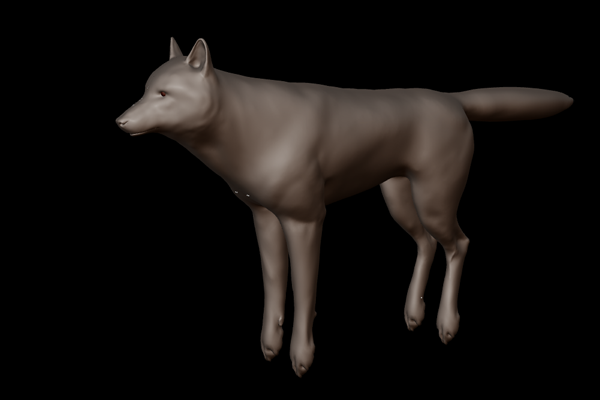
 CrazyWolfman — Keystone Wolf WIP
Published: 2011-02-25 22:39:30 +0000 UTC; Views: 1899; Favourites: 2; Downloads: 6
Redirect to original
Description
My poor wolf model keeps getting built and hacked apart every five minutes it seems. Aw well, here's yet another picture of it. This time it's the high poly version, from which I'll get a normal map baked (this will then be combined with the normal map for fur to create the final lighting effect).And no, it's still not finished. I'm a perfectionist so it might take a good number of further amendments yet before I call it a day.
Related content




Comments: 13


This is amazing. The paws, lower jaw, eye(s) and tail could use a bit of tweaking; and I've noticed that the hind legs seem a little thin in comparison to the front legs (there's something a little off about them, but I can't really put my finger on it), but otherwise... wow.
I still want to try this out, but I feel like it's going to take a while to get comfortable using the program, and a while more before I can make something like this. I think I'll wait till I have more time on my hands.
How's your game coming along by the way? What I've read about it sounded quite promising, and I bet the models will look great. Are you making different builds/breeds or even different species, or just one standard model?


👍: 0 ⏩: 1

Thanks! Always nice to read some good constructive criticism too. I definitely agree with all the areas you suggested for improvement. Some (the feet in particular) I've already amended, but I'm still having a little difficulty with those hind legs. I'm thinking it might look odd in part because it doesn't have fur yet, but the plan is to add planes extending from the back of them with tufts, so it might be the case that those bulk it up sufficiently. The same goes with the neck and face, as those will also be bulked up considerably if this works. This one almost represents a shaved wolf I guess at this stage.
The game is still progressing, albeit quite slowly now I'm zookeeping full time as well. As for different breeds and builds, what I've done with my low poly version is to rig is so that individual bones can be edited for their length and thickness, which will affect the associated part of the wolf. In this way I can allow the player to basically modify all the character's dimensions (size, weight, ear length, eye size, leg thickness etc. etc.) as they choose. Not sure how well this works with the normal map bake yet though, and I'm still trying to work out how to customise fur colouration. I'm working on some other species too, because without hunting and interspecies interaction the game would probably be pretty boring, but these won't be playable.
👍: 0 ⏩: 0


Glad to hear all that time spent looking at skelingtons and muscle diagrams paid off!
👍: 0 ⏩: 0

Haha, behold hoverwolf's amazing powers!
Nah there's actually some method behind the madness; when it's rigged it's easier and better looking to bend the feet upwards, rather than straighten them. I have to admit it still looks kinda funny though.
👍: 0 ⏩: 1

dude this looks awesome. how could it be any better?
I keep having problems with my model. faces being flipped when I change to texture mode.. annoying....
did you get this problem?
👍: 0 ⏩: 1
Cheers! Areas for improvement include the feet, which I accidentally subdivided incorrectly and saved (wolf feet are more thick and blocky), the lower jaw and the hindlegs. Have to say it's getting to the point where I don't think I can improve it all that much though.
Your problem isn't likely to be that the faces flip when you change to texture mode, instead it's probably that the faces were already flipped, but you only noticed in texture mode because it renders them differently. When in edit mode do you have 'Double Sided' selected? If you turn that off then you'll be able to see if a face is the wrong way round much more easily. I personally didn't get this problem very often, but then again I used a large, simple shape and subdivided it with loop cuts. The only times it happened for me were when I was doing certain facial features involving deleting and creating vertices in unusual ways, but normally so long as I created new faces adjacent to an existing (correctly aligned) face it would get the idea and I'd not have an issue. Otherwise I'm afraid you're kinda stuck with selecting and ctrl-N.

👍: 0 ⏩: 1
ye i've been crtl-n-ing a lot.
it usually works, however there are a few parts [on the tail and ears especially] that just refuse to budge. even if i delete the face and redo it. i attempted to delete the vertices around that face, and redo this entire area... only to come across a different area not working.
and im pretty sure double-sided was off...
when i can be bothered looking at my fail model again ill try to fix it.
its getting to the point where i should create everything in texture mode XD joke.
nah ill get round to fixing it later, when i have more time.
👍: 0 ⏩: 1
If it doesn't work, just select the offending face on its own and try ctrl-n on that. I'm sure you'll work it out either way though, but I'm glad to hear you're still working at it.
👍: 0 ⏩: 1