HOME | DD
 CypherVisor — Content-Holder Box Floating Image Tutorial

Published: 2013-03-10 14:41:45 +0000 UTC; Views: 195821; Favourites: 7520; Downloads: 10
Redirect to original
Description
»»»»»»»»»»»»»»»»»»»»»»»»»»» Exclusively for Premium members and Super groups only «««««««««««««««««««««««««««How to use ?
Just copy the source code(s) below and paste it in your Custombox module in your profile or group page.
SOURCE CODE:
Note: Change your image alignment from right to left by replacing the align="right" with align="left" in the above code.
Fella image link (the image that I've used for demo in this tutorial)
------------------------------------------------------------------------------------------------------------------
http://fc01.deviantart.net/fs70/f/2013/069/d/6/fella_by_cyphervisor-d5xk416.png
Background image that I've used for demo in this tutorial:
-----------------------------------------
Background link: [link]
by =TaNa-Jo
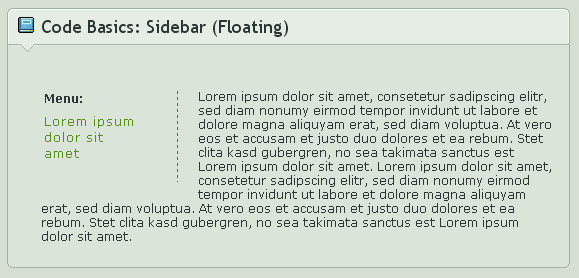
The blue content holder box
Other Content-holder boxes: [link]
Other tutorials
Custom Box background tutorial:
Custom background for DeviantID-box widget:
Custom background for New deviation-box widget:
Want to customize your profile more?
Check all my free resources + tutorials: [link]
Having any doubt? Please read this F.A.Q. + Tips n Tricks before writing a comment below.
I am a free resource provider for the deviantART community. If you like my free customization resources you can donate some
points
 to me as an appreciation or support.
I take commissions to make custom journal CSS too. Check out my Journal CSS folder or Read-made Journal Skins . Send me a note to contact me.
Related content




Comments: 1090


When I did it, it made my picture huge?
👍: 0 ⏩: 1

Are you using a huge image image-url? or are you using width or height property in your img tag? These are the main things which could cause this.
👍: 0 ⏩: 1
may be show me what you are doing.

👍: 0 ⏩: 1
I think I am ok now, but thank you
👍: 0 ⏩: 1

thanks this helped me a lot ^o^
👍: 0 ⏩: 1

this is great, but when i do it, i think the pic is too large, is it possible to resize it ?
👍: 0 ⏩: 1
Yep.
Please check this journal for Custombox F.A.Q. + Tips and tricks
Thanks
👍: 0 ⏩: 0

How do you put the image over the box?
👍: 0 ⏩: 1
You mean at the top?
👍: 0 ⏩: 1
You can actually do that using this code cyphervisor.deviantart.com/art...
I'll be posting a tutorial for this soon.

👍: 0 ⏩: 1

Is this for premium members or for everyone?
👍: 0 ⏩: 1
It's for premium members.
👍: 0 ⏩: 1
oh...okay then, thanks. ^^
👍: 0 ⏩: 1

It didnt work for me, I tried the Direct link thing in my custom box, and it didnt work. It came up as a little square with a paper in it.
👍: 0 ⏩: 1
Your image link is having a problem that means. Check it out.
👍: 0 ⏩: 1

Thank you for the help!
By any chance do you also have a tutorial to making custom Journal skins? I can't find any good ones out there. Thank you!
👍: 0 ⏩: 1
You're welcome!
I just uploaded a long awaited tutorial for journal CSS here: cyphervisor.deviantart.com/jou...
I hope that you like it!

👍: 0 ⏩: 1
Thank you so much! It's the best one on DA as of now! I will be using it! Thank you!
👍: 0 ⏩: 1

I tried it out but it doesn´t work and I don´t know why >.> After all, the code looked like this:
fc04.deviantart.net/fs70/i/201... ">
Welcome to my page 
blablablaghfhfghfhdhg <*img scr="fc02.deviantart.net/fs70/f/201... " align="right"/> bnofoossd
fc05.deviantart.net/fs70/f/201... " height="24" width="344">
👍: 0 ⏩: 1
--------------------------
Just without this "wytiwyg="1". I don´t know why they are there o_o
I think all is correct^^ I also tried it with other content holder boxes, but it still doesn´t work.
If you paste your codes here in the comment I can't see the them because it gets messed. May be note me?
👍: 0 ⏩: 0


Thank you for this! I'll totally be using
Also, does this work on other websites as well?

👍: 0 ⏩: 1
You're welcome!
And it might work.
👍: 0 ⏩: 0

Dumb question
Is there any way to make it float above the box?
like on top not on the bottom . o.?
👍: 0 ⏩: 1
Yes there is. You can do that by using the custom box bg code from here: cyphervisor.deviantart.com/art...
👍: 0 ⏩: 0

This is an amazing tutorial, I love all of your stuff~
I am having a little difficulty with this one tho ; ~;
I can get the floating image to work fine if I use one of the pre-colored content-holders (I tried this out with the blue one and it worked perfectly), but if I try to float an image in my box with a custom background content-holder (the one from here that I tried ), it freaks out and won't float, no matter where I place it Dx
Anyway I've been fiddling with this for a while now and my brain is fried, the only thing I can think of this is somehow conflicting with the custom bg content-holder coding but I can't figure it out
👍: 0 ⏩: 1
hmm...that is something I haven't tried yet.
I'll try and give a check on it.
👍: 0 ⏩: 0

I did step by step of what you did. But instead of being "floating", it's in the box.
How do I make it floating?
👍: 0 ⏩: 1
Try inserting the code not at the very last but little bit before the end and see if works. Let me know about it.
👍: 0 ⏩: 1
No, it didn't work.
Here's the code i have: fc03.deviantart.net/fs70/f/201... " align="right"/>
👍: 0 ⏩: 1
Remove this from the code wytiwyg="1" and try it.
👍: 0 ⏩: 1
Okay, this is what happened.
I had that text box, it kept going inside, then I changed the type of text box, and it floated.
For some reason, it didn't like that light purple text box of yours.
So, It's good now. I didn't have to remove the wytiwyg="1"
👍: 0 ⏩: 1
Glad that it is working fine now. And I'll check that out in the light blue box. Thanks for informing.
Sid
👍: 0 ⏩: 1
Okay. Little purple it is.

👍: 0 ⏩: 1

may i ask how i can put the image inside the box, floating to the right instead of having it going over the line
👍: 0 ⏩: 1
check how to float image here Custombox F.A.Q. + Tips and tricks
👍: 0 ⏩: 0
<= Prev | | Next =>