HOME | DD
 DavidRaid — Elefaenza-Blue
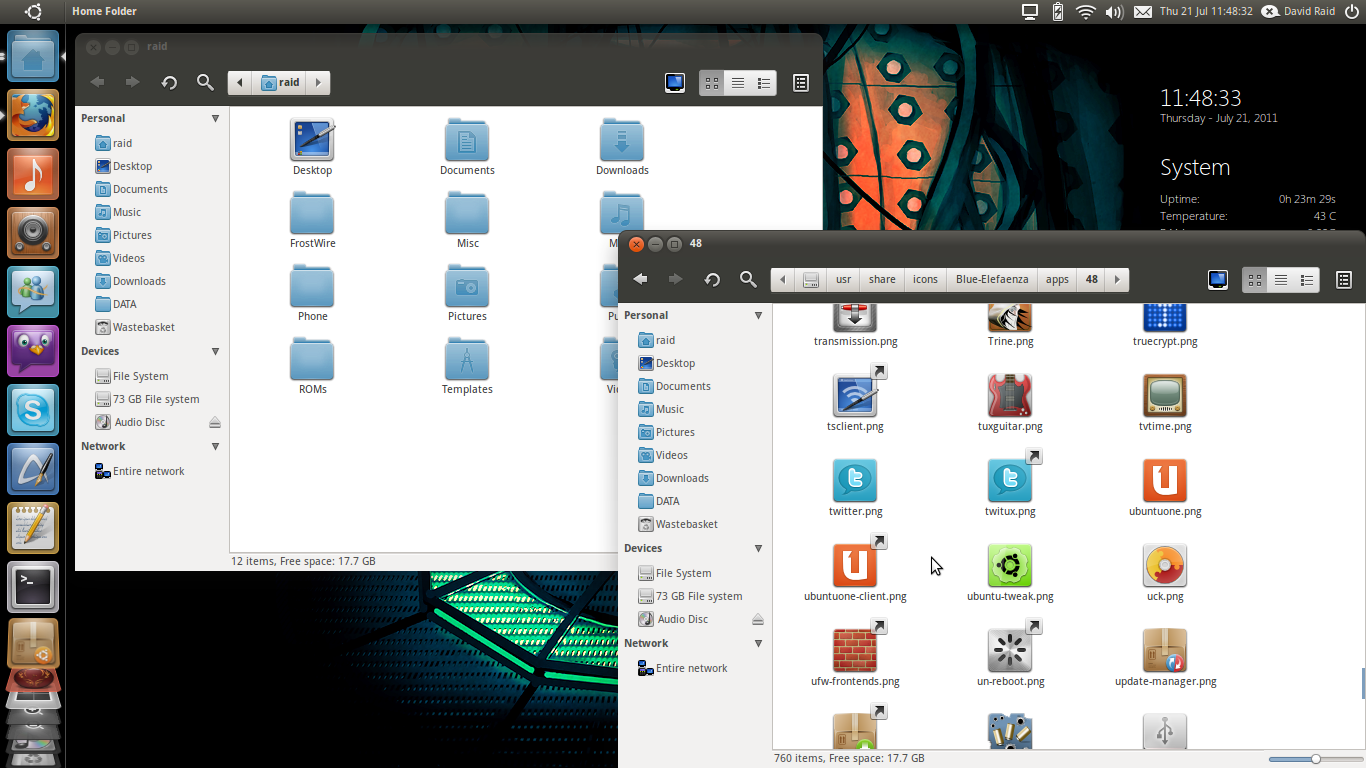
Published: 2011-07-21 11:10:13 +0000 UTC; Views: 13894; Favourites: 11; Downloads: 2523
Redirect to original
Description
This icon theme uses the Faenza icons as a base (by Tiheum) with the blue folder icons from Faenza Cupertino (by john007) and the Faenza Fresh (by funnyguy) icons swapped in. Also included is the Faenza Games icon pack by Half-left.The panel icons are all from the incredible elementary theme (by Dan Rabbit) with the exception of the Ubuntu logo panel icon, which is from a pack of elementary style distributor icons (by zpletan). I've also included the other distribution logos in the pack in case you are using something other than Ubuntu. Logos included are OpenSUSE, Mandriva, Linux Mint, KDE, Gnome, Gentoo, Fedora, Debian and Archlinux.
I've also restored the Light Themes Workspace Switcher, because I like the original look. It feels less like an application and more like a Workspace tool built into Unity, as it should.
This icon theme is recommended for use with the fantastic Light Themes Evolved! [link]
The amazing original Faenza icon theme can be found here
[link]
Faenza Blue
[link]
Faenza Fresh
[link]
Faenza Games Icon Pack
[link]
elementary
[link]
elementary distributor logos
[link]
---------------------------------------------------------------
Changelog for Version 2
-Fixed index.theme inconsistencies and errors
-Fixed problem with me-menu invisible icon
-Fixed action icons duplicates
-Fixed recent icon size in Ubuntu Software Centre
-Added most recent Faenza Cupertino icons (turns out I was using a very out of date pack, now EVERY folder icon is blue)
-Fixed/removed broken symbolic links
-Added animations from elementary icon set for the panel (including connecting to wireless and brasero burning animations)
-Fixed inconsistent media icons when in full screen on Totem. (I noticed that when full screen, pressing space to pause and using the arrow keys to track backwards and forwards used inconsistent icons, this is a problem within Faenza itself. I replaced them with icons from elementary)
-Fixed Totem blurry icon upon startup when not playing a file
-Fixed Category problem with Beatbox (it kept using elementary icons due to duplications)
-Fixed blurry volume icon in notifiyOSD
-Cherrypicked the best elementary icons for 16px folder in Actions
With thanks to 'Simply Great' for his suggestions and help.

Elefaenza is here [link]
Related content









Comments: 16

Very nice! One complaint I have is that the icons don't look any good in unity side panel if you set icon size below 48.
👍: 0 ⏩: 1

Ah, sorry about that. It's a limitation of the original Faenza icons themselves as all the icons in the size folders are PNG files as opposed to scalable SVGs. Can't be helped I'm afraid.
If you know a quick and easy way to resize SVG files, I could probably eventually fix this by using the 96px size SVG icons in the scalable folders to make new sizes, but for the moment, this is the best possible.
👍: 0 ⏩: 0

Hi. Thanks for this icon theme!
I found a bug regarding to the actions category: there's icon duplicity on the "16" folder. Maybe you forgot to delete the .png versions. I already did so for the "ubuntu-faenza-darkest" icon theme, so you only have to replace that folder with the one I provided 

BTW, adding the elementary's icon for Midori would be great!
👍: 0 ⏩: 2
Thanks for telling me. ^^ Unfortunately, I didn't read what you'd written properly and went through the folder removing .svgs (except for the occasional one I thought would look better) and only once finished did I re-read what you'd put and realized "Crap, these are light icons on a light background." I then used the folder from your 'ubuntu-faenza-darkest' as you suggested. Because your icon theme inherits missing icons from the ubuntu-mono-dark theme, I had to tweak it to include the file search and recent files icons (which I noticed when about to upload the new version haha, it resorted to a 32x32 icon and made the column huge 
I'm updating the icon theme now. Thanks for your help, I really appreciate it!
As for the Midori icon, I thought about it, but I can't bring myself to break with the square icon trend. Having that round Midori icon in there with all the nice square ones feels like a theme breaker. I'll look for a faenza variant though!
👍: 0 ⏩: 1
That was fast! Thanks.
Maintaining icon themes is really a pain in the neck
I really like this icon collection and would like to make it available on the Light Themes Evolution PPA, so I'm seeking your permission
👍: 0 ⏩: 3
Okay. Last edit. Really. If you've already downloaded to add to the PPA, please delete and re-download. ^_^;;
👍: 0 ⏩: 1
Thanks. I knew you were working on an update and thought it would be better to wait for the latest version before uploading. I'm preparing the package right now
👍: 0 ⏩: 1
Yay! I've reuploaded it a couple of times since, but the one currently on DA is the final one. You'll know if it's right because it'll be called Elefaenza-Blue instead of Blue-Elefaenza.
I changed the name (along with a few bugfixes) because I've also uploaded a non-blue version, plain ol' Blue Elefaenza. I edited it to also include ubuntu-mono-dark icons where the BE theme has a blue folder in the icon (such as the copyfolder icon in 16, Actions). It looks best with the default colour option in Ambiance Evolved.
[link]
👍: 0 ⏩: 1
--plain ol Elefaenza
I wish editing DA messages was possible.
👍: 0 ⏩: 0
Version 2 is uploaded, please delete any previous versions and use this for the PPA, I've tested a thousand times and made a lot of changes, lots of minor ones not in the changelog.
👍: 0 ⏩: 0
I'd be honoured!
They really are a bit of a pain to maintain, as the longer you use them, the more things you notice that you think need fixing. I'm never satisfied.
Did you try the shade of blue I suggested with your theme? (#7E9EBD) It matches the folders themselves best I think. ^^
👍: 0 ⏩: 1
That's true. Of course I tried the color you suggested
👍: 0 ⏩: 1
Specifying the icon sizes for the folders "apps/24, "panel/32" and "panel/24" in the index.theme file is needed as well
👍: 0 ⏩: 2
Fixed and uploading. Also noticed a bunch of inconstancies in my index.theme file.
I've gone through and fixed all that I can see, comparing to what's in the folder and what is in the original Faenza index.theme file.
Should all be good now.
I've also added the Animations folder from the elementary iconset, as it has panel animations for connecting to the internet and Brasero burning a disc.
👍: 0 ⏩: 0
I didn't even notice that! Thank you!
Fixing now.
👍: 0 ⏩: 0