HOME | DD
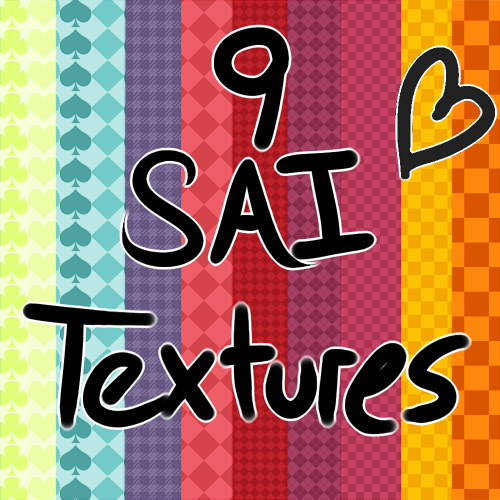
 DemonoidZero — 9 SAI Textures
Published: 2013-06-14 22:04:26 +0000 UTC; Views: 92683; Favourites: 2106; Downloads: 29192
Redirect to original
Description
A collection of textures I made to use in SAIDirections
1. Unzip files
2. Drag texture files to your papertex folder in Sai
3. Click start-sai.exe
These files may also be copied into your brushtex folder if desired.
I also reccomend you backup your old files before applying these, doesn't hurt to be safe.
Credit is not required but a link back is always appreciated ^o^b
Note:
I will not be able to answer any questions about problems you may have with SAI since I have two children who love to keep me busy. My apologies.
EDIT: I'm glad this has been so well liked. I wish I could thank everybody indivutually but I can't. Thanks for all of the favorites everybody~
Related content



Comments: 235

👍: 0 ⏩: 0

👍: 0 ⏩: 0

👍: 0 ⏩: 0

👍: 0 ⏩: 0

👍: 0 ⏩: 0

👍: 0 ⏩: 0

👍: 0 ⏩: 0

👍: 0 ⏩: 0

Is there a papertex.conf of all the textures? because it's not working.
👍: 0 ⏩: 0


Where do i download them i cant see the link or anything in the description
👍: 0 ⏩: 1

the download button on the right of your screen
👍: 0 ⏩: 0


how do I use/open these textures in my sai?
I did as the directions told me but it didn't work :'0
👍: 0 ⏩: 0


Not sure if you'll ever see this because you are busy and such but you honestly showed me how to not only download these files but brushes as well ;o; Thank you so very much it was always confusing when I read thought everything but nothing ever worked, Thank you very much!
👍: 0 ⏩: 1

This is totally late but there should be a download button somewhere on your screen on this DA page. Also, you don't download brushes you make them in sai if you'd like to know how I can help you I used to think the same thing lol.
👍: 0 ⏩: 1
OMG, this is TOTALLY LATE ;-; I never get on since school drowned me so so very sorry!!! but yes I tried making brushes but I work with a mouse since my tablet died (Rest in peace Tablet) but I would still love to learn how to make it that is if your still willing ;~; I'm so sorry!!!!
👍: 0 ⏩: 1
Lol my tablet literally just broke so i feel you. xD All you do is right click on an empty tool space in the little area where you have your pen tool, airbrush tool, etc and select the brush option. Then you click on the new brush you made and change the texture to one of the brushes you've downloaded. Some brushes require more than that such as changing advanced options but these ones are pretty easy.
👍: 0 ⏩: 1
OH NO ;-; R.I.P Tia-Moon78's Tablet you will be missed ;-;!!!
I'm trying so hard to take in any commissions for side money you know? to get a new tablet ;-; I draw out my stuff by hand and pray it will come out better when I'm done. Though the eye's never come out to what I want it to be ;-; I can't do details with a mouse it hates me TT - TT!!!!
But I will try doing that 
👍: 0 ⏩: 1


I dragged them into the papertex folder ;o
But they don't show up in SAI
👍: 0 ⏩: 1

You have to go to the papertex.conf file and list each of your new custom textures, following the same format (for each texture) as the other native textures. 👍: 0 ⏩: 1
For example,
1. Go to papertex.conf in your SAI folder (should be in your Programs folder if you're using Windows, Apple or others idk..)
2. Make a new line/entry after the final line of format
3. Follow this format: 1,papertex\
These steps apply similarly for your brushtex.conf and brushform.conf, just replace the "papertex" with said conf. file format.
IT'LL MAKE SENSE ONCE YOU START DOING IT.
I HAVE FAITH IN YOU.
When I open it it already has all the file names in it like so:
1,papertex\Canvas.bmp
1,papertex\Checkers Small.bmp
1,papertex\Checkers Tiny.bmp
1,papertex\Checkers.bmp
1,papertex\Deck.bmp
1,papertex\DiamonX.bmp
1,papertex\Diamonds Tiny.bmp
1,papertex\Diamonds.bmp
1,papertex\Paper.bmp
1,papertex\Watercolor A.bmp
1,papertex\Watercolor B.bmp
👍: 0 ⏩: 1
Did you run start-sai.exe after saving your changes? Close SAI, run that .exe file (ignore if it says "it didn't work" or something like that), then restart SAI.
If possible, try sending me an image/link of your papertext.conf file, I'll see what's happening. (and quickly! I haven't much time left, do it before the 23rd!!)
👍: 0 ⏩: 1
Yea I noticed I had to just restart my pc XD
//Wooopsssss
👍: 0 ⏩: 1
ahhh its okay!! at least the issue has been resolved!
(sorry for late reply, i was gone away for a while)

👍: 0 ⏩: 1


👍: 0 ⏩: 0

Thank you for these!
These textures for sai are wonderful
👍: 0 ⏩: 0


These are nice! I do have a little snag tho.. I don't have step three as an option. Is there another way to make it update?
👍: 0 ⏩: 1
Try going to the papertex.conf file and list each of your new custom textures, following the same format (for each texture) as the other native textures. 👍: 0 ⏩: 0
For example,
1. Go to papertex.conf in your SAI folder (should be in your Programs folder if you're using Windows, Apple or others idk..)
2. Make a new line/entry after the final line of format
3. Follow this format: 1,papertex\
These steps apply similarly for your brushtex.conf and brushform.conf, just replace the "papertex" with said conf. file format.
IT'LL MAKE SENSE ONCE YOU START DOING IT.
I HAVE FAITH IN YOU.
(if this doesn't work I'll try sending you a "startsai.exe" as a last measure)


| Next =>