HOME | DD
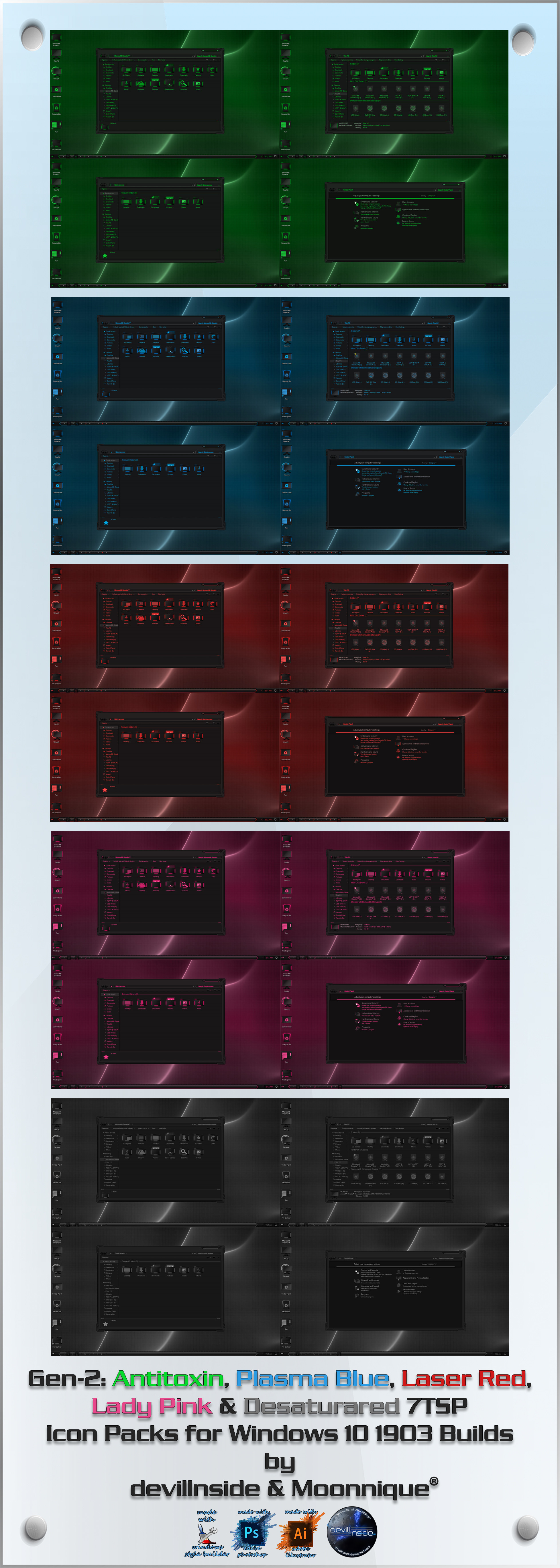
 devillnside — Gen-2 Series 7TSP Icon Packs for Windows 10 1903+
#1903 #ash #blue #contrast #customization #desaturated #desktop #gen2 #generation #girl #green #grey #gui #iconpacks #icons #lady #ladypink #laser #neutral #nextgen #os #osicons #pink #plasma #red #skins #tech #themes #toxic #toxin #utilities #windows #antitoxin #plasmablue #laserred #7tsp #windows10 #19h1 #19h2 #20h1 #hightech
Published: 2019-07-07 22:56:52 +0000 UTC; Views: 79692; Favourites: 16; Downloads: 1514
Redirect to original
Description
Gen-2 Series: Antitoxin, Plasma Blue, Laser Red, Lady Pink & Desaturated 7TSP Icon Packs
For Windows 10 1903 & above builds
Big thanks to Moonnique @ Virtual Customs for all the hard work she put in into recolouring, compiling, testing the new 7TSP release & updating the icon packs for 1903.
To install these icon packs you need to use 7TSP GUI 2019 Edition found here:
fav.me/ddb5026
Installation:
Open up 7TSP & click Add a Custom Pack & select the icon pack you want to install.
Click on Start Patching.
By default 7TSP will create a restore point & install the icon pack.
Once installation is done reboot & you're done.
Note:
Do not use any of these icon packs on any other Windows 10 builds other than 1903 19H1, 19H2 & 20H1.
Enjoy.
DOA Themes.
Related content










Comments: 38

👍: 0 ⏩: 0

👍: 0 ⏩: 0

👍: 0 ⏩: 1

👍: 0 ⏩: 1
👍: 0 ⏩: 1
👍: 1 ⏩: 0

👍: 1 ⏩: 1
👍: 1 ⏩: 0

👍: 0 ⏩: 1

What is this exactly? An add-on for a pre-existing icon pack?
👍: 0 ⏩: 1
no.. the others are ipacks, using the ipack installer which isn't compatible with windows 10 1903 onward .. so this is for windows 10 1903 & 1909 meant to be installed using 7TSP GUI
👍: 0 ⏩: 1
no problem, happy to help
👍: 0 ⏩: 0

Hi. Have you been able to solve the problem of the changed icons? Since my July 24 message I have not known about it. Greetings and thanks for the work you do.
👍: 0 ⏩: 1
i'll be testing a this out on an new icons pack in the coming week & if the issue is fixed there then i'll update these packs accordingly... apologies for your troubles
👍: 0 ⏩: 1
You do not need to apologize. You do a great job. My respects. Thank you
👍: 0 ⏩: 0

Hello, my problem is that the symbol of the explorer does not change.
Windows 10 1903
👍: 0 ⏩: 2
👍: 0 ⏩: 0

👍: 0 ⏩: 1
can you post a screenshot of where the icon does not change?
👍: 0 ⏩: 0
Hi. Excellent work. I have found 2 errors. The "ISO" images icon does not correspond, and it is also of a low resolution. In addition, the thumbnail view of videos appears covered by a generic video image. I had to uninstall this icon pack and use the "Media Preview Configuration" program to restore the thumbnails. Otherwise, everything works and looks excellent. Good job👍
👍: 0 ⏩: 2
Hi Moonnique
I have attached some screenshot of the video previews (before and after) and the icons of iso and img images in 2 different sizes. Thank you
👍: 0 ⏩: 1
I am sorry, the problem of erroneous icons persists (in video previews and iso images), although this time they are different icons. I attach screenshot.
👍: 0 ⏩: 0
thanks for the feedback.. much appreciated.. i'll look into the isssues
👍: 0 ⏩: 1
Thanks to you. I'll be waiting for an update to reinstall it.
👍: 0 ⏩: 1
👍: 0 ⏩: 1
thanks mate.. but the "work" is not really my doing... i just made the plasma blue icons the first time around & sent the png's to Moonnique, everything else you see is done by her
👍: 0 ⏩: 1

Awesome! Thanks for your part nonetheless

👍: 0 ⏩: 1
