HOME | DD
 DrewGreen — Cool Photoshop Brush Tutorial

Published: 2008-10-24 07:51:40 +0000 UTC; Views: 20621; Favourites: 281; Downloads: 2653
Redirect to original
Description
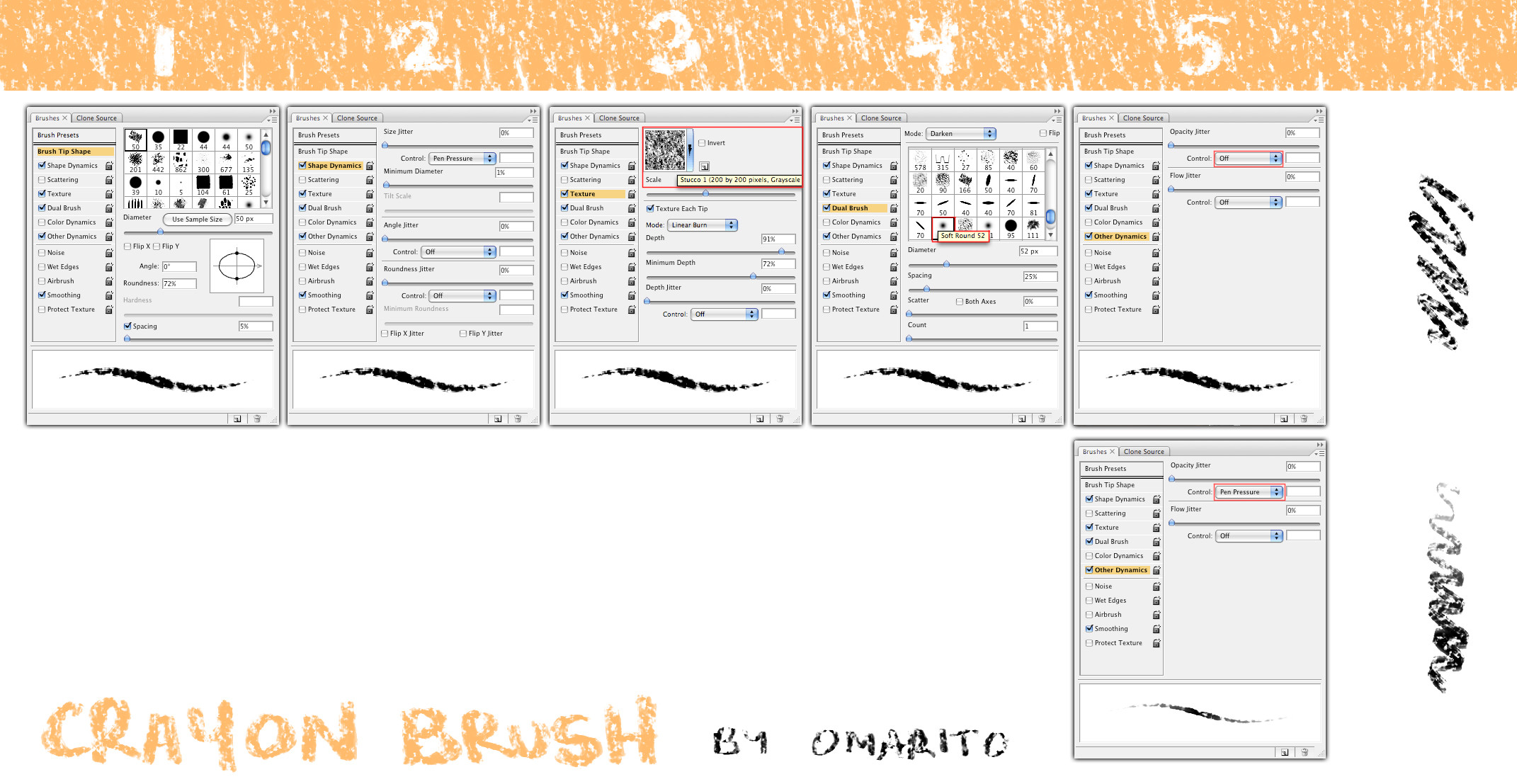
Hey!A lot of people were asking about this brush that I've been using in a lot of my quick stuff recently, so here's how to make it!
Click download for the full view (which you'll want to do).
Warning: The image is really big!
Hope it helps you out! Let me know if it does.
PS: This goes hand-in-hand with the full-fledged tutorial I'm about to submit. Keep that in mind.
Related content






Comments: 32

1 more reason for me to folow you .... I mean "watch"
👍: 0 ⏩: 0


Quick question... how do you actually apply the image for the pastel brush?
I've got the settings right, but I can't seem to find a way to add a new image as a texture. I hope you understand what I'm asking.
👍: 0 ⏩: 2

Oh, yeah! I think I understand the question. Get the rectangular marquee tool and select the thing you want to be a texture (don't select any of the white part around it), then go to (I think) edit>>create new pattern...it's near the bottom of the edit menu, it might be create texture, I can't remember. It's been a while since I've done this, I'm sorry.
Just be sure to download this image so that you get the full-size to use for the texture! ;D
👍: 0 ⏩: 1
That's alright! Thanks for the help! I understand it's been awhile. Seeing your awesome vector works, I started watching you a little while ago, but sometime after you made this, because if I'm correct, you do mostly vector art in Illustrator these days, right?
But thanks for the great brush dude! I really like the way it looks and works, and I'm workin' on a painting with it right now!
👍: 0 ⏩: 1
Well, I still do some work in Photoshop (I always sketch in Photoshop for instance), and when I make new brushes and things, it's almost intuitive for me. I don't think about what the menu options are called, I just kinda know where to click at this point, haha!
And hey, when you finish a piece using this brush, please let me know! I'd love to see it. ;D
👍: 0 ⏩: 1
Will do! It shouldn't be too much longer, but I've been slackin' lately.
👍: 0 ⏩: 0
Whoops, ignore that question, I just remembered. 
👍: 0 ⏩: 0

wow, thank you so much for the tutorial! I never thought of using the texture option for brushes.
👍: 0 ⏩: 1
You're welcome! It can really take your brushes to the next level.
👍: 0 ⏩: 0

um wow... now that I read this tutorial I now think I have expansion into shading with textures. What an ingenius person you are! O_O; *bows in thanks*
👍: 0 ⏩: 1
Thank you! I really hope the method helps you out!
👍: 0 ⏩: 0

hello! never got to thank you for this so thank you! LOVE the pastel brush 
👍: 0 ⏩: 1
Wow, you're doing much better work with those brushes than I have been. Fantastic stuff! I'm very glad you have been able to use them to such great effect!
👍: 0 ⏩: 0

I tried this and it gives nice effects. Though I think I messed it up since I can't get some pen pressure (since my tablet's pen tip is broken 

👍: 0 ⏩: 1
Sorry to hear about your tablet pen being difficult, but I'm glad that you like the brush! I hope you're able to use it to full effect one day.
👍: 0 ⏩: 0

Awesome! Nice and simple =] The way things should be lol
Thanks a bunch!
👍: 0 ⏩: 1
Thanks! And you're welcome!
👍: 0 ⏩: 0


I always wondered how you added textures to brushes in photoshop. I've always been too lazy to figure it out myself, haha. I think I'm going to try this one day soon. I especially like the pastel type brush you've been using and glad you showed how to make it.

👍: 0 ⏩: 1
My pleasure! I really hope it helps you out.
👍: 0 ⏩: 0

wow! thank you so much for sharing this
i have been working on my own brushes as well, but as i almost never ink digitally (only to correct some things once the drawing has been scanned), i do not use them a lot.
but your brush looks absolutely fantastic, i want to train my digital inking skills now

👍: 0 ⏩: 1
I really hope they do some good for you! Digital inking can be fun and therapeutic if you have the time to do it.
Trust me, though, vector inking can be a real snore and takes forever to explain, so be glad it's not a tutorial on that. XD
👍: 0 ⏩: 0

Ohh that's the thingy I was looking for!
Glad to know how you make that gorgeous effect, Imma try it out too!
👍: 0 ⏩: 1
Cool! I can't wait to see the results (that is, if you like it).
👍: 0 ⏩: 0

for some reason it never occurred ot me to use textures for brushes to make it look like actual pencil on paper
i feels stupid >>
lol
thanks for reminding me XD
👍: 0 ⏩: 1
Hehe, no problem. Textures make a world of difference. ;D
👍: 0 ⏩: 0


Oo, excellent! I'll certainly be looking into this.
👍: 0 ⏩: 1
I can't wait to see what you do with it!
👍: 0 ⏩: 0