HOME | DD
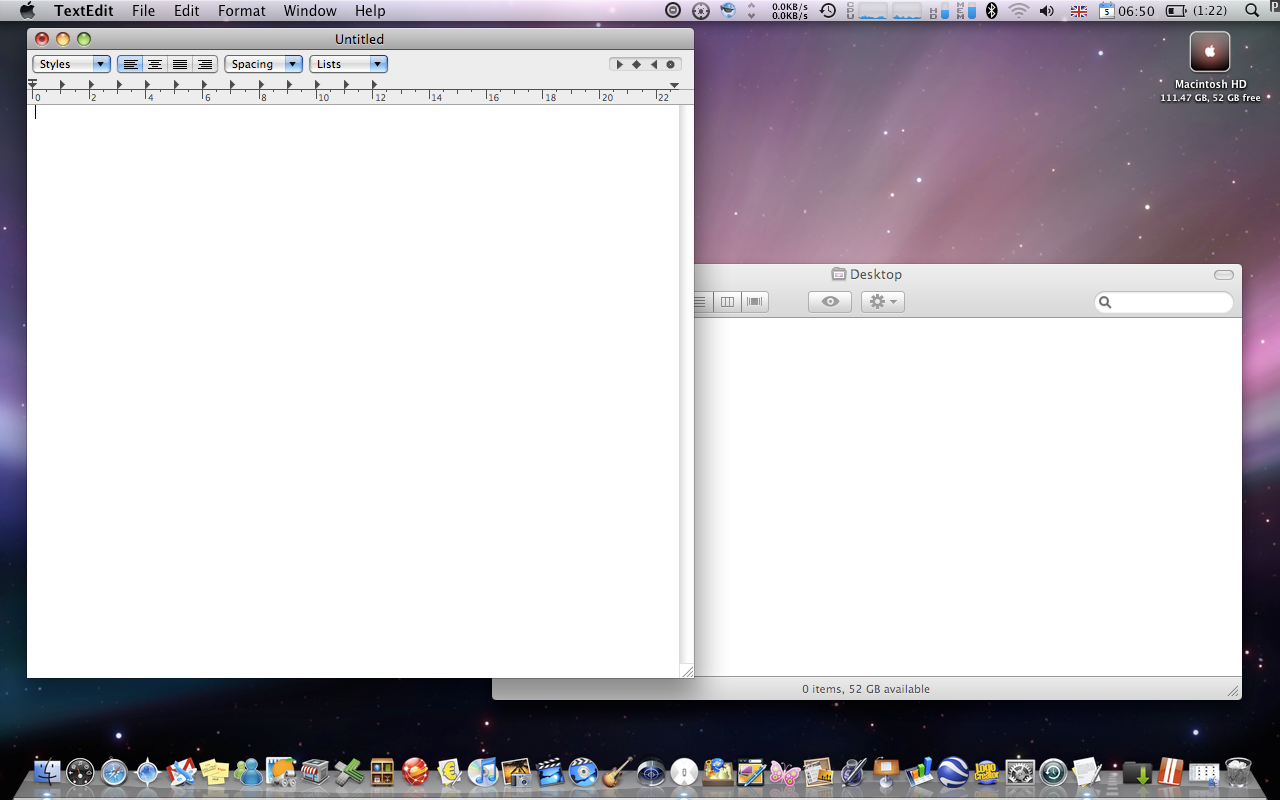
 eamon63 — Leopard inspired xp wb PLUS
Published: 2008-04-06 07:12:51 +0000 UTC; Views: 109054; Favourites: 146; Downloads: 41247
Redirect to original
Description
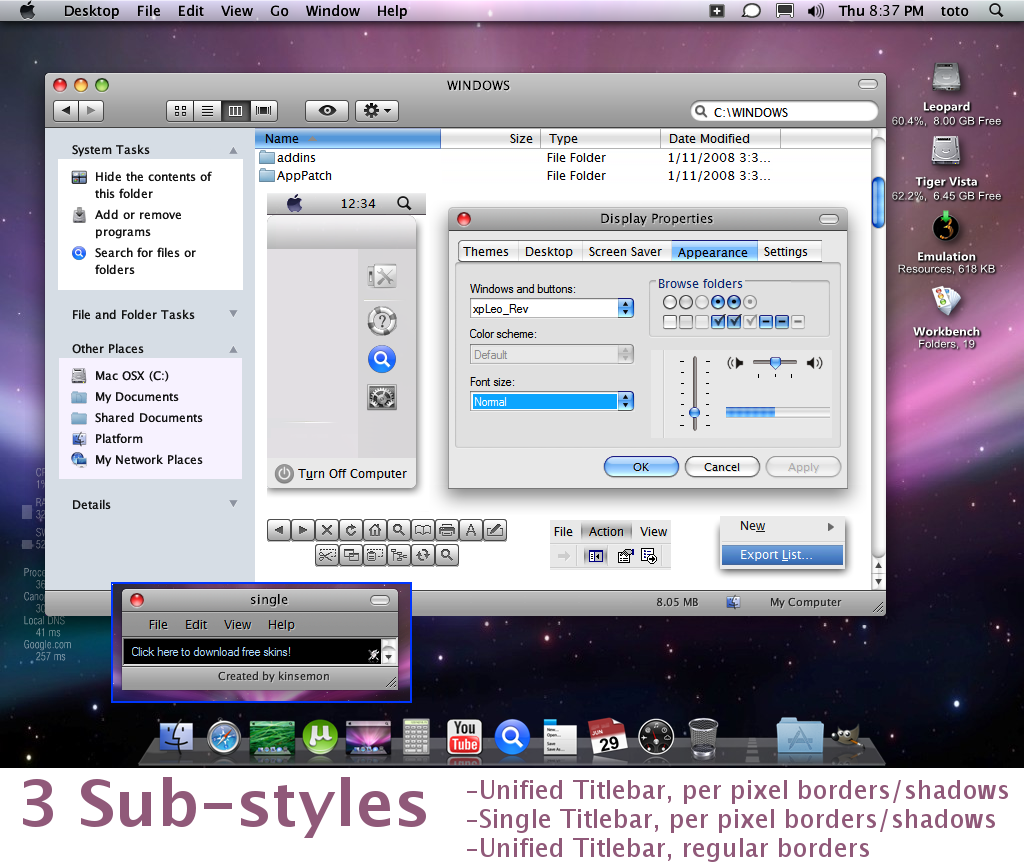
EDIT: 1 Dec 08-Re-worked skin elements to conform to leopard looks
-Fixed image tiling and stretching margins/issues
-ADDED 2 Sub-styles: single bar per pixel border, and a non-per pixel/ordinary border, for those with alternative shadowing apps(Styler, Y'z shadow etc)
Note:
-Before installing this, first remove/delete old version using WB Config.
-To change skin fonts, go to WB config. Recommend Blitzr's Lucida G (Included in the pack).
-Am studying how to edit shellstyle.dll, for additional skin elements
-Tested with WB 5.5 and 6.0. Need feedback on errors or bugs....
-Some issues with the modified scroll bars, evident when browsing very long web pages or very large folders, haven't found a work-around yet
Big thanks to Mark Raats/Raatsgui for the comments and suggestions.
Cheers!
EDIT: 2 Dec 08
-Removed rounded corners from bottom borders in :Single' sub-style, as per Rastsgui's recent suggestions.
Related content








Comments: 156


Hi Eamon63! I am asking permission to re-edit this theme for enhancements! Can I Re-edit the nonpix substyle??
I will change these:
*Hovering of the cursor to the mac traffic light buttons (single hover effects)
-when cursor hovers to the traffic light buttons, the hover effect affects all 3 buttons......
*Progress Bar (optional) p.s. seems fine
BTW nice theme work, can you release this again changing the progress bar animation with a moving blue and with
bar?

👍: 0 ⏩: 1

hello mate.
you can do whatever you want with it. cheers.
👍: 0 ⏩: 1

nothing wrong with download link....
👍: 0 ⏩: 0

you need to have windowblinds in order to use this skin...
👍: 0 ⏩: 0

hey nonsense why didnt u give the instruction.....what the fuck we do with dis shits without any direction.........stupid fuckers
👍: 0 ⏩: 0

my laptop is dell xpx m1330 window xp can install ??
👍: 0 ⏩: 1
Yuo to first install stardock Windowblinds
👍: 0 ⏩: 0

But something's wrong with the progress bar...
👍: 0 ⏩: 0


eamon loved the work. I was wondering how to put back the folder icon to the titlebar on the xpLeo_REV.
Thanks for the WB again
👍: 0 ⏩: 1
i don't think you can put icons in the titlebar using older versions of WB. not quite sure since i'm more into ubuntu this past year...
👍: 0 ⏩: 1
T^T how unfortunate for me...
I heard Ubuntu is an OS for more advanced users but It makes the most realistic MAC OS X feel.
👍: 0 ⏩: 1
you should try ubuntu, in another partition....
👍: 0 ⏩: 0

how can i get those "Desktop File Video, etc..." buttons in my taskbar on XP? i remember that once i did, but now i dont temember how

👍: 0 ⏩: 1
elmetalero, i'm not quite sure what you mean. If you meant the top bar, it is Stardock Objectbar. the bottom bar/dock is RK Launcher (or you can also use Stardock Objectdock)
👍: 0 ⏩: 1
thanks, i'm actually using it, but with RocketDock

👍: 0 ⏩: 0

Please reply how did u get the detailed leopard tigervista detailes at the bottom (62.2% 6.5gb free) please reply

👍: 0 ⏩: 1

you prbably got this one a million times but how to do change the background an start menu thing, im using winow blinds 6 is that too old, im also on windows xp, i know thats too old too
👍: 0 ⏩: 1
dec,
i am actually using using wb 5.5 on xp sp3. directions on wb 6.x is pretty much clear-cut. if you want to change startmenu background, just look for the appropriate image, then change it. just be careful to retain image dimensions...
👍: 0 ⏩: 0

Ok. I have been looking for this answer to this question for months. You know in the picture where it says: 8.05MB My Computer
How did you get that on your Window?Is It fake, or is it because you're using Windows 7? If not, please, please tell me how to get it! I will really be grateful!
👍: 0 ⏩: 1
hultuy,
i'm pn Windows XP sp3. the bottom bar/ status bar is pretty much standard on xp. you can toggle the view on/off by clicking on the active window menubar View>statusbar....
👍: 0 ⏩: 1
oh ok thanks. This style is the perfect i've seen. there is a slight bit of problem though. The max/min/close buttons have to show when you hover your mouse over them. I was wondering if you could just add those please?
something like this:
[link]
i have my mouse hovering, you just can't see it.
👍: 0 ⏩: 1
hultoy, the buttons SHOULD show indicators on mouse hover!!!
👍: 0 ⏩: 1
I swear it! The 3 buttons (Min/Max/Close) Do not show indicators on mouse hover. Is It because im using windowblinds 6?
👍: 0 ⏩: 1
probably. i made the skin for xp sp3 running WB 5.5...if you have Skin Studio 6.x, you can edit the button behavior...
👍: 0 ⏩: 2
I have skinstudio 6 full version, but I don't know how to make the buttons indicate. I even tried to bring other people's skins like blitzr's and dobee's theme, but when I replaced the buttons, they stayed the same. Does it have to do something with UIS2 Frames or something? If no, please tell me how to fix the problem? Or can you just re-upload the skin with indicators working? Are you running WindowBlinds 7?
👍: 0 ⏩: 1
sorry for the late reply...
after fiddling around with vista for a bit, i am now 99% in ubuntu linux, so i really don't have any idea with the goings-on in the Windows world. I only got as far as Windowblinds 6.x under Vista....
👍: 0 ⏩: 0
Ok I tried with SkinStudio 7, but I have no idea where I should edit the button behavior. Please tell me?
👍: 0 ⏩: 1
i don't have ss7 mate, but if it is anywhere near ss6, using it should be fairly easy. the hardest thing actually is giving the necessary effort... what you can do is study other themes. start with the pre-loaded WB themes .
👍: 0 ⏩: 0


dude how did u get your finderbar (the top bar) i really want one, btw im on win7 32bit
👍: 0 ⏩: 1
Lowelight,
the "top bar" is stardock Objectbar, running on xp. ver 2.1 also runs on Vista. Regarding win7, you'll have to check out later app releases with similar effect at stardock website.
👍: 0 ⏩: 1

sorry, but how do you install these onto your computer? is there a program you use?
👍: 0 ⏩: 1
You need to install Stardock Windowblinds, then you can download this theme and use it. for XP only...
👍: 0 ⏩: 0

What is WB Config ? I guess I need it to install this skin... how can I get it ?
👍: 0 ⏩: 1
You need to buy and install Stardock Windowblinds, then you can download this theme and use it
👍: 0 ⏩: 1
Thanks, but I gonna look for something free...
👍: 0 ⏩: 0
| Next =>