HOME | DD
 fraccy — Photoshop Fireball Tutorial

Published: 2003-01-31 21:34:21 +0000 UTC; Views: 28914; Favourites: 120; Downloads: 1629
Redirect to original
Description
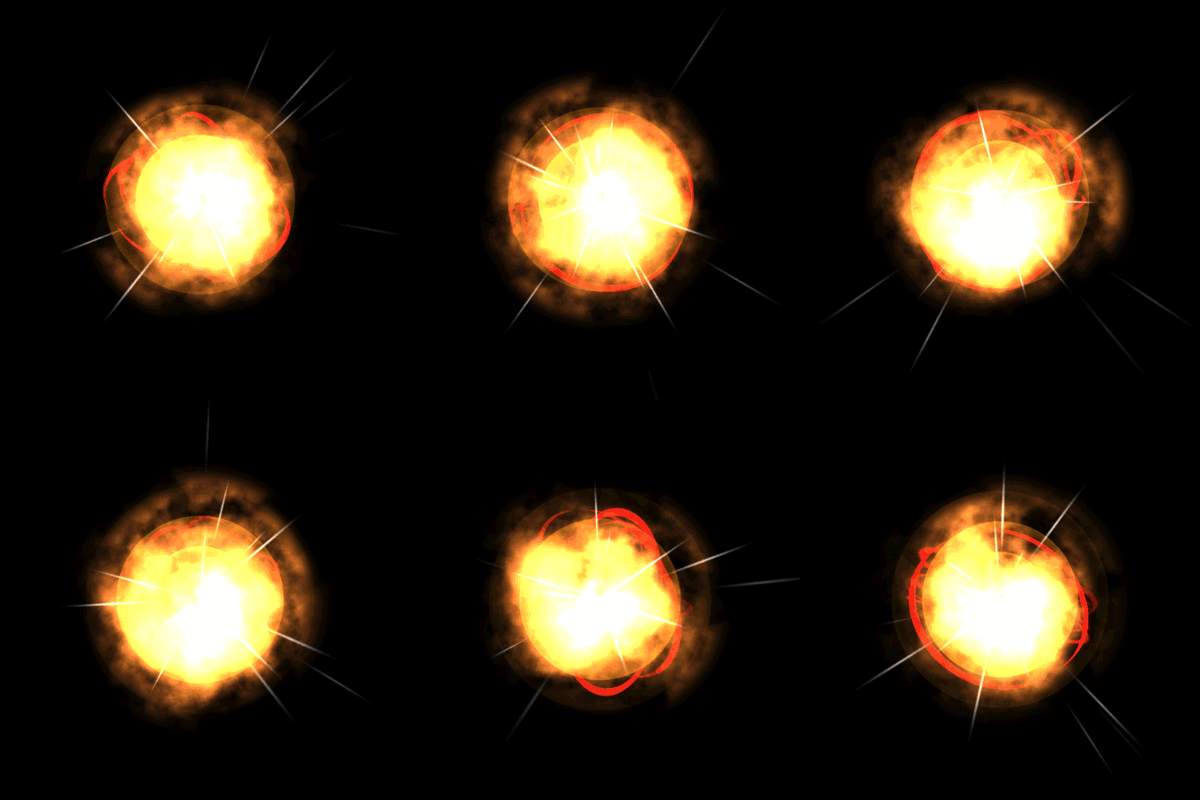
1) start with a blank image 640x480 or higher, with a black background2) render a lense flare in the middle of the image
3) apply some wind from the left: filter > stylize > wind
wind once for a more fiery look
wind twice for a smooth stream
4) create a new layer and render clouds and set the layer to color dodge
5) render difference clouds a few times until the fireball looks good
i was experimenting with photoshop and i found this easy technique..like 2 minutes ago!
and i thought i would share it
hope this is useful
please comment
all comments are welcome
Related content




Comments: 34

ok i know how but I'm not understand 4 and 5 :S can you explain me?
👍: 0 ⏩: 0

Fantastic find.....That you for sharing this technique.
👍: 0 ⏩: 0


I hope to use this tutorial to make a comet scene sometime soon. If it's successful I will give you credit and a link.
👍: 0 ⏩: 0


how do ya get to lens flare? i'm still kinda new with photoshop... ^^''
👍: 0 ⏩: 1


I modified your technique to include various smoke brushes and I have to say this was really cool - thx
👍: 0 ⏩: 0

Nice tutorial. Reminds me more of a magic missile though.
👍: 0 ⏩: 0

Wow, dude, this is great! Totally going to use this'n, here.
👍: 0 ⏩: 0

Even if it doesn't look like the classic fireball, it reminds me of a plasma bolt, or a comet. Love it.
👍: 0 ⏩: 0

even that so easy but it's great work I like it thanx so much
👍: 0 ⏩: 0


Hiru- Hey thx, I'm doing a project for a class and this really helps out!
👍: 0 ⏩: 0


Wow, this is the first tutorial that I've actually gotten to work!
[link]
👍: 0 ⏩: 0

A question (directed to anyone)
if i want to use it into a comic, how do i do to make the black background dissappear?
👍: 0 ⏩: 1

(If you are still interested after that long time 
I have tried the following, render the flare as described with wind and all, when you are finished do
"select colorrange (pick black) -> set fuzziness to full effect (200) -> okay, then hit del."
Not sure if this is clean enough.
👍: 0 ⏩: 1
Thank you,i am, but now i use it in flash movies.
👍: 0 ⏩: 0


Very cool. Add something like a ripple effect and a some Brightness/Contrast and Hue/Saturation adjustments and you can get some spiffy looking flames. ^_^
👍: 0 ⏩: 0

The top leftimage looks pretty awesome ^_^
*opens CS*
👍: 0 ⏩: 0

pretty good, I'm sure you could make it better in more steps, but I like how quick you could do it like this ^^
👍: 0 ⏩: 0

Good Critism, but i'm with Circanow, well done, least steps, "Get in, and Get out" just like that man, what cha gotta do
thanks a bunch ciao...
👍: 0 ⏩: 0

Man these people are so critical. I think you came up with one of the coolest looking images in the least amount of steps. I had fun with it and hope you come up with more cool stuff on accident. Great job man and I appreciate you taking the time to share and post.
👍: 0 ⏩: 0


the top left one is really cool but the others need a little modifying! and do it the old ways!
👍: 0 ⏩: 0

The idea is cool, but you really didnt submit this in typical tutuorial form. Also it doesnt really look like a fireball, just a stretched lens flare. Nice attempt though. Maybe spend a little more time on it then you could come up with something really cool!!
👍: 0 ⏩: 0

pretty kool idea... i dunno if i like that lens flar to much in the front but you could always blur it out
👍: 0 ⏩: 0