HOME | DD
 iynque — Flurry Extras 8
by-nc-nd
iynque — Flurry Extras 8
by-nc-nd
Published: 2013-04-22 18:19:10 +0000 UTC; Views: 12320; Favourites: 35; Downloads: 3205
Redirect to original
Description
Feel free to request icons for the apps that you use! ...No seriously... I hate picking out apps myself. Make my job easier and request icons you'll actually use.
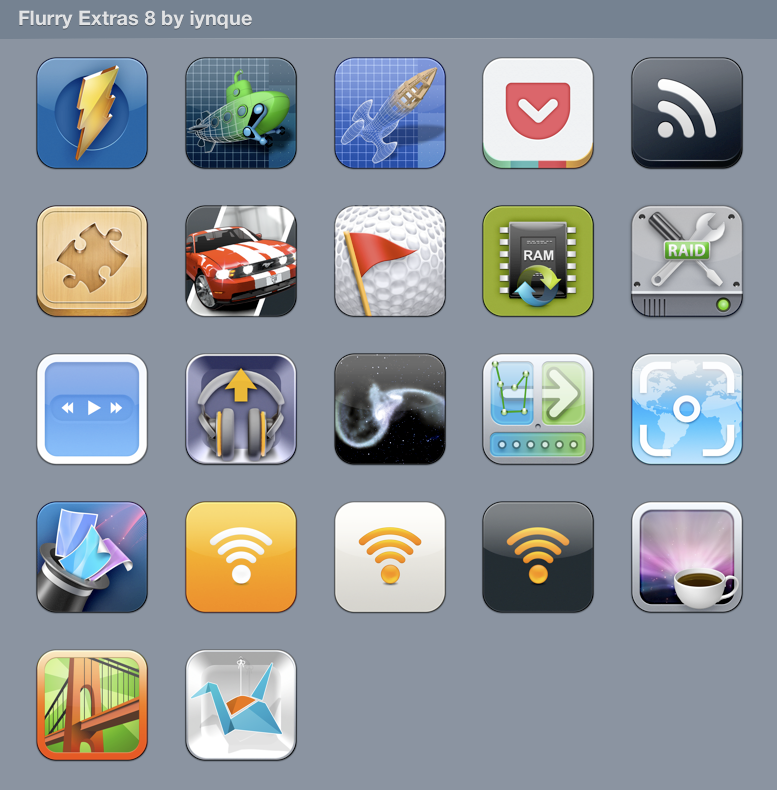
Designed to work with other Flurry & Phoney iPhone-style icons. Some are just the original/iOS icon reformatted for Flurry/Desktops. From left-to-right, top-to-bottom:
-Monosnap
-123D Design
-123D Make
-RSS Notifier
-Jigsaw
-CSR Racing
-GL Golf
-Memory Freer
-RAID Utility
-Byte Controller
-Google Music Manager
-Gravilux
-Norrkross MorphX
-Paparazzi!
-Wallpaper Wizard
-Eye-Fi Orange
-Eye-Fi Helper
-Eye-Fi Center
-Caffeine
-Bridge Constructor
-Copy app
• Includes .ICNS (Mac), .ico (Windows), and an iContainer for CandyBar
• Maximum resolution 1024 x 1024
Flurry by The Iconfactory
Phoney by Matthew Rex Downham
Related content












Comments: 8

👍: 0 ⏩: 0

👍: 0 ⏩: 0

👍: 0 ⏩: 0
👍: 0 ⏩: 0


Does anybody know how to change the icons for apps installed from the AppStore (ie. Pocket or Sparrow, etc)? I used to be able to via CandyBar, but since those apps are digitally signed now, I believe they are locked.
👍: 0 ⏩: 1

Here's how to change the icon for App Store apps or any other digitally signed apps that break when you change the icon via CandyBar:
-Select the icon in CandyBar, and copy it (cmd+C).
-Locate the app in Finder
-'Get Info' by going to File > Get Info..., or push cmd+i
-Click the icon in the top left corner to select it (there will be a blue glow when it is selected; click again if the blue glow hasn't appeared).
-Now just paste the new icon (cmd+v). Finder may ask for your password to make the change.
All done! This is a 'soft' method that doesn't actually replace the icon like CandyBar would; it just makes Finder/Dock/Launchpad display the new art.
To restore icons applied this way, 'Get Info' on the app, select the icon, and cut or delete it. The original icon will be restored.
👍: 0 ⏩: 0
