HOME | DD
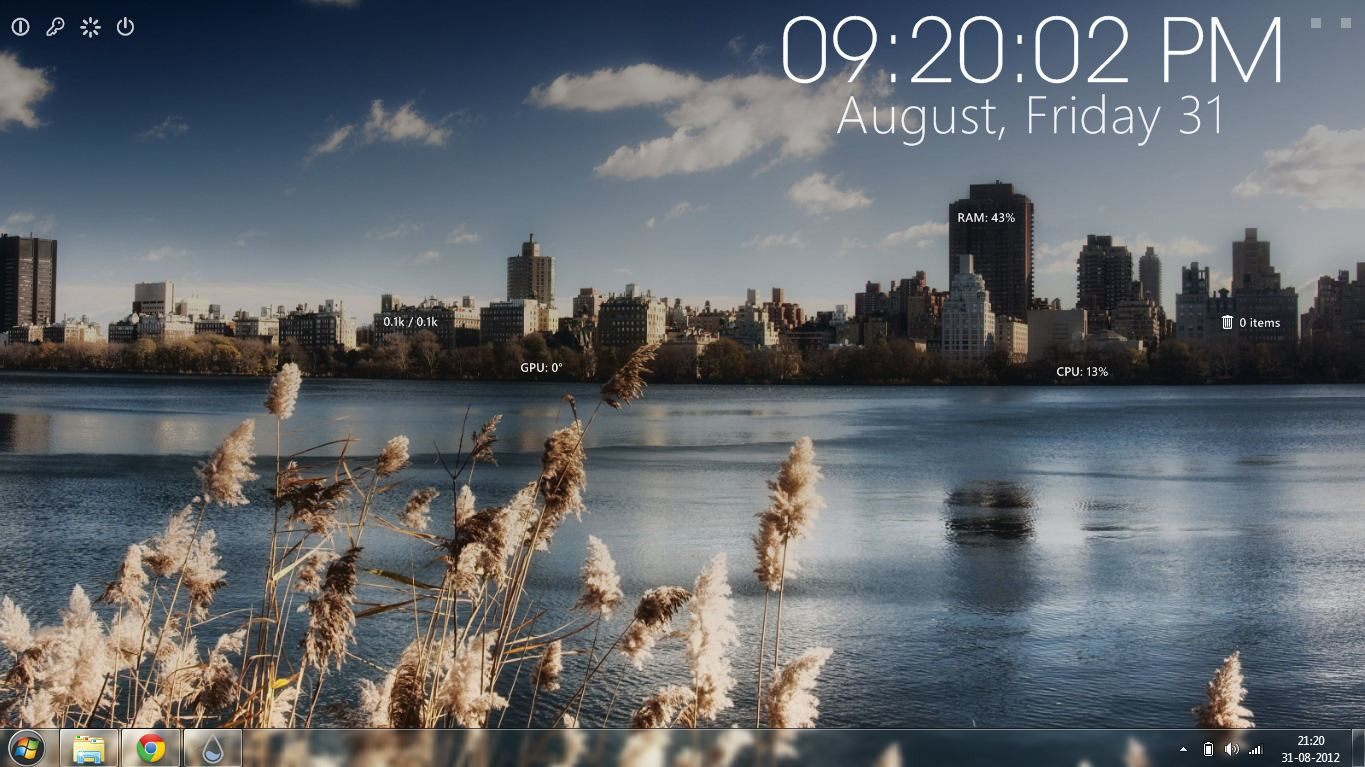
 jonptr — Rainmeter Windows 8

Published: 2012-08-30 06:05:54 +0000 UTC; Views: 100388; Favourites: 163; Downloads: 37608
Redirect to original
Description
A Windows 8 Themed DesktopDownload Link: [link]
Skins Used-
Surface-Home, Start, I-tunes, Slideshow
Omnimo-Another BG, Rainmeter Toggler, Powerbuttons.
Modified-
Color for different tiles,
Added clickable links to few tiles,
Fixed Hibernate Dialogue error for powerbuttons,
Added Tiles for Downloads, Pictures, Control Panel,
Added Icons for tiles.
Courtesy-
WP7-Xyrfo & fediaFedia
Icons-Dakirby309
Download File Here: [link]
Related content








Comments: 62

👍: 0 ⏩: 0


Hey I have a download for this theme. You will have to configure it but otherwise it is perfect, and it looks great!
Here is the link
|
|
|
\ /
www.mediafire.com/?0432wvndxs8…
👍: 0 ⏩: 3


Also you're a c.unt!
👍: 0 ⏩: 0

i love this, but you rly complicated our lives with this annoying download procedure, in the end i didn't even follow it through...
👍: 0 ⏩: 0

need help, completed the survey as mentioned but couldnot get the password of rar file. its unfare
👍: 0 ⏩: 0


plzzz I need password to install it cldnt complete the servey nthng happens it keep w8n for it to complete nd tht othr page took me to vube or smthn... my email d3vilkhan@yahoo.com :-P advance thanx
👍: 0 ⏩: 0

Thanks for the support guys. The theme reached 36k+ downloads. So i decided to shift to an external server for increased web popularity. Thaanks again
👍: 0 ⏩: 0


hi there... can i know how to use the slideshow feature? how do i insert pictures into it to make it a slideshow? i tried putting pictures into the slideshow folder in C drive but nothing is coming out. Can you please help me?
👍: 0 ⏩: 0

Hey, anyone know how to move the iTunes shortcut/Icon?
👍: 0 ⏩: 0

How can i move the iTunes tile? It just open all the time.
👍: 0 ⏩: 0

is it only compatible with windows 7 and up? vista and xp having install problems
👍: 0 ⏩: 0


Once you learn a few shortcuts (at the very least Win+x) life without the old start menu is much easier
👍: 0 ⏩: 0

can you send me an edited version of the shutdown buttons? make it red please i've been trying to do it but its to hard for me. I made the icons white with a grey touch but when i was dne it turned up light blue,please make it so its easy to edit the button pictures so i can use my custom buttons.im making a Beats Themed laptop and that is a need. so PLEASE HELP
👍: 0 ⏩: 0

The powerbuttons don't work !!! HOW TO FIX THIS? nothing happens when i click them
👍: 0 ⏩: 0



Awesome job..... featured here! You can add the featured link in your Description section also....
👍: 0 ⏩: 0

I cant install it. It keeps saying that my version of windows is not supported. Any solutions to this?
👍: 0 ⏩: 0


its giving me a error saying you need rainmeter 2.4 1613 but i have 2.4 1634 wth
👍: 0 ⏩: 0

I can't get this to install I'm getting an error that reads "Invalid settings file in: and my file path, what do I need to do to correct this?
👍: 0 ⏩: 0
I can't get it to install, I keep getting an error code that says Invalid settings file in: then the path name, what do I do?
👍: 0 ⏩: 0

This is really nice, but I'm having problems getting into Videos, music and pictures through this, is there anything I need to change or something? Nice job though!
👍: 0 ⏩: 1

If you look in the settings, can just right click, all the file paths for all of that is point to c:\users\John\, just change John to whatever your user is.
On a side note, I can't get the iTunes and the block with Games in it to move, when i try to click and drag, all it does is do the leftmousedown execution. Any ideas?
👍: 0 ⏩: 1

In the rainmeter manager just find the .ini of the skin in the windows 8 folder and you can use the Coordinates X and Y ^^,
👍: 0 ⏩: 0

Your Version of Windows is not supported by this package.
I am getting this error.. can you please tell me any way to troubleshoot it..?
I love this theme.
:]
👍: 0 ⏩: 0

Another question :
Is the Itunes icon here just for the decoration (and to launch iTunes) ? Or we have to do something if we want to use this icon as a small player ?
👍: 0 ⏩: 1
the Icon is for launching iTunes. Once a song has started playing you can control i tunes using the iTunes tile.
👍: 0 ⏩: 0
Hi, I love your skin and I use it for my 2nd screen.
But I'm french 
But I saw that we can't change the date (for exemple "Septembre" instead of "September"
Could you allow us to change this ?
I also saw lines for a 3rd HDD, but I didn't find how to display it ^^ (I have 5 HDD ^^)
and here
"[Dock24]
Meter=IMAGE
X=250
Y=310
w=120
h=150
ImageName=bgr.png
LeftMouseDownAction=!execute ["wC:\Users\****\Downloads"]"
I think that the w in front of the C shouldn't be there ^^
👍: 0 ⏩: 3
For the Hard disk just copy the snippets with titles [Drive1Label], [Drive1Usage], [Drive1Total] and paste it there itself. Now change the 1's to 3's as i have done it for 2's. If you want for more drives just repeat these steps..I hope it solves the problem
👍: 0 ⏩: 0
[MeasureWeek]
Measure=Time
Format=" %B, %Y"
[MeasureDate]
Measure=Time
Format="%d, %A"
Substitute="January":"JAN","February":"FEB","March":"MAR","April":"APR","May":"MAY","June":"JUNE","July":"JULY","August":"AUG",:"September":"SEPT","October":"OCT","November":"NOV","December":"DEC"
This is how it is written in the code. Replace it with the following code
[MeasureWeek]
Measure=Time
Format=" %B, %Y"
Substitute="January":"JAN","February":"FEB","March":"MAR","April":"APR","May":"MAY","June":"JUNE","July":"JULY","August":"AUG","September":"Septembre","October":"OCT","November":"NOV","December":"DEC"
[MeasureDate]
Measure=Time
Format="%d, %A"
Now edit the JAN, FEB etc to french names. I have done septembre for you..(i dont know the rest 
I hope this will solve the month problem and sorry for the wrong code
👍: 0 ⏩: 0
Yes the w in the code is an error. If you remove that w then a click anywhere in the tile would allow you to get into downloads. with the w you will have to click on the icon to get into the downloads folder.
👍: 0 ⏩: 0

where do you get the plugin? also thank you i just installed your theme. i think its awesome!
👍: 0 ⏩: 1
| Next =>