HOME | DD
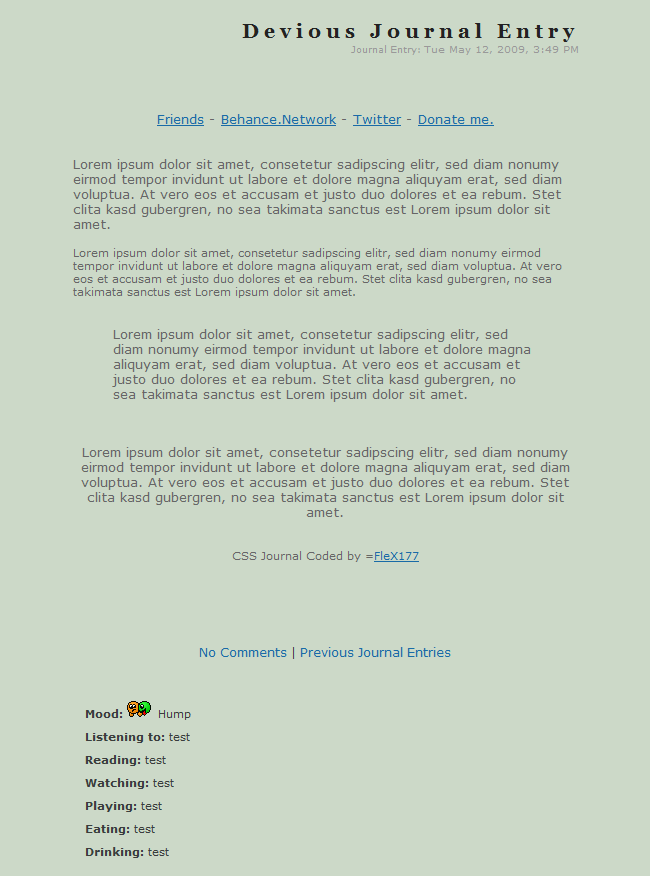
 Kataang-furuba — + Free Use CSS +

Published: 2009-03-06 23:08:18 +0000 UTC; Views: 1599; Favourites: 9; Downloads: 19
Redirect to original
Description
CREDIT ME WHILE USING THIS CSS JOURNAL!!!This is my first CSS. Yes, I did make it completely by myself. Please, please remember to credit me, Kataang-furuba, and feel free to give a link. :)
It is now availble in .ZIP file.
Veiwed in: Internet Explorer
Best Veiwed in: Internet Explorer
Features:
•Two types of headers
•Two types of scrollboxes
•Simple CSS
•Moods visible
•Journal icon not visible
•Short Code
•No list on side
•It's ...... free.
You are able to put the moods in any place you want. o3o If you are having any troubles with the CSS, make sure to tell me and I will help you as much as possible.
Live: [link]
Note:You must be a deviantart subscriber or senior to be able to use a journal CSS.
EDIT: I had added the non-visible jouranl icon thing and am not able to edit the zipped file so You'll have to wait for the icon to show up in the CSS file. So, make sure to add this at the end of the CSS for the non-visible journal icon:
.journaltop h2 img {
display:none;
I will fix this as soon as possible, I promise you. For the time being, follow these directions.

Related content










Comments: 27

this is awesome im gonna use it ^^, i dont know if you could let me only change a bit the colors, can i?, of course i will credit you
👍: 0 ⏩: 0

If I were a subscriber/staff member/senior, I would totally use this until I would be able to make my own. :)
👍: 0 ⏩: 1

Looks pretty good! If you need any help with CSS, I'm a free resource. 
👍: 0 ⏩: 1

I think I know enough, but one question...I'll save for later because I don't need to know it just yet.
But, right now, I do. I want it were when you push download you have the file. How do you do that? I can't save it under .zip, for some strange reason, the notpad thing, I mean. 
but, it said that it wouldn't allow me. I was wondering why, because it said it accepted certain types, and txt was one. I dont understand, it was saved under txt, but it just wouldn't work. txt is the only way I can save it under. It only has "txt" or "All files" I did All Files, but it didn't work either. Can you please help me?? D:
👍: 0 ⏩: 1
What operating system are you using?
👍: 0 ⏩: 1
What do you mean? Notepad...is that what you mean. D:
👍: 0 ⏩: 1
I meant Windows (Vista or XP probably), or Mac OSX, or whatever.
👍: 0 ⏩: 1
XP . . . . . . .
I'm retarded.
👍: 0 ⏩: 1

You're welcome!... uh very much!
👍: 0 ⏩: 0


I don't really understand what CSS formats are. I'm planning to get a subcription, but I have no clue what a CSS format is. can you please explain to me what they are please.
👍: 0 ⏩: 1
CSS is a complex code that you make to make your journal/gallery/website/blog...ect look all pretty and stuff. It's kinda complicated to explain, in a way. You can cusomise it to your likings. CSS is just a code for blogs, journals, websites, all those types of things. It's quite fun, if you ask me~
I love subscribtions. They're awesome. I don't have enough money for another one, but it'd be awesome if I did. 
👍: 0 ⏩: 1

It is now availble in format.
👍: 0 ⏩: 0
I'm working on how to get the download button to work for me so you can get the CSS. But, if you want, I can just give it to you now.
.journalbox {
background-color:#3C3C3C;
border-style:dashed;
border:4 border-color:#529EBA;
color:#959C9D;
font-family:Century Gothic;
font-size:13px;
text-align:left;
font-weight:lighter;
}
.journalbox .journaltop {
background-color:#3C3C3C;
color:#529EBA;
font-family:Century Gothic;
font-size:13px;
text-align:right;
font-variant:small-caps;
font-weight:normal;
}
.journalbox .journaltop h2 {
background-color:#3C3C3C;
color:#529EBA;
font-family:Century Gothic;
font-size:24px;
text-align:right;
font-variant:small-caps;
font-weight:bolder;
}
.journalbox .journaltext A:link {
color:#9BD6EB;
font-family:Century Gothic;
font-size:13px;
font-variant:normal!important;
font-weight:bold;
}
.journalbox .journaltext A:hover {
color:#9BD6EB;
font-family:Century Gothic;
font-size:15px;
font-variant:normal;
font-weight:lighter;
}
.journalbox .scrollbox1 {
color:#959C9D;
background-color:#3C3C3C;
position:static;
overflow:auto;
height:160px;
width:px text-align:justify;
}
.journalbox .scrollbox2 {
color:#529EBA;
background-color:#3C3C3C;
position:static;
overflow:auto;
height:160px;
width:px text-align:justify;
}
.header1 {
height:46px;
text-align:center;
font-size:18px;
font-weight:bolder;
font-family:tahoma;
color:#529EBA;
letter-spacing:7px;
padding-top:20px;
font-variant:small-caps;
}
.header2 {
height:46px;
text-align:center;
font-size:18px;
font-weight:bolder;
font-family:tahoma;
color:#959C9D;
letter-spacing:7px;
padding-top:20px;
font-variant:small-caps;
}
There you go~ Don't forget to credit me, okay? 

👍: 0 ⏩: 1

Thanks. But I dunno how to get the scrollboxes.
👍: 0 ⏩: 1
Sorry I forgot something included in the code. Under the A:link code, put this:
.journalbox .journaltext A:visited {
color:#9BD6EB;
font-family:Century Gothic;
font-size:13px;
font-variant:normal!important;
font-weight:bold;
}
---
Oh, that's simple~ For the gray text scroll box, type
👍: 0 ⏩: 1
Thanks.
Dang I'm retarded...

👍: 0 ⏩: 1
°A° You're not retarted!!! >:(
I didn't know how to do it either until I used the tutorial thing included in the css of `ClaireJones black css thingy. D:<
If you're retarded, I'm retarded, too.
👍: 0 ⏩: 1