HOME | DD
 kirykid — VolumeBar

Published: 2011-06-04 18:05:44 +0000 UTC; Views: 9175; Favourites: 93; Downloads: 1524
Redirect to original
Description
Made by kirykid
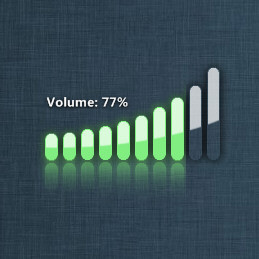
VOLUMEBAR l Only for geektool
-Alot of people have been asking for the volumebar so I thought that I would release it.
Thanks to .
How to use
-All of the information for how to use the volumebar is located in the download. Please read the instructions before you use it.
Need More?
-If you might need a diffrent color for the volumebar you can ask me and I will make one.
-Light version will be released soon
Related content









Comments: 53


link is broken! can you provide a megaupload link or something? thank you!
👍: 0 ⏩: 0


Fantastic, took me a while to figure this out but got it working in the end and its great...... carnt wait for the light version
👍: 0 ⏩: 1


im having some issues aswell (btw awesome work it looks so cool
[link]
👍: 0 ⏩: 2

You're missing a forward slash in there somewhere
👍: 0 ⏩: 0
my mad i got it to work somehow however it only changes when the volume goes up. when i turn the volume lower nothing happens untill i mute it completely then the icon changes to muted the bar however stays the same.
👍: 0 ⏩: 1

Wow I've never had the problem of it not going down. Did you mess with the script?
👍: 0 ⏩: 1
i didnt mess with the script as far as i know (only what was needed) when im back home ill redownload it and try again with fresh files
👍: 0 ⏩: 1
Ok and if it docent work note me
👍: 0 ⏩: 0


Everything looks ok, but it isn't working for me. It isn't doing anything, it's just there, I can't get it to respond. I followed the instructions (I think), any suggestions?
👍: 0 ⏩: 1
did you put any refresh seconds on there?
👍: 0 ⏩: 1
Nevermind, I screwed up the locations name, so I just a had a static image. I love this btw!
👍: 0 ⏩: 1

I tried this and it doesn't work anymore so I wonder how to proceed as there are no exe files included in the tutorials a part a file unrecognized by windows so how???
👍: 0 ⏩: 1
this is not for windows, It is for a mac..
👍: 0 ⏩: 0

I am having issues using this, probably because I'm a nubb. I can't open the VolImage.scrpt file.
👍: 0 ⏩: 1
you are on a macintosh, correct?
👍: 0 ⏩: 0

be awesome to get an alternate version where the volume indicator glyph wasn't vertical but facing the right like the native mac volume indicator
👍: 0 ⏩: 1
That is a very good idea, I am assuming you mean that the volume bar should be Horizontal instead of Vertical.
👍: 0 ⏩: 1
Nah I just mean the small white glyph should be horizontal so that it mimicks the native mac glyph (i.e. the volume indicator in the menu bar)
👍: 0 ⏩: 1
Ok I understand now, yes indeed that would be very nice in the nest version i will add that and add horizontal also Enjoy.
👍: 0 ⏩: 0


Awesome work! Today is the day of releases, thanks for share dude

👍: 0 ⏩: 1


It's Not my ressource ?! Man I didn't give you the permission !!!!
👍: 0 ⏩: 1
messaged and didnt get a response..
👍: 0 ⏩: 1
So I didnt give the permission to you , because I was waiting for the release from Side-7 man 
👍: 0 ⏩: 1
The only thing i used was the bar. I got rest from [link]
👍: 0 ⏩: 1
Ok Sorry 
👍: 0 ⏩: 1


You Welcome and Thanks for the 
👍: 0 ⏩: 0
Looks good buddy. I would only add an image for muted state. When you mute it, the output volume doesn't change. Instead you've got another variable that is output muted (true or false).
Hope that helps some
Cheers and beautiful work mate!
PL
👍: 0 ⏩: 1
| Next =>