HOME | DD
 luxorus — Firefox Ribbon UI version 2.05
by-nc
luxorus — Firefox Ribbon UI version 2.05
by-nc
Published: 2012-10-15 22:53:47 +0000 UTC; Views: 36098; Favourites: 74; Downloads: 11918
Redirect to original
Description
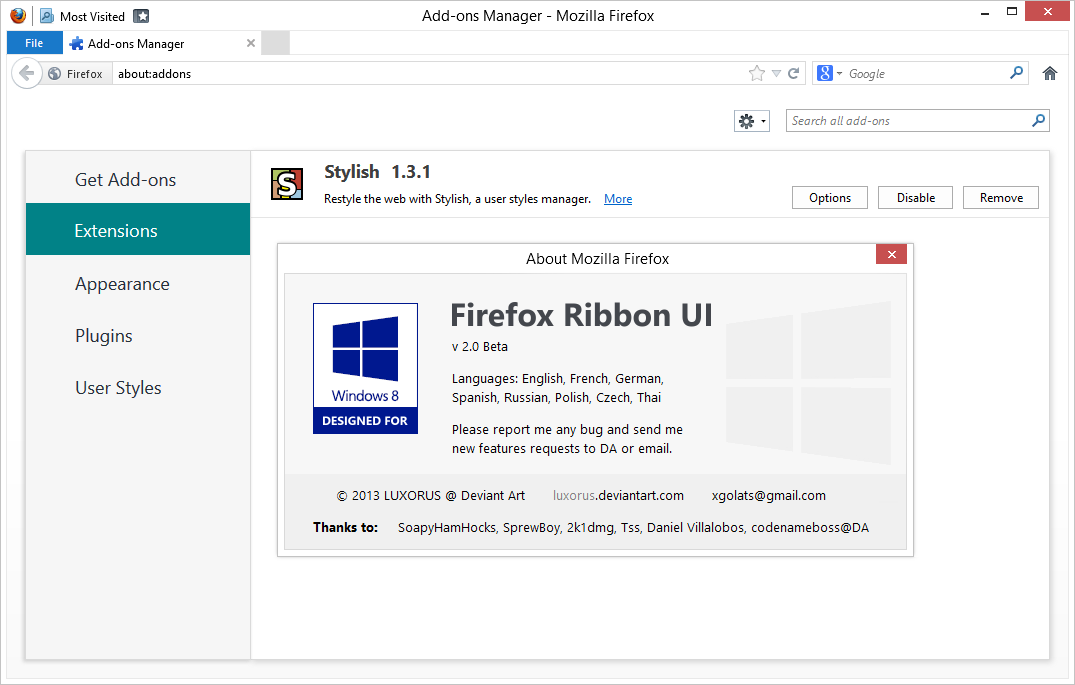
!!ALL VERSIONS sourceforge.net/projects/firer… !!Languages: English, French, German,
Spanish, Russian, Polish, Czech, Thai
Please report me any bug and send me
new features requests to DA or email.
• If you know how to force forward button always visible, please tell me.
• If you could translate it to other languages please send me the translation to comment or email (xgolats(at)gmail.com) Please report me bugs and send me new feature requests.
Changelog:
____________________________________________________
/*version 2.05*/
Cyberfox margin-fix added
Quick access bar fixed (now you can drag there any of these icons:bookmarks, history, new window, copy, paste, cut, print, full screen, sync, magnify, rss channel, Tab Groups) (home button, download button and some plug-ins buttons are buggy)
File button bug in private browsing fixed
Tested on Firefox 25beta, Cyberfox 23 AMD and Intel, Cyberfox 24 AMD
Status-bar background changed to windows default
____________________________________________________
/*version 2.03*/
30thJune margin-fix for Firefox 22.0 or higher
____________________________________________________
/*version 2.02*/
29thMay margin-fix for Firefox 21.0
____________________________________________________
/*version 2.01*/
!!! This version didn't contain theme by mistake. Sorry for that !!!
____________________________________________________
/*version 2.0*/
8thApril margin-fix for firefox 20.0
some minor fixes
new addon-manager
Thai version by codenameboss officially added
colors of "places"(history+bookmarks) changed to white
3rd party plugins removed.
____________________________________________________
/*version 1.5*/
1.5.2 expanded tab min-width to 110px
1.5.1 more languages - added
Easier installation
problem with overwriting "prefs.js" - solved
____________________________________________________
/*version 1.4*/
appmenu-button hover color changed from #3693e3 to #298CE1
appmenu-button font-weight problem in Win8 PRO fixed
color of border changed to semi transparent color
addon Tab Weel Scrool - ADDED
(color of border fit with color of windows) - better solution still finding
urlbar/search bar squared
NAVIGATIONBAR color changed to solid white
color of every border is same rgb (218,218,218)
ugly blue line after navigation bar - DELETED
new page background changed to white
(color of border fit with color of windows)-PLANNED[maybe at next version]
____________________________________________________
/*version 1.3*/
tab bar more like Windows 8 explorer
problem with unusable 4 positions in titlebar - FIXED
problem with titlebar in maximized mode - FIXED
reduced number of addons:
Stratiform 3.0.1 - DELETED
____________________________________________________
/*version 1.2*/
easier installation (only drag files to folder)
file button hover and click effects chenged
private browsing had purple file button
tabbar fixed in maximized mode
userstyle divided to Ribbon UI (RTM, COLOR, URL, TEXT)
reduced number of addons:
Roomy Bookmarks Toolbar 1.3.8 - DELETED
Extra Padding When Maximized 1.0 - DELETED
App Button No Text 1.2 - DELETED
____________________________________________________
/*version 1.1*/
3 languages - added (English, French, Czech)
colors of "Firefox Operalike text-field" - CHANGED
addon Smart location (smart text) 4.7 - ADDED
Thanks to
authors of these add-ons:
Stratiform 3.0.1 addons.mozilla.org/en-us/firef…
Stylish 1.3 addons.mozilla.org/en-US/firef…
Smart location (smart text) 4.7 addons.mozilla.org/cs/firefox/…
and thanks to autors of these userstyles:
Firefox Operalike text-field userstyles.org/styles/59403/fi…
Firefox: Bring the Title Back userstyles.org/styles/41025/fi…
and thanks to Daniel Villalobos, who translated this skin to Spanish an codenameboss (Thai)
Related content












Comments: 124

That's the problem with his installation: it replace your current Userstyle config... If you didn't do backups, your only solution is to redownload and reinstall your previous styles

👍: 0 ⏩: 1

Yea, I thought I had them backed up on another profile. I can probably piece most of what I had back together eventually.
👍: 0 ⏩: 1
I hope you will get back what you want.
👍: 0 ⏩: 1
Thanks, Ive managed to get back most of it

👍: 0 ⏩: 0

I am sorry. The problem is that version 2.01 didn't contain theme by mistake. Sorry for that.
👍: 0 ⏩: 1
No problem, I reinstalled the previous version.
👍: 0 ⏩: 0


never mind i figured it out, awesome skin btw, great job
👍: 0 ⏩: 1
i can't seem to figure out how to get it to work, i put the files in the profile, i see changes and i allow install............ but the title bar doesn't have the icons, how do i get them to show up?
👍: 0 ⏩: 0

Great Addon, but I use my bookmarks toolbar very often. So do you know how to get the old bookmarks bar back ?
👍: 0 ⏩: 1
Go to "about:addons" there find userstyle named "Ribbon UI WINDOW" by ctrl+F find "QUICK ACCESS BAR" write after it "/*" or delete all css values between "QUICK ACCESS BAR" and "NAVIGATIONBAR". It should bring back old bookmarks toolbar. I hope it helps if not please tell me and I will try to help you more. Thank you for your interest.
👍: 0 ⏩: 0

as I may have said before, style the icons !!!
👍: 0 ⏩: 0
To force the forward button :
window:not([chromehidden~=toolbar]) #navigator-toolbox[iconsize=large][mode=icons] > :-moz-any(#nav-bar[currentset*="unified-back-forward-button,urlbar-container"],#nav-bar:not([currentset])) > #unified-back-forward-button > #forward-button > .toolbarbutton-icon {
/*To remove mask from forward button and url bar
mask:none !important;
clip-path:none !important;
*/
}
#winstripe-urlbar-back-button-mask,
#winstripe-keyhole-forward-mask-hover,
#winstripe-keyhole-forward-mask {display:none;}
#urlbar-container {
clip-path:none !important;
}
#forward-button {opacity:1 !important;}
window:not([chromehidden~=toolbar]) #navigator-toolbox[iconsize=large][mode=icons] > :-moz-any(#nav-bar[currentset*="unified-back-forward-button,urlbar-container"],#nav-bar:not([currentset])) > #unified-back-forward-button[forwarddisabled]:not(:hover) + #urlbar-container > #urlbar {
margin-left: 0px !important;
}
👍: 0 ⏩: 0

Great update, i think is perfect just like how it is. Fits great with the Windows 8 GUI!
👍: 0 ⏩: 1

how can I add ff icon, most visited button, etc in left top corner of window?
👍: 0 ⏩: 1
Dear friend, you must right-click anywhere on navigation-bar there check that you have checked bookmark-toolbar visible after that your bookmark toolbar will appears in left top corner you have to pin there some page with Firefox icon. There is picture with this process [link] . I hope it will help if not just tell me I will try to explain it deeper.
👍: 0 ⏩: 1
ok i got this. now tell me how to add history and favorites buttons

👍: 0 ⏩: 1
About favorites button when you will move fav button to navigation toolbar it will disappear from this location, and it will appear on the left top corner. With history would be problem, because you could simply move there any button from button palette to the top but it will do this [link] now I really don't know how to fix it because I don't know what causes it. I am working on it so I hope that it would be fixed in next version but now I don't know what to do with it. I hope it will help if not just tell me
👍: 0 ⏩: 0
No problem with the version 2.0, everything works great, in all window modes.
I just have to change the File button location (I just another VS than the Windows8 default one).
👍: 0 ⏩: 1
there was also a little problem with File button location in firefox 20.0 I didn't expected that there would be problems (I made this version of "FRUi" on versions 18.1 and 19.) but today morning I fix it. It wasn't exactly wrong location of file button but wrong location of #navigator-toolbox(toolbox with toolbar and tabbar) I hope that Mozilla wont release next version with another change that will change margin of #navigator-toolbox anymore because they did it in versions 18+ 19+ and now 20+. Thank you for your interest and have a nice day.
👍: 0 ⏩: 1
I'm currently using PaleMoon 19. But on Windows 8 I always had to move the button, because one thing I did very quickly on my system was to reduce the window borders width (on Vista/7 with Aero, it's smooth, but with the opaque colors of 8, it's too big for me.)
👍: 0 ⏩: 0

Thanks for the code! Made me understand a little more so...
I edited to look like this...
Normal ... [link]
Maximized ... [link]
Codes ... Ribbon UI Window - line 98 edited - border: 1px solid rgba(255,255,255,100) !important;
Ribbon UI Border (transparent) - line 12 edited - border-right: none !important; ... got rid of another blue line thingy when maximized.
After line 21 inserted - border-top: 1px solid rgba(255,255,255,.15)!important; ... so line 22.
The code you gave I edited the color - #main-window[sizemode="maximized"]
#nav-bar{ border: 0px !important;
border-top: 1px solid rgba(255,255,255,100)!important;}
So now the question is how to get the Firefox "File" button and tabs in the title bar. The other theme you have makes the close, minimize, and restore buttons rounded and weird. You obviously have a lot of knowledge with what you are doing, so can you help with that?
👍: 0 ⏩: 0
It works fine when normal, not maximized. [link]
👍: 0 ⏩: 1
Oh, now I see what the problem is. Just copy :
______________________________________________
#main-window[sizemode="maximized"]
#nav-bar{ border: 0px !important;
border-top: 1px solid rgba(218,218,218,100)!important;}
______________________________________________
and paste it to {ribbon ui border (transparent)} wherever you wish and hit the save button.
The problem should be now fixed. If it is not please tell me. and also please let me know if it works or not.
👍: 0 ⏩: 0
When maximized in Firefox 19.0.2 the Ribbon UI BORDER (transparent) turns blue instead of grey. If you can fix that...
👍: 0 ⏩: 1
Dear megazildjian
Please, can you tell me more about it or if you could send me also print-screen of that problem because I have tried last version (1.5.2) with Firefox 19.0.2 and I didn't find blue color anywhere. Thank you in advance
👍: 0 ⏩: 0

Can you make a video tutorial about how to install this? Because, it's quite obviously hard as fuck to do. I can't get it to work, going through all these alien AppData folders.
👍: 0 ⏩: 1
Unfortunately I don't know how to make video tutorial. I will try to do installation easier in next versions. And if i find out how to make video tutorial I promise I will post it here. Until that you could try to download this from [link] . In this download link the archive contains shortcut which will lead you to the alien AppData folders
👍: 0 ⏩: 0


UPDATE:I Have a thai version NOW!
[link]
👍: 0 ⏩: 1
Thank you very much for thai version
👍: 0 ⏩: 0

How to use this theme with firefox 17
👍: 0 ⏩: 1
Just like in other versions. Move everything from your language folder to your profile directory:
C:\Users\
👍: 0 ⏩: 0

Could you do a version with an orange flat button and with the text Firefox instead of file. I think this would keep the firefox personality.
👍: 0 ⏩: 1
dear friend this could be done by you. Paste about:addons to your url bar. Then click to userstyles and find Ribbon UI COLOR click edit and there you can find 6colors (normal, hover, clicked, private browsing, private hover, private click) and you can change it as you wish. Just change hex colors (#some number) to hex color which you want [link] here you can generate any hex color. About word firefox in app-button you have to change Ribbon UI ENGLISH(or SPANISH etc.) open it and on the top you will find word "File" so change it to "Firefox" and change value 9 to 0 in: margin-left: 9px !important;} so that is all. I hope it helps. If you will have any problem just tell me I could also send you code which you will only copy to these files.
👍: 0 ⏩: 1
Wow. Thank you so much. I love it
👍: 0 ⏩: 0
Really good job, I know is the final release but, there is a chance for a edit on the addons manager UI? I think is the only thing left to improve. I know is a minor thing but the perfection is in the little details for me
👍: 0 ⏩: 2
That would be kicking the excellence
👍: 0 ⏩: 0
Yes there is chance but it will take a lot of time I need at least week and half for it.
👍: 0 ⏩: 1
Finally i had a time to make a first version of addons manager UI. I hope you will like it
👍: 0 ⏩: 0

Hi luxorus, just one question, i've instalded the theme and works great(on firefox 17, beta 5), but the uper right buttons(minimize, maximize, close) are still the default firefox buttons. Any sugestions? Thanks
👍: 0 ⏩: 1
Hi dnsadr, there is one simple answer why are uper right buttons(minimize, maximize, close) same as in onther windows aplications. That is becouse this userstyle doesn't redesign those buttons. Buttons which you can see on preview picture are original buttons from windows 8. Unfortunetly I dont know how to redesign uper right buttons by userstyles (for other operating systems then win8) but if you really want I could try it. Also there is another option, you can download some windows 8 inspired theme for your OS, on DeviantArt there is plenty of those themes (for example [link] ) you could find better this is only example [link]
I hope that it helps.
Sebastian
👍: 0 ⏩: 1
Hi luxorus, I understant, thank for you time. Cheers
👍: 0 ⏩: 0
Old or experimental versions you can find here: [link]
👍: 0 ⏩: 0
| Next =>