HOME | DD
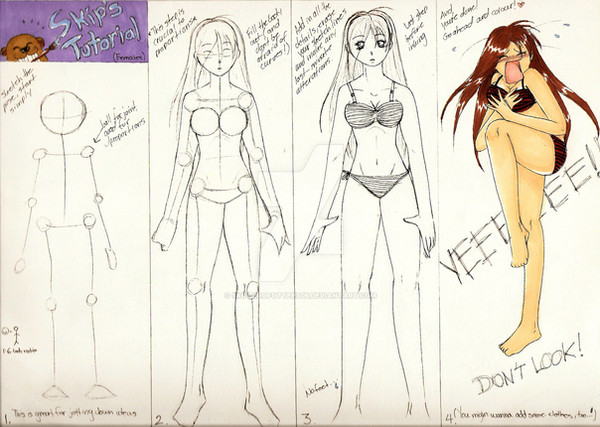
 MLeth — MLeth's Anime Skin Tutorial (2009)
[NSFW]
MLeth — MLeth's Anime Skin Tutorial (2009)
[NSFW]

Published: 2009-03-18 00:49:38 +0000 UTC; Views: 36686; Favourites: 1495; Downloads: 0
Redirect to original
Description
2016 EDIT: You guys should really go look at another tutorial because this one is pretty bad. The way I shade the skin here is so basic and doesn't really follow the anatomical rules at all!2014 EDIT: Okay so at this point this coloring method is really dated and unpractical! That's just a warning from me to you!
2011 EDIT: I've evolved alot since this tutorial and I do much more pronounced body shading, especially on bellies ( : But I still basically color like this. Check out the rest of my gallery!
---
Holy cwap, it's big D:
Wow, my first ever tutorial.. It's pretty hard to explain stuff since I'm not THAT good with english xD But.. I did my best!
I'd like to mention that this is merely one out of very many ways to paint skin. But this is how I do it ^^
I hope you find it recourseful and helpful!
And I hope your browser dont crash when loading the picture xD
The painting:
Mature Content
MLeth's Anime Eye Tutorial: mleth.deviantart.com/art/MLeth…
SELF PROMOTION:
Please do not use, or alter, my work in any way without my permission.
Related content







Comments: 188

You're welcome! However, I wouldn't use this too closely as it's veeery old, haha
👍: 0 ⏩: 0


This is really really helpful, I'll definitely give this a try with my next drawing. Any chance I could talk you into doing one for anime-style hair too?
👍: 0 ⏩: 0

I followed ur tutorial to make this 
👍: 0 ⏩: 1
You did pretty well! Thanks for sharing

👍: 0 ⏩: 1
thank u very much
👍: 0 ⏩: 0

I Love your Tutorials...xD especially the little drawings you do on it x3
So funny x3 I chuckled when I seen the 'Bewbs' and the blood nose one xD
👍: 0 ⏩: 0

Helpful, thanks! I didn't even know that there was a smudge tool and blur tool in photoshop before I found this tutorial!
👍: 0 ⏩: 0


hey Im still using this tutorial for a WIP im doing atm here [link] I've already used the eye tutorial for the picture as you may see not quite as good as yours but getting there. My question is during the rough and soft shading parts of the Tut what was the layer style because I've kept everything on normal style I was gonna do a multiply because it brings out the shades more but Im actually trying to follow this to the T here the shades I've chosen are a slightly darker form of white almost greyish really feels like Im missing something here really any ideas? or should I just choose a darker shade
👍: 0 ⏩: 1
Yeah I never use different layer styles when I shade skin, just darker shades : )
👍: 0 ⏩: 1
hmm intriging to say the least I've always taught myself to use multiply when I cell shade maybe just this wont it hurt to try something new I'm really trying to follow your tutorial
👍: 0 ⏩: 0

I really like your tutorial and it's very helpful, However when I was looking at it my friend came into the room and she said "you pedo! looking at little girls!"
I told her it was a tutorial but she answer with a "Yeah right"
SO if it not too much to ask, for any new tutorial, could you try to make it with less nudity? it just so people can use it in offices or college classroom without feeling uncomfortable.
👍: 0 ⏩: 2
I would've been like would u like me to make a picture of you using this tutorial they would've made them think
👍: 0 ⏩: 1
Well there are plenty of other tutorials out there, with less nudity, by other people : )
👍: 0 ⏩: 1
I know, but yours is simple to understand and explains well the process, I hope it didn't sound like I'm criticising, I just making a suggestion!
👍: 0 ⏩: 1
It's a good suggestion - I don't really know what I was thinking when I made this - All my new tutorials have been kids-friendly (and ignorant co-worker-friendly). Guess it was just because this painting of mine had lots of skin! Hence the "skin tutorial" :'D
👍: 0 ⏩: 0

interesting tutorial and funny also.. nice one..
👍: 0 ⏩: 0


This is the most helpful colouring tutorial I've ever come across!! I've learn a lot. Thank you.
👍: 0 ⏩: 0


Thank you so much for this! I always struggled with PS and coloring skin ¬.¬
👍: 0 ⏩: 0


very educational this one. Always wondered how people created these soft effects. Gotta give it a try sometime
👍: 0 ⏩: 1


So it was you
I saw this ages ago and actually saved it in my pc! hahahah
It's so awkward to finally talk to you after all this time LOL
You've been helping me to improve my noob sense of digital coloring since 2009, Mr. Sweden
👍: 0 ⏩: 1
Omg! Haha, what are the odds..? xD
I'm glad to hear i've been able to help none the less :'D
👍: 0 ⏩: 0

OMG you're awesome thanks for the tutorial is really helpful
👍: 0 ⏩: 1

... I ... I could be crying right now. You've just changed my life forever 8D
The trick you use to make the shading look more dynamic, when you apply the eraser at like 0% ... I have been fucking trying to create that effect for as long as I have been drawing!!!!! Why? Why did I not find this sooner? 
I'm really happy dude, this open so many possibilities for me, you have no idea. I'm gonna stop my current work, use this on my old deviations and finally they will look half decent! OH MY FREAKING GOD IT'S AWESOME!!!!
I love you so much dude.
👍: 0 ⏩: 0

Great TuT.It was really helpful : 3 thank u soooo much *-*
👍: 0 ⏩: 0

You probably are one of the best tutorial makes on here, and this has helped me a lot! Thank you so much for creating this!
👍: 0 ⏩: 0

One of the best skin tutorial I've ever used. Thank you so much, this was really helpfull!
👍: 0 ⏩: 1

Only just found this and this is a god-send! Thanks a ton, Leth. This was a massive help. ^_^
👍: 0 ⏩: 0

All gods of this world bless you for teaching me about the clipping mask!!!
And thank you for sharing your techniques

👍: 0 ⏩: 1

I honestly can't tell you how much this tutorial has helped me. I've always hated coloring skin because i didn't know how to shade it properly, but now I do, thank you so much!
👍: 0 ⏩: 0

Great tutorial!
But you could make some parts different, like a likewise technique in paint or gimp or something. Not everyone is bright enough to get him-/herself PS
👍: 0 ⏩: 1
| Next =>