HOME | DD
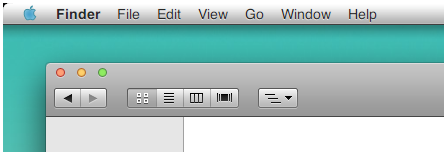
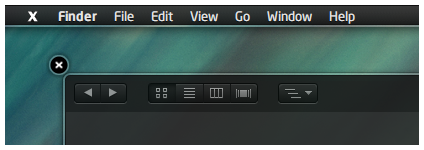
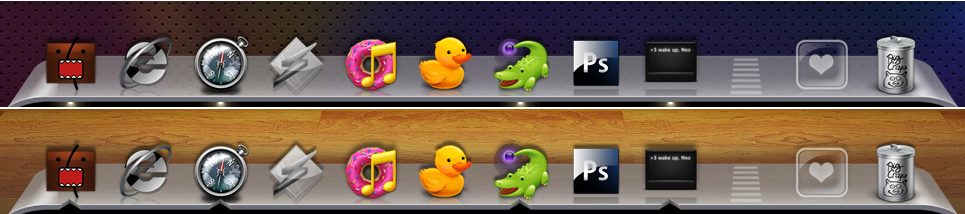
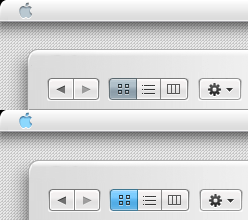
 nardoxic — Plastic Pulse WB
Published: 2011-08-27 20:46:29 +0000 UTC; Views: 16043; Favourites: 81; Downloads: 3817
Redirect to original
Description
credits to ~neodesktop , ~Delta909Styler TB, ObjectBar and fonts included
Related content













Comments: 56


Oh cool, i've knocked up one, but i wait yours with impatience!!
👍: 0 ⏩: 0


Come on Nardo, try to make .msstyles for W7!!
👍: 0 ⏩: 1
Really? cool!
I wish for a Plastic Pulse port!!

👍: 0 ⏩: 0

Hey man i also tried this VS on WinXP 'cause on 7 there are still some bugs (read below).. Why cant i see Plastic Pulse's Close,Max,Min frames on XP? I only saw a "X","-","+" ..like "mmnl" VS, not the colored frames ):
Well, i spent one day to test thiz theme on Win7, Im going to report you what bugs i saw:
1) There is no titlebar on Win7's windows (fixable by using AeroBar.exe tool)
2) The text of Start Menu's Search Box sometimes is uncentered and the round "X" button if you type something inside the box (also in a window) is bugged
3) The taskbar clock override the search icon at the end of itself
4) The "Show hide icons" button is uncentered and (maybe) this cause a problem to the taskbar.. each reboot it become bigger because that button is going below the clock
5) Many applications are bugged if you are using the theme, you can fix it (not always) by adding an exception for those. For softwares like firefox its a problem caused by them's Windows 7 skin that is 'particular'
6) (Optional, but very very cool) In Windows 7, the Styler Toolbar doesnt work and we cant have your styler's buttons ): If you can, please add them (only the pictures) next the explorerframe (back n next arrows) and hide or resize the navigation bar and place it near them, it would be great i think!
Mate, if you can fix it on Win7 it will be the most perfect simulation of an OSX for Win7!!

👍: 0 ⏩: 1

1) No Title on Win7 Explorer window coz its Win7
2) screen pls
3) screen again please.. is this for win7 windowblinds?
4) screen pls
5) screen again pls
6) i dont know how to export them to explorerframe.. what should i use
👍: 0 ⏩: 1
The first point anyway it has already fixed by AeroBar.exe
About the bad lens image (only the lens) that you will see its not a bug, if i restore the original explorerframe.dll that image will become okay but the cross will remain bugged..
About your Styler Toolbar buttons, in Win7 Style Builder many users did a thing like that by editing the AddressBand inside the .msstyle, but i dont know how do to that in WB ): I tried to edit "aero.msstyle" but i've only removed the organizebar, i tried to add those buttons but the VS became bugged and still without them..
Date/Time Bug: [link]
Big Taskbar Bug: [link]
StartMenu Searchbox Bug (1): [link]
StartMenu Searchbox Bug (2): [link]
Window Searchbox Bug: [link]
Firefox Bug: [link] (dont spend time to fix this one, the reason is the Win7 skin of FF)
👍: 0 ⏩: 1
thanks man.. k about the explorerframe ill look into that using VSB
and ill try to install this theme to my w7
👍: 0 ⏩: 2
yeah, and when you will use vsb: do it in a vs( msstyles)

👍: 0 ⏩: 1

perfect!! thanks a lot my friend
👍: 0 ⏩: 0

First of all: I really love the theme, especially on the picture! Second, I'm having some troubles and I ask here since you seem to know WindowBlinds well.
1. The titles in my Firefox theme (Foxdie) turns white: [link]
2. My explorer window does not look like yours, I have marked my errors. [link]
The navigation pane is white and have no border, in yours it's grey and have a border. The bottom thing shouldn't be there. And I get no fake adress bar like you. I'm not saying the error is yours, I'm saying I don't know what I've done wrong 
👍: 0 ⏩: 1
I have solved the Firefox issue by choosing making WindowBlinds avoid skinning it, and I changed to original shell32.exe and it made my Explorer window look like this: [link]
The upper red-marked area looks awful as it is not skinned, is there anyway to remove this bar? Not to show it at all I mean (I use Win7).
And the left panel is still white, thanks in advance!
👍: 0 ⏩: 1
first of all .. i never tested this for windows7. and im using Findexer for my left pane
👍: 0 ⏩: 1
Thank you. FindeXer doesn't seem to work on Windows7, shame, great theme!
👍: 0 ⏩: 0


Glad that you released this one! (:
Man have you fixed those problems on Win7?
👍: 0 ⏩: 1


like I wrote on g+ awesome theme 
but still the buggy startmenu in win7 :/
👍: 0 ⏩: 2
| Next =>