HOME | DD
 NomNuggetNom — Taskbar Launch
Published: 2011-05-27 18:57:30 +0000 UTC; Views: 103578; Favourites: 282; Downloads: 16264
Redirect to original
Description
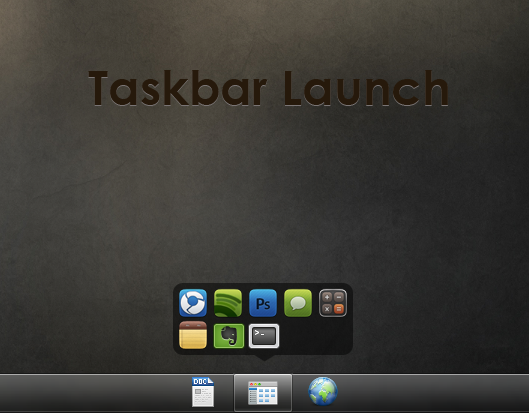
DOWNLOAD HEREMy fourth rainmeter skin! Yet another launcher

The idea of this launcher was to fit in with the taskbar. It was designed specifically for the Windows 7 theme Dream, found here: giannisgx89.deviantart.com/art…
I highly suggest getting it, otherwise the active button won't look as good.
It supports up to 10 icons per "tab", and can be customized by middle-clicking on the launcher. Or, navigate to your Rainmeter Skins folder, and find the "Taskbar Launch" folder. Open it and edit Variables.txt.
I will take requests to make adjustments in order to make the theme look better if you don't have the custom visual style. Just post, and tell me your theme.
I hope you all enjoy it! Feel free to ask questions and leave comments

:thumb170008962:
Related content


Comments: 63

👍: 0 ⏩: 1

👍: 0 ⏩: 0

👍: 0 ⏩: 0

Hi. Very good. I know it hasn't updated for long time, but if anyone see it, can we
1 add more icons, eg 30
2 show also filename
3 by pressing anywhere in screen to close the folder.
Thanks.
I will watch if anyone can program it.
👍: 0 ⏩: 0

Don't know if it'll fit on my win10 with startisback, cuz it's completely transparent.
Could you tweak it for transparency? Like just a minimal white icon with a red dot indicator or something.
👍: 0 ⏩: 0


how do u fade out after selecting the shortcut.
Don't want to do another clicking just to close the skin.
👍: 0 ⏩: 0

Great launcher, I'm just having a little trouble changing the icons. Any assistance you could give would be helpful.
👍: 0 ⏩: 0

Sorry for stupid question: How i can put it to taskbar?
👍: 0 ⏩: 1

You have to set it as "always on top". I haven't used Rainmeter in a long time, so I don't remember exactly, sorry
👍: 0 ⏩: 1
Thanks, that's helpful!
👍: 0 ⏩: 0


That's a really good Taskbar Launch, but only usable for a big taskbar. As I and also others are asking for a small icon version for a small taskbar would be perfect.
👍: 0 ⏩: 1
Someone could easily make it themselves
👍: 0 ⏩: 0


I cant get the links to do anything from the internet button.
👍: 0 ⏩: 1
Try this for exmaple: [link]
👍: 0 ⏩: 1
Or this (without the *'s) http*://*www*.deviantart*.*com/
👍: 0 ⏩: 0

Interesting... I'm using small icons, so I will need to customize it. I'll take a look, but i'm novice.
It can be good to add a mouseover on the program's icons

👍: 0 ⏩: 1
Yeah, sorry. Never really got around to making a small-icon version.
👍: 0 ⏩: 0


Looks nice, but I have two main problems with it. One is more an annoyance that bothers me but probably noone else (Hell, I might be doing something wrong for all I know) and that is that the taskbar jumps ontop for a moment before the icons jump back up.
Secondly, it's only sized for the large (standard) version of the taskbar, whereas I prefer the small one. Would be nice with one that fits the small taskbar, might help me ignore the other issue, because all in all it looks rather useful to have.
👍: 0 ⏩: 1
Right click the skin, go to Settings > Position > and check "Stay topmost"
👍: 0 ⏩: 0


RT @azeez4u: how did you align task bar icons in center?
👍: 0 ⏩: 0

I don't know what you mean. In the center of my taskbar? Just drag it all the way down.
👍: 0 ⏩: 0


don't work 
👍: 0 ⏩: 1
I couldn't find "click.png" in this skin folder. Is it needed?
👍: 0 ⏩: 1
I just downloaded the lastest version of Rainmeter and everything's ok now
Thanks a lot!

👍: 0 ⏩: 1
| Next =>