HOME | DD
 Offering — Watercolour Action
Published: 2005-02-23 02:13:04 +0000 UTC; Views: 32889; Favourites: 45; Downloads: 12376
Redirect to original
Description
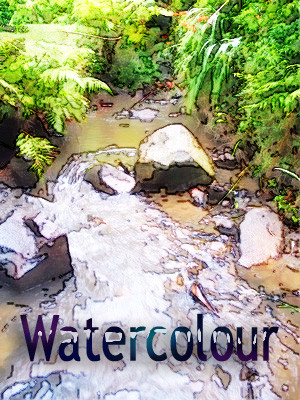
a PS action that will turn an image into something resembling a pen and ink watercolour.this was created in PS CS using a PC, i hope it works with early versions of PS.
the image in the preview is from my alter-ego, over at stocktake .
Related content



Comments: 17


thank you!
and thanks for the favourite as well, it's appreciated.
👍: 0 ⏩: 0

hey thanks this is great. i tried it out on a few images and the effect is very nice. i do have to hit "OK" on a number of settings (the settings for the poster edges filter for example) before seeing the final result. is that normal, or can it be set up so it all works without having to hit "OK" over and over? either way, it works great, and thanks for sharing this.
👍: 0 ⏩: 1
if you have the actions panel open (windows > actions), then click the triangle to the left of the action's name, then each of the sequential processes involved in the action should be listed .. and which probably all have ticks next to them down the left side of the panel. clicking the ticks hides them and stops their associated dialogue boxes from opening, and the action should just run straight through without asking you to okay each one each time. however, you might like to keep some of the processes ticked, as it gives you more control over how you want your final image to look.
thanks for the comment, it's appreciated ..
👍: 0 ⏩: 1
oh, great. i always wondered what those ticks were for. i'll try it!
👍: 0 ⏩: 0


This is great -- thank you! Better than a commercial version I just paid too much $ for!

👍: 0 ⏩: 1
thank you!
i don't get too much feedback on the Actions .. pleased to hear it works ..
👍: 0 ⏩: 0


I downloaded this..i can't wait to try it. you're tutorials are the best. i still need to explore the earlier ones more. IT'S EXPERIMENT TIME!!!!!!!!!!!!!!!!
👍: 0 ⏩: 1

Is it a filter? Do I download and add to "filters" or "plug-ins" or something? Looks groovy, and you KNOW I can't resist an OFFERING from you.

👍: 0 ⏩: 1
no, it's an action.
in PS, fire up the actions palette, click the triangle thing at the top, select 'load actions', navigate to wherever you saved the 'watercolour.atn' to, double click it. it will then load up inside PS, and be there for all eternity (unless you decide to nuke it). tthen load up an image, and single click the recently added action, run it by prerssing the triangle on the lowest edge of the box, then sit back, make a cuppa, and watch while PS does its magic.
to make it even more watercoloury, you could add a slight texture, and maybe add a feathered white border ..
weird, i uploaded it, and it isn't appearing at all on my site, and nor are my two most recent favourites.. must be why DA has been lapsing into maintenance mode all day.
👍: 0 ⏩: 0