HOME | DD
 phraught — Quick Test...
[NSFW]
phraught — Quick Test...
[NSFW]
Published: 2018-09-21 18:10:32 +0000 UTC; Views: 775; Favourites: 2; Downloads: 0
Redirect to original
Description
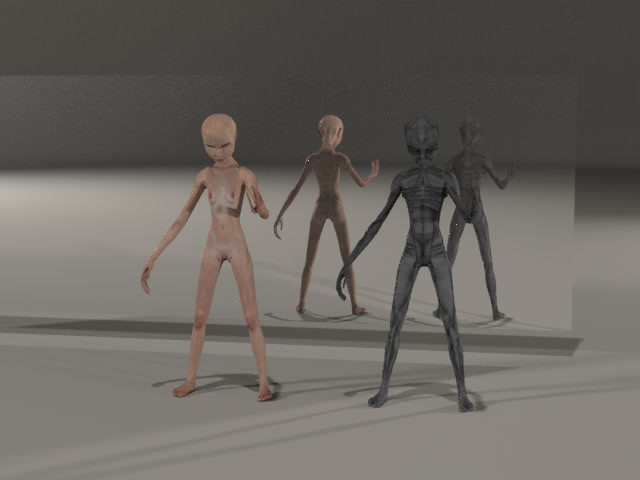
Animation: 5 secsI've already posted something similar - but this is with a reworking and using the updated Evo (by ) that now includes: breathing!
This is all OBJ based, I have 14 target poses for each figure to allow me to animate them during the transformation process. Coming along!
Related content





Comments: 9

Nice! I have no idea what you mean but this being OBJ based though... I mean, isn't all of the stuff in Poser based on OBJ files?
👍: 0 ⏩: 1

Hey Molly - thanks. The OBJ file format is really just a collection of vertices (x,y,z) and faces (3 or more vertices) - plus options for normals, textures etc. There is no concept of "bones" or posing - you can change the scale in any axis or rotate, but no "bend the forearm", etc.
But you can add a morph target to to such an object. Basically another version of the same OBJ, but with the vertices in a different location. That creates dial that chooses where the vertices are: the original location, or the new morph target location or somewhere in between.
So - I posed both the alien (Grey) and the human (Evo) in the various poses I wanted (see my note to above). I then had to make "cross" versions of these - so, much like I did with the Krotons, I created versions of both Grey and Evo that were matched up - scaling one up, making the Evo fingers long and thin and lined up along with the two that Grey has, etc. Looks weird, but then I create OBJs for each.
I then run a python script I wrote to match them up - for each vertex in Evo (62,000+) I find the closest vertex in the Grey OBJ (66,000+) and create a translation table. I do the same for Grey to Evo. Then I process each of the 14 poses (plus the original) through another script that writes out the new file with each of Grey's vertices in the position they would be in in the Evo object, and vice versa.
I may post the match objects later.
It does make for a fair bit of complication, but I think if I take it a bit at a time it should go quickly.
The animation above uses just the original pose for each, plus pose 4, head down looking at the hand. It's a matter of managing some amount of each pose from both Grey and Evo depending on how far along the process things are. This lets me do a pretty smooth transition as well as some movement during the process - some breathing and eye blinks.
We'll see.
👍: 0 ⏩: 0

I does luv me some lightweight morph-free OBJs. They're the computer equivalent of PETA!
But 14 target poses!!! 
Fascinating as always! As you say rightly "Coming along!" . It's strange how my mind continues to see the grey one as alien even after the transformation.
(plus I had a look at "Evo", I'd never heard of her before, very interesting indeed!)
👍: 0 ⏩: 1
Populists for the Extreme Treatment of Aliens?
So - I'll give more of my explanation below for Molly, but I generated a base pose for each - the beginning post for the alien (Grey) and the final pose for the human (Evo). I then posed the figures and exported OBJ files for each pose - and for two of the 4 poses, I included eye closed/open and inhale/exhale - so four exports for each of those poses (e.g. Evo-pose2-ci.obj, Evo-pose2-ox.obj). These all become morph targets, but because morph targets have to have the same number of vertices as the base object, I have to run them through my custom process to put the Grey vertices in the Evo location (Grey2Evo-pose4-cx.obj) using, well, a bit more of that technical jiggery-pokery.
So far so good - the alien's upper arms are flattened along the sides, due to an artifact of the process, but no matter because the human looks fine for most of the process and I'll be switching to that one then.
In fact, there will be 28 obj files for each. For the Grey to move about during the transform, he'll need about 65% of which ever pose "Grey", and 35% of the Grey2Evo - same thing for Evo - though I don't really have to animate both of them except around the transition between the two which is currently looking like about 10 frames.
Keeps me busy - and away from the things I need to be doing.
👍: 0 ⏩: 1
Just read your answer to Molly, ..... I need a sit down!
But we're nearly on the same page, it's the PoS morph targets that are foreign to me (I understand them but have never used them).
I tend to use the "almost universal" MDD files ("Motion Designer Document"??? I forget, I'm old) for animating OBJs, especially for applying dynamic cloth which, by your explanation, = Morph Targets
But for me, a simple V4>OBJ, 90 frames = 75MB file (so that would be 2.5GB for your 28 OBJs..... Maybe your way's more gooder!)
As always, lovely to see a master at work!
👍: 0 ⏩: 2
So far as being a "master" - I shall defer to Jonathan Swift's introduction in Gulliver's Travels. Seems to fit.

👍: 0 ⏩: 0
You know - MDD files might be what I need for another aspect of this... PoSer has the ability to export something like that... but I'm not so sure about importing. I need to look into that.
For now - the transition animation will be the manipulating of some portion of those 28 dials for each figure.
What could go wrong?
👍: 0 ⏩: 0
