HOME | DD
 Pikadude31451 — MMD Physics Tutorial (In MMD)
by-nc-nd
Pikadude31451 — MMD Physics Tutorial (In MMD)
by-nc-nd
Published: 2012-04-22 02:55:21 +0000 UTC; Views: 36039; Favourites: 352; Downloads: 1270
Redirect to original
Description
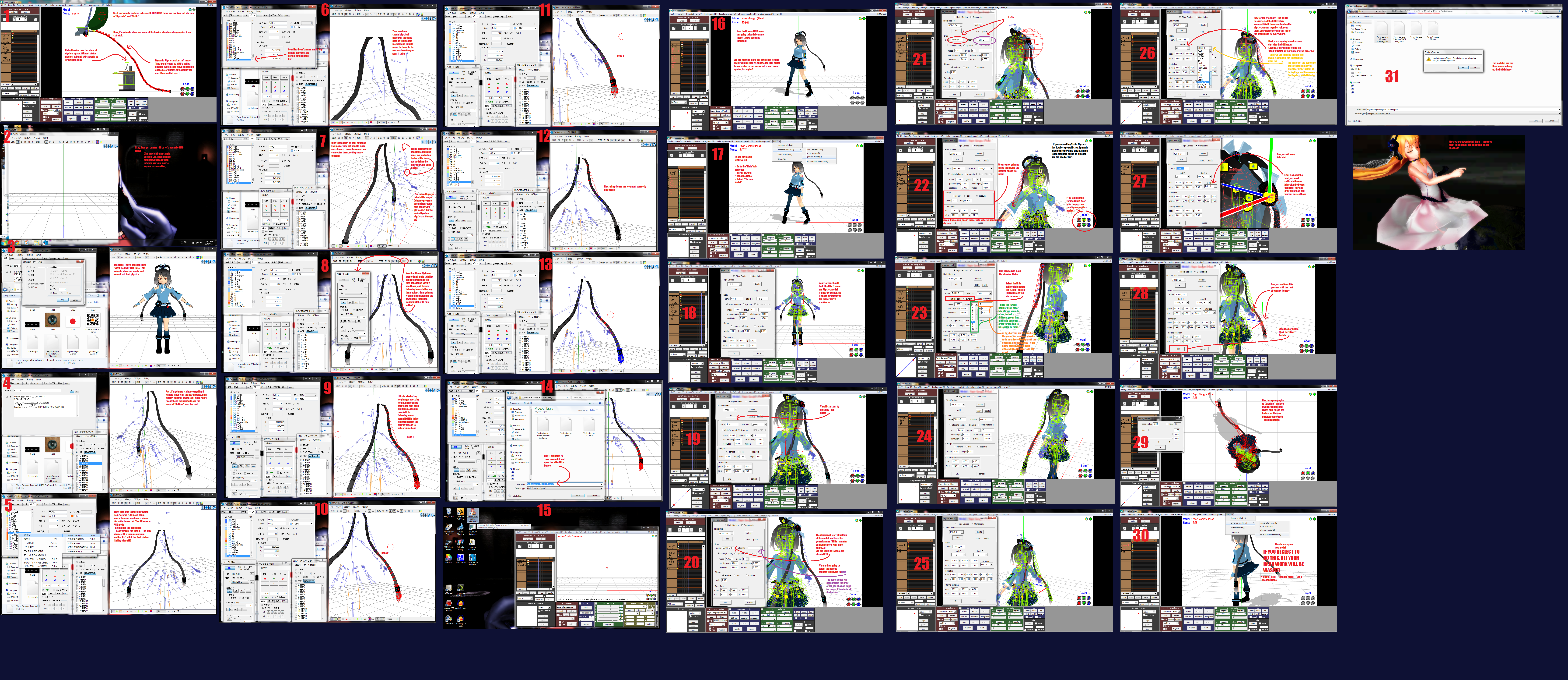
I wanted to make a tutorial of everyone's best friend - Physics~(Click twice to zoom in, but it is huge, so it has to load)
If I didn't explain something correctly, or you need help, don't be afraid to ask or note me~
also. lots of typos. sorry about that. I hope everything is still clear
Yayin - Pikadude Edit
Kirby - Pikadude original
Computer Desk - Jomo
Sweet Ann - Saboten
Related content


Comments: 109

No - it's easy! You just apply the physics to the bone that Animasa put on the sleeves. (Make the joint connect to the forearm)
👍: 0 ⏩: 1

Alright! Thanks! ^^
👍: 0 ⏩: 0

Hello 

👍: 0 ⏩: 1
Oh, it's not MMd's Fault, per se - MMD can't edit PMX. However, i'm thinking about making a new tutorial for physics, mainly because this tutorial doesn't even touch Joints, which are important.
👍: 0 ⏩: 1
owo that is a really sad new xD!!!, anyway, Im going to wait to your new physics tutorial
👍: 0 ⏩: 0

Awesome tutorial,thanks alot!
👍: 0 ⏩: 0

the best physics tutorial ive ever looked at- ;v ;
👍: 0 ⏩: 0

I am having a problem with physics and I have no idea what is causing it. When I put my model into mmd, the skirt works fine, but for some reason, the whole lower half of the shirt is just happily jiggling around with the skirt physics? Why is this happening? Is there any way to tell the skirt physics to just leave her shirt alone? T_T
model: link
👍: 0 ⏩: 1
nevermind, I fixed it. It was some convoluted weighting issue that even I don't fully understand. If you don't have all your weights set just right, it really messes with physics.
👍: 0 ⏩: 0

oh my gosh this one actually helped learn how to make physics without making me cry out of fustraction..... THANK YOU
👍: 0 ⏩: 0

omg thanks a lot for this, I was searching how to made bone and phisics everywhere, thanks a lot
👍: 0 ⏩: 0

Awesome and very helpful tutorial! thank you very much

👍: 0 ⏩: 0

I have english version, after i click the bones tab what do i click?
👍: 0 ⏩: 1
YOu right Click the Bones list, and make a new bone~
👍: 0 ⏩: 1


But I did add joints after making the physical bodies and the mesh like sunk to the ground OAO
👍: 0 ⏩: 1
Did you remember to connect the Static Joint to the bone, and the Dynamic physic to the Static physic?
👍: 0 ⏩: 1
Um... Bone to Static to DYnamic... Are you 100% sure? Because this sounds like joints not corrected correctlly. Just make sure and if it still doesn't work, if you trust me, you can send it to me and i'll take a look at it
👍: 0 ⏩: 0

quick question i loaded a model but the enhance model feature is grayed out and I can't click it. Any idea why its doing that?
👍: 0 ⏩: 1
Is it PMX? You'll have to conver it to PMD in order to edit it in MMD.
👍: 0 ⏩: 1
oh ok now it works @_@ thanks, btw is there a rigid tab in pmx editor or something??? If i recall changing from pmd to pmx screws with the legs or something
👍: 0 ⏩: 1
Yes, you can edit physics in PMX editor, also. Converting to PMX doesn't always mess up the legs, but just in case, [link]
👍: 0 ⏩: 0

well i tryed and i it work bur it just stays there, like i will bon around when i move it but not the way i want it to. i want it to move not just jiggle in place
👍: 0 ⏩: 1
Have you tried playing with the coordinates of the joints? they weren't really explained in this tutorial, but I can try. DO you see the other tab I opened starting on panel 25? Well, those are the coordinates. Do you see the section of the tab called "Limitaions"? That's where you put the coordinates. It helps to open up a model that has similar physics to the the model you are making, and looking at the way they do joints, Because it can be hard to explain and is easier to learn by examine others.
👍: 0 ⏩: 2
thats it worked prefictly XD
👍: 0 ⏩: 0
thanks ill try
👍: 0 ⏩: 0

so, what if i want to have physics behave in different ways? i currently have a model i'm working on and the physics in his hair, (the back mostly) and it's ok for motions where there's not a lot of fast or bouncy movement. but there's few motions like that obviously and so when i load a motion like that, the hair bounces around like crazy and stretches flips and does other weird stuff which does the mesh no service at all. it would be best described as behaving like boob physics. i don't want it to be so stiff that it tends to stay still like babi's namine ritsu's hair. i just don't want it to stretch or flip around mostly. i've been playing around with them for ages now and haven't gotten any results. i assume there's a way to do it because i've seen physics behave quite differently even after i've fixed any problems that made it spazz out.
👍: 0 ⏩: 1
I have a few theories. One is The Static head physic. Is the Dynamic Body crashing with the Head physic? If it starts inside of the head physic, the Body assumes that is the defalt position, and will try to go back, resulting is a Spastic body. Make sure that the Head physic isn't crashing with anythin. Another theory I lies in the Joints co-ordinates. What are they like? I didn't touch the joints in this Tutorial. If you want, you can send the model to me, and i'll take a quick look at it. I don't need textures and stuff. Just the PMD is fine
👍: 0 ⏩: 1
the physics on the model at first had a major collision problem, they were way to big and too close together but i fixed that problem by bringing the size down. when the model's being still but physics are turned on it's fine, it's mostly bouncing type motions. as for the joints, they looked normal to me but i'll send you it for a second opinion.
👍: 0 ⏩: 0

They won't move with the model, either.
👍: 0 ⏩: 0
Hi, maybe you can help me.
I have a problem with some wings. Upon activating the physics, the bones disappear. Any idea what's going wrong?
👍: 0 ⏩: 1
When the bones dissapear, that means it worked! You just have to mess around with the joints to make them move more. But it's not following your model? hmm, did you remember to make the First Dynamic wing joint follow the back Static Physic? And is the Back Static following the Upperbody bone? (I'm assuming it is the back)
👍: 0 ⏩: 3
I am stupid...SO FREAKING STUPID!!! THEY WERE DYNAMIC WHEN THEY WERE SUPPOSED TO BE STATIC! I swear this always happens, I ask a question and find out the answer like 2 minuets later. It's annoying...
👍: 0 ⏩: 1
No problem - How did they come out?
👍: 0 ⏩: 0
Oh, and they follow the neck bone.
👍: 0 ⏩: 1
You're trying to make wiggle Physics? Your a trooper, for your beginning projects. To do Wiggle physics, YOu need two separate bones. The original bone, and a new bone. You need to and the physics to each new bone. So, instead of weighing the vertices to the original bone, you are going to have o weigh all the vertices to the new bones, and make the new bones follow each old bones in the respective place. Then, you'll need to add a Static physic to each bones you want to preserve. Then, one all the original bones have a static body, you'll need to add a dynamic body to each new bone. when you do that, the joints will have to follow each individual bone with a static body. YOu should also make the joints "-20, 20:-20, 20:-20, 20", or something like that.
👍: 0 ⏩: 1
Suggestions for a hood?
👍: 0 ⏩: 1
Suggestions for a hood? Like, the part, of what kind of physics?
👍: 0 ⏩: 1
I'm trying to find out how to apply physics to a model's hood so it reacts to the other parts like a real hood would. "Should I put the bones at the base or the top?", questions like that.
👍: 0 ⏩: 1
Maybe you should add 2-3 bones, and bone the whole hood. Kinda like hair, but a hood.
👍: 0 ⏩: 1
IT WORKED! My first successful model edit! Now I just need to import some facials cause' I deleted them all by accident...

👍: 0 ⏩: 1
Good job!! The first model I made didn't even have physics. You know how to make facials, right?
👍: 0 ⏩: 1
Well, no.
The model's thumbnail was spazzing, so I deleted the thumbnails. And in doing so, I somehow deleted all 66 preset facials. I could look up some tutorials and try to do them manually, but if I can somehow import the facials from another model(or replace a model that has them w/ the one without) it would be much easier and yield much better results.
Problem is I can't do that either.
👍: 0 ⏩: 0
I think they're all dynamic. They have bones running along them so they'll move, like teto's wings.
👍: 0 ⏩: 0


Ugh! when i do it again again it goes to the floor
👍: 0 ⏩: 1
Did you remember to use the joints? the most important joint is the joint connecting the Static body joint to the Dynamic moving joint.
👍: 0 ⏩: 1
| Next =>