HOME | DD
 PkGam — 23 Basic GIMP Brushes For FREE!
by
PkGam — 23 Basic GIMP Brushes For FREE!
by
Published: 2010-10-03 07:32:16 +0000 UTC; Views: 6920; Favourites: 20; Downloads: 1698
Redirect to original
Description
Update: I moved this to my scraps because these will pretty much be replaced by a much better and more balanced brush set soon.Another Update: They have been created! Go to my "resources" gallery folder to get them.
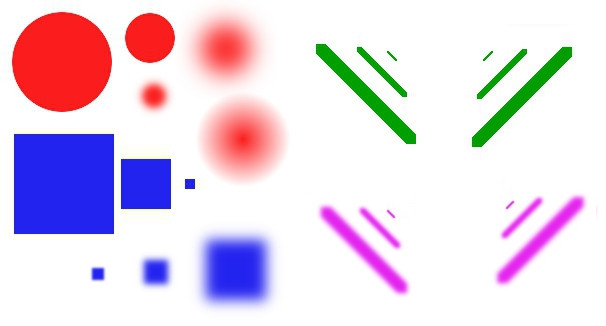
(You MUST download these. The image above is just a preview of what the brushes look like.)
This basic brush pack has brushes of varying sizes and styles which includes:
6 Diagonal Brushes
6 Fuzzy Diagonal Brushes
3 Square Brushes
3 Fuzzy Square Brushes
2 Larger Circle Brushes
3 Larger Fuzzy Circle Brushes
How to use:
You want to drag and drop (or copy) the brushes into your GIMP program folder titled "Brushes".
While directories and drives on each computer can vary, the
typical path is:
Computer > C: > Program Files (Possibly a "x##" extension) > GIMP 2.0 > Share > gimp > 2.0 > Brushes
Enjoy!
-PkGam
Related content










Comments: 36

These are pretty neat. Thanks for the brushes!
👍: 0 ⏩: 1

Thank you so much for posting this. I have deleted the basic brushes and the only one left was the big one. So glad that you uploaded this.

👍: 0 ⏩: 1

Back to the basics - I love it!
Really helpful, thanks.


👍: 0 ⏩: 1

Pretty cool! I use a mix of Adobe Photoshop Cs5 and paint.NET, so I can't use these. =/ However, you still did an amazing job!
👍: 0 ⏩: 1

Thanks!
I don't think you'll need these with those programs actually as I'm pretty sure these kinds of brushes are built in, ha ha!
👍: 0 ⏩: 0

Hey, for some reason the brushes, at least the two big round fuzzy brushes are black. Is there a way to change it? I've never had this problem with brushes before.
Thanks
👍: 0 ⏩: 2
I posted that issue in the description. You have to change the foreground and background color to the same one then tick the "use color from gradient box" to get color on them. I made these in GIMP, but for some reason GIMP does not create the file format that would allow the brushes to change colors like others. I'm looking for a solution to that so I can update these brushes so they'll be more convenient to use.
it's probably something simple like a file conversion program.
👍: 0 ⏩: 0
sorry I sent it twice, ha
👍: 0 ⏩: 1
Update: I learned how to make the brushes change color like a normal brush. So, you can re-download them and replace the ones you have already.
👍: 0 ⏩: 0
These are just what I'm looking for, except they are always black. I've downloaded brushes before any I've always been able to change the color, but at least the two round fuzzy brushes are always black for me.
Is there a way to change it?
Thanks
👍: 0 ⏩: 1
Update: I learned how to make the brushes change color like a normal brush. So, you can re-download them and replace the ones you have already.
👍: 0 ⏩: 0

Thank you so much! I accidentally deleted all of my original GIMP brushes and this was very helpful!
👍: 0 ⏩: 1
You're welcome.
You know that you can get all your old brushes back by downloading another copy of GIMP right?
👍: 0 ⏩: 1
I know now. Thank you for your time.
👍: 0 ⏩: 2
Update: I learned how to make the brushes change color like a normal brush. So, you can re-download them and replace the ones you have already.
👍: 0 ⏩: 1
Much thanks for the update. The colour-change is very convenient.
👍: 0 ⏩: 1
You're welcome. Glad you like them.
👍: 0 ⏩: 0

omg I'm always thinking the EXACT same thing when working with gimp!!! no squares, the round brushes not large enough... THANKS! 

👍: 0 ⏩: 2
Update: I learned how to make the brushes change color like a normal brush. So, you can re-download them and replace the ones you have already.
👍: 0 ⏩: 0
Ha ha! you're welcome! I'm glad I could help!
👍: 0 ⏩: 0

im sorry for being a noob but... um., how do i add these to gimp?
👍: 0 ⏩: 1
It varies depending on where your folders are or what drive you are using.
But, the default directory is usually:
(My) Computer > C: (Your drive letter may vary) > Program Files (Mine has x86 added after it) > GIMP -2.0 > Share > gimp > 2.0 > Brushes.
In other words, you put them in GIMP's brushes folder.
👍: 0 ⏩: 1
Update: I learned how to make the brushes change color like a normal brush. So, you can re-download them and replace the ones you have already.
👍: 0 ⏩: 0

I love these (they're really useful) but I can't seem to get the colour to change.
I can change the colour on another brush, but even when I change to, say, a square, although the colour in the patch stays the same, it still paints/draws black.

👍: 0 ⏩: 3
Update: I learned how to make the brushes change color like a normal brush. So, you can re-download them and replace the ones you have already.
👍: 0 ⏩: 0
Thanks! I'm glad you like them.
Yeah, that is a issue that I had to explain in the description myself.
I couldn't make the color changing brushes that I was hoping for because strangely GIMP doesn't make the file type that allows for them to change with the foreground color... So, I had to improvise a solution.
The trick is to change the foreground and background color to the same color (copying and pasting color codes help immenseley), then in the brush box (where you can change the size, opasity, etc.), check the "use color from gradient" box and select the FG to BG gradient. It'll properly color the brushes.
👍: 0 ⏩: 0
Sorry, just read the bottom and I get it now.
👍: 0 ⏩: 0

Oh gosh, tyvm. I'm so tired of having to make my own brushes because Gimp doesn't have basic shapes.
👍: 0 ⏩: 2
Update: I learned how to make the brushes change color like a normal brush. So, you can re-download them and replace the ones you have already.
👍: 0 ⏩: 0
You're welcome. That's exactly how I felt about their basic brush selection.
👍: 0 ⏩: 0