HOME | DD
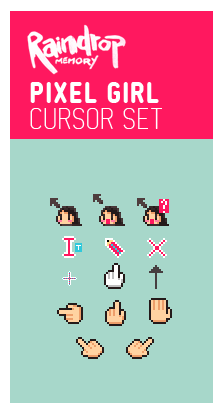
 Raindropmemory — PIXEL GIRL Cursor Set
by-nc-nd
Raindropmemory — PIXEL GIRL Cursor Set
by-nc-nd
Published: 2010-04-13 06:03:58 +0000 UTC; Views: 94611; Favourites: 708; Downloads: 17307
Redirect to original
Description
Hello~! Long time no see.This is cursor I create a while ago, some icon is not pixel perfect though.
Have fun!

HOW TO INSTALL:
1) Download it
2) Extract the file
3) Inside the extracted folder, you'll see several cursor files, but there is a TEXT file named 'Install' Right click on it, and choose 'install' at the popup menu.
4) Then go to 'Mouse pointer' section in Control Panel, there you'll see the drop down box for you to choose this cursor.
That's all!
Related content













Comments: 190


with this cursor set, you just light up our laptop/pc lives!
Thanks a lot!

👍: 0 ⏩: 0

waaaaaaa it's so unique ....
thanks ... i like it very much
👍: 0 ⏩: 0

Hi, i have some problems installing th cursor. Not only th cursor did not appear, but th customized icons are now changed to some random icon that cannot be seen. How do i revert this??????? Please help!
👍: 0 ⏩: 1

I need to know before analyze, What method did you use to install this cursor set?
👍: 0 ⏩: 0


Works perfectly. 
👍: 0 ⏩: 0

I love this cursors, it changes the classics windows cursors !
👍: 0 ⏩: 0


I installed it and it didnt worked

👍: 0 ⏩: 1
Hmm...Which method did you use?
👍: 0 ⏩: 1
I got it to work now! Haha. I just forgot to go to Control Panel and change the cursor properties and stuff. 
👍: 0 ⏩: 0

Awwwwwww this is way too cute.
Can I use it for my tumblr pleasee ;D
👍: 0 ⏩: 0

I love these cursors!!!!!
👍: 0 ⏩: 0

I love the cursor but I right clicked the install thing and I can't find the install button. Im really new to this >v<
👍: 0 ⏩: 0

these are so cute! i love them. but i wonder why my laptop keeps deleting them when i startup.
👍: 0 ⏩: 0


I'm so in love with this cursor! I am actually using this one now. I want to thank you for this! Btw, I adore your works and I will be waiting for new ones!
👍: 0 ⏩: 0


This is so cute! xD I just installed it, I love it ^^
👍: 0 ⏩: 0


1) Extract the zip file you just download
2) You should see the only text file in the zip. right click on it!
👍: 0 ⏩: 1


Wow just great
Fav,
What software you used
Again thanks

👍: 0 ⏩: 0


found this on your pixiv, i gotta say , this is excellent !

👍: 0 ⏩: 1
Oh, you're on Pixiv too? Great!
👍: 0 ⏩: 0

i did what you said but the cursor didn't change :s
👍: 0 ⏩: 1
You have to change the cursor manually too.
Go to 'mouse' in control panel, and select the cursor theme from Mouse pointer tab.
👍: 0 ⏩: 1


this is so nice!! download haha :> great work. FAVE
👍: 0 ⏩: 0

Its so adorable! Thanks for sharing
👍: 0 ⏩: 1
| Next =>