HOME | DD

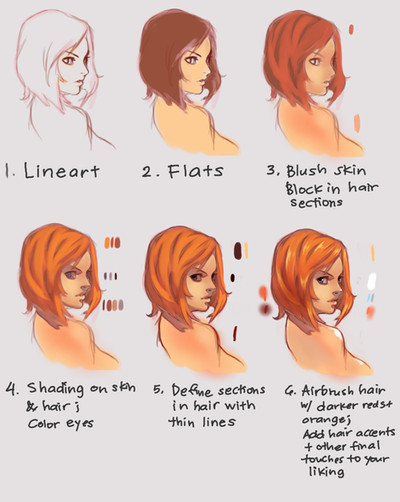
ryky — face coloring tutorial

#coloring #face #ryky #tutorial #tutorials #painttoolsai #adobephotoshop #howtodraw #stepbystep
Published: 2015-04-02 19:04:00 +0000 UTC; Views: 171978; Favourites: 6132; Downloads: 2687
Redirect to original
Description face coloring tutorial 


WATCH me for MORE TUTORIALS , BRUSHES ,UNFINISHED WORK and REFERENCES 

add me to your friendlist on facebook or just follow me      www.facebook.com/benjamin.cehe…
Related content
Comments: 80

mo259 In reply to ??? [2015-04-04 07:22:40 +0000 UTC]

I have the same question

👍: 0 ⏩: 0

Wiimi [2015-04-03 21:06:38 +0000 UTC]

Whoooow, cool! Thank you!!

👍: 0 ⏩: 0

moonlightangelbaby [2015-04-03 19:36:47 +0000 UTC]

amazing! do you mind if I share some of your works this on my art tumblr? I will link/source it back to you  

👍: 0 ⏩: 0

AinePi [2015-04-03 14:39:50 +0000 UTC]

And I needed so much smth like that yesterday... o.o

👍: 0 ⏩: 0

demonfoxgirl1000 [2015-04-03 12:41:17 +0000 UTC]

what program are you using?

👍: 0 ⏩: 1

ruiruicchi In reply to demonfoxgirl1000 [2015-04-03 13:08:28 +0000 UTC]

I'm sure it's Paint Tool SAI

👍: 0 ⏩: 0

Azhuradean [2015-04-03 12:29:58 +0000 UTC]

dayuumm.. you helped me a lot!

👍: 0 ⏩: 0

Willow-Bell [2015-04-03 11:36:49 +0000 UTC]

Interesting...

👍: 0 ⏩: 0

Celuthien In reply to ??? [2015-04-03 11:08:05 +0000 UTC]

THIS IS SO EPIC THANK YOU SO MUCH I CAN'T EVEN
Thanks a lot. I've been attacking the internet searching for something like this, and now IT'S FINALLY HERE. Lol. Ty again

👍: 0 ⏩: 0

uto-pia [2015-04-03 06:44:54 +0000 UTC]

Useful, thank you

👍: 0 ⏩: 0

M-a-f-u-y-u [2015-04-03 06:22:03 +0000 UTC]

You are being followed  

👍: 0 ⏩: 0

SpiderShii [2015-04-03 03:09:09 +0000 UTC]

omg this looks so amazing! your shading is seriously SO BREATHTAKING! <333

👍: 0 ⏩: 0

ShadowProductions24 [2015-04-03 02:43:33 +0000 UTC]

wow!!!

👍: 0 ⏩: 0

Faithwoe [2015-04-03 01:36:27 +0000 UTC]

amazing tutorial

👍: 0 ⏩: 0

NerdyBrian [2015-04-03 01:09:28 +0000 UTC]

This is great!  How did you change the color of the lines on the last bit?

👍: 0 ⏩: 1

Elanory In reply to NerdyBrian [2015-04-04 11:45:14 +0000 UTC]

You can put your outlines on an additional layer, sothat you can opacity lock it. But the effect here looks more like new layer > colour > change layer blend mode to addition (or overlay, depends on colour). It also effects the skin, not only the outlines, so. ^_^

👍: 0 ⏩: 1

NerdyBrian In reply to Elanory [2015-04-04 13:34:24 +0000 UTC]

Cool, thanks!

👍: 0 ⏩: 1

Elanory In reply to NerdyBrian [2015-06-06 07:45:36 +0000 UTC]

You're welcome ^_^

👍: 0 ⏩: 0

Oskua [2015-04-03 00:50:16 +0000 UTC]

Wow! thanks so much

👍: 0 ⏩: 0

raegiovanni [2015-04-03 00:45:57 +0000 UTC]

you're a star- thanks for this!

👍: 0 ⏩: 0

alef76304101 [2015-04-02 23:44:43 +0000 UTC]

good tutorial

👍: 0 ⏩: 0

RoyalMann [2015-04-02 21:47:07 +0000 UTC]

yes

👍: 0 ⏩: 0

Nerdux [2015-04-02 20:36:14 +0000 UTC]

mercy!

👍: 0 ⏩: 0

trevu [2015-04-02 19:42:35 +0000 UTC]

so helpful! thanks for sharing! ;w;

👍: 0 ⏩: 0

DarkestHeartRuby [2015-04-02 19:27:48 +0000 UTC]

The darkness to the left of her face looks too dark, but other than that it's fine.

👍: 0 ⏩: 1

Lleld In reply to DarkestHeartRuby [2015-04-03 16:07:25 +0000 UTC]

That would actually depend on the lighting source, the sun can cause some pretty harsh shadows.

👍: 0 ⏩: 0

RuiKagen3 [2015-04-02 19:22:48 +0000 UTC]

THANK YOU THIS IS BEAUTIFUl

👍: 0 ⏩: 0

owls-in-october [2015-04-02 19:22:21 +0000 UTC]

Very pretty. I love her freckles.

👍: 0 ⏩: 0

OtakuKiller99 [2015-04-02 19:06:53 +0000 UTC]

Lo practicare .

👍: 0 ⏩: 0


<= Prev |