HOME | DD
 SiathLinux — Menger Sponge Revisited
by-nc-nd
SiathLinux — Menger Sponge Revisited
by-nc-nd
Published: 2009-03-27 01:02:37 +0000 UTC; Views: 2081; Favourites: 4; Downloads: 22
Redirect to original
Description
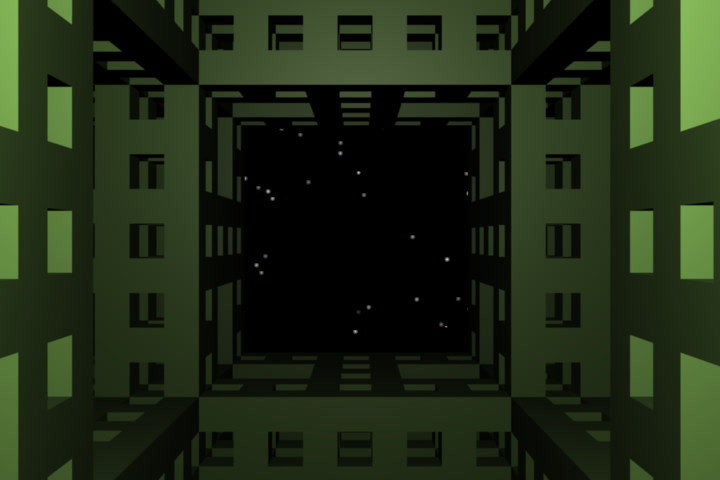
Menger Sponge RevisitedI wanted to do a better animation of this ..
Made only with Blender 2.48a
I give =3D-Asuarus permission to use this in the club

Related content


Comments: 64

It was a challenge to make this even with Blender

👍: 0 ⏩: 1

It didn't look all too complicated though.
👍: 0 ⏩: 1
The concept behind the Menger Sponge is 'simple' but making it in 3d, not so much, especially to make it with no doubled surfaces, points, or edges.
👍: 0 ⏩: 1
Well i guess it's just a matter of subdividing.
👍: 0 ⏩: 1
sort of yes, but it's a lot of removing faces and adding faces...
👍: 0 ⏩: 1
hm... I think you're right, it may takes some time to create something like that.
But i't should be able to make a script to automate this.
👍: 0 ⏩: 1
It would be a very complex script as there are different sized openings but all of the 'solid areas' are equal-distance. And it's technically an algorithm (that was how Menger came to the conclusions that created the 'sponge' which was named after him)
👍: 0 ⏩: 1
Well it's basically a pattern of removing cubes. So i don't see how this would be that hard.
👍: 0 ⏩: 1
You'd have to remove the correct cubes of the correct size - then as those are removed you would have to 'face' the surfaces that were cut out. It's a bit more than your thinking.
👍: 0 ⏩: 1
Well the whole idea with the menger sponge is to divide a cube into 27 cubes, remove the middle ones. Then divide those, remove middle ones and do this once again. It's nothing else than a simple algorithm ^^
👍: 0 ⏩: 1
well, yeah, but to get it to cover the openings created after the removal would be the challenge.
👍: 0 ⏩: 1
If you imagine a cube made out of clay. Divide that cube into 27 cubes, remove middle cubes and then rebuild it. Wouldn't that make sense?
👍: 0 ⏩: 1
All things 3d are hollow... when you subdivide and remove a section, the hole that is left has no inside sides. Those have to be added back.
👍: 0 ⏩: 1
Yeah i know. My point is that the idea is really simple, so all you have to do is convert cubes into more cubes and then convert those cubes into more cubes :3
👍: 0 ⏩: 1
Well, the concept seems simple but to have no repeating points, edges or surfaces made it a bit more complex in the making.
👍: 0 ⏩: 1
Not really. If you replace a cube with 27 cubes and remove the middle cubes. You will get the same result :3
So it's not really that complex either...
👍: 0 ⏩: 1
You are simplifying too much - as there can be no doubles - ie when you have 27 cubes, you have the edges, verteces and surfaces from them all - when you place them 2 together you would have 1 pair of doubled surfaces, 4 pair of doubled edges, and 4 pair of doubled verteces.
👍: 0 ⏩: 1
well then you will only have to use the command called remove doubles
👍: 0 ⏩: 1
Mostly cause I've yet to learn how to write Python scripts.
👍: 0 ⏩: 1
I don't think python is too hard to learn, gotta try learning it first though
If i ever take my time and learn it, i will write a cube to menger sponge-script ^^

👍: 0 ⏩: 1
I'd love to see one of those - it would be very cool to have that on the 'space bar' add item menu
👍: 0 ⏩: 1

Thank you
👍: 0 ⏩: 1

Wow, 2 hours to make the shape but only 20 minutes to set up the animation!

👍: 0 ⏩: 1
That is why I said if you make objects I can animate them
👍: 0 ⏩: 1

I have always wondered how people created a cube like that... I think I have an idea and will test it out. No clue how well it will work.
Great animation.
👍: 0 ⏩: 1
This is made from a single cube using subdivide. I've been told there is a way to create this from a Fractal, but don't know how to do that in a true 3d form...
And thanks, I wanted to give the viewer the since that it is a structure...
👍: 0 ⏩: 0


_go by blendernation & look at two cool object generator scipts -
_the city engine i got and used -
my newest is an example_``~...

👍: 0 ⏩: 1
saw that one (the city builder - but I'm having some odd issues with my Blender install under WinVista SP2 (latest patching of a nasty open ended issue with iexplore) it's the Vista permission issues that seem to be the trouble... after I fix this I'll get YafRay working (it's not worked on this computer since installing.), and then I'll get the rest of the scripts put in place.
👍: 0 ⏩: 1
- well, hope you get this fixed - This Is Not the city builder, this is different - it's not a script exactly it's a .blend - does have a control panel for settings - get one and try it out _``~...
👍: 0 ⏩: 1
I will, I just really haven't had the time to fully uninstall and reinstall
👍: 0 ⏩: 1


hm . .. the lighting is harsher, the movement is quite crude - it has a very mechanical touch. The stars are o.k.
I maybe would combine the first one with this, because I really liked the beginning of the other one (including the moovement of the cam) and here you can see more or less only that black at the end . . . I know it's there but only because I alredy saw it once
👍: 0 ⏩: 1
I shortened the lighting distance, and changed them to quad spotlights. I could edit them together (as they are separate .blend files.) I could also 'soften the lights on this one, but to do that I'd have to increase the lighting distance. I'll work it some more later, I'm going to attempt to make the Menger Triangle next which is a bit more complex.
👍: 0 ⏩: 1
. . . however, I've used to link a light to the cam, makes things sometimes much easier

👍: 0 ⏩: 1
The lights (two of them at low level, quad spots, are '
👍: 0 ⏩: 1
| Next =>