HOME | DD
 SkyJohn — iOS 7 style Dock WIP/Test/Download
by-nc
SkyJohn — iOS 7 style Dock WIP/Test/Download
by-nc
Published: 2013-11-11 18:20:55 +0000 UTC; Views: 26185; Favourites: 61; Downloads: 4921
Redirect to original
Description
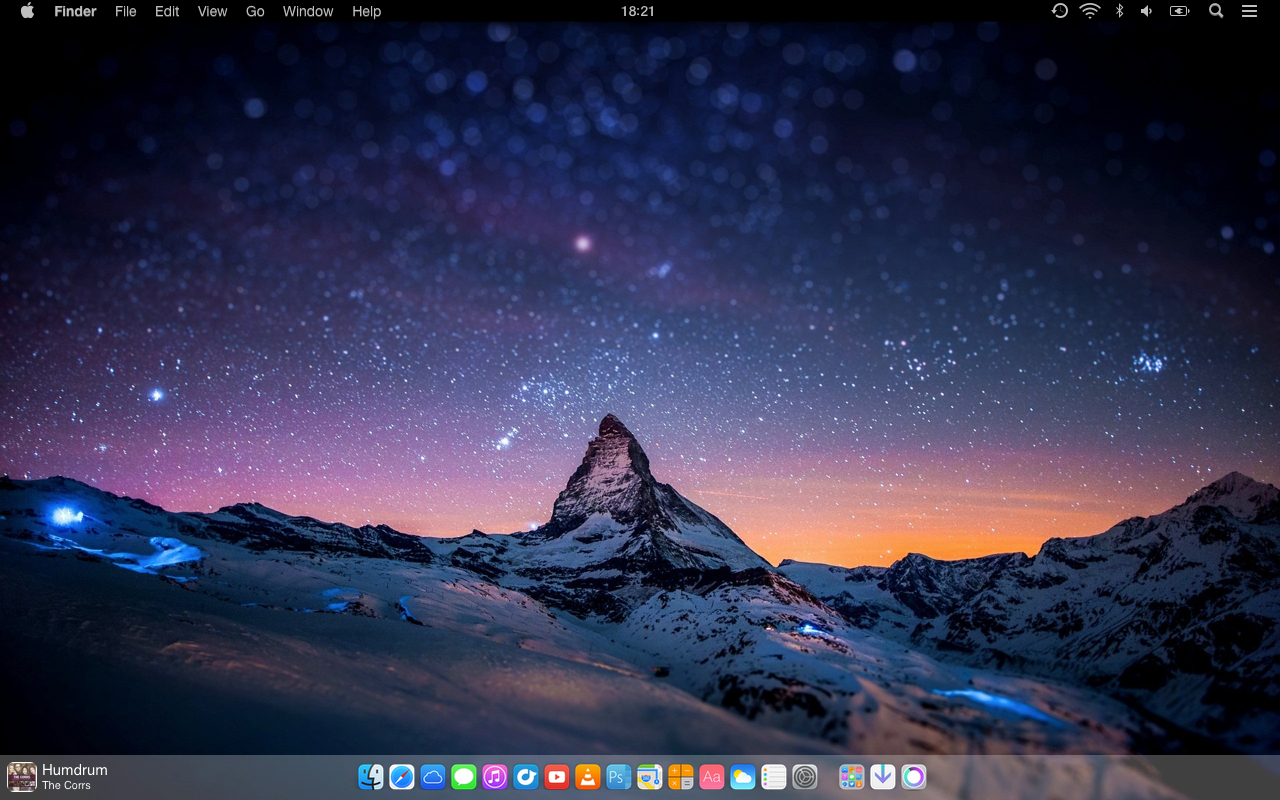
iOS 7 style Dock WIP/Test
This is just something i've been messing with.
Dock background was created with a GeekTool shape, the centred menubar Clock was made with GeekTool as well.
Original Mavericks dock background was made transparent with the beta version of DockMod www.dockmod.com
The download is just a transparent theme for use in DockMod.
Related content




Comments: 44


How did you get the Dock to go all the way across the bottom?
👍: 0 ⏩: 0


Question, how did you get rid of/make transparent the doc seperator? I don't seem to see the option in doc mod. :/
👍: 0 ⏩: 0


I really just want that flat dock, that stretches from end to end. I admit to being a newb when it comes to customizing a Mac. I was a Windows user for many years (since the mid 90's), and have only recently made the switch to Mac, so I don't know a lot about how to get things done. Any help for getting that dock to work? I didn't really understand the GeekTool, and I ended up installing a script on it, that I didn't want (the big clock in the center of the screen). But I still haven't gotten my dock to work. .docktheme file - where does that go? How do I install that?
👍: 0 ⏩: 0

How do i make the dock blurred with dockmod and what is the theme for bowtie?

👍: 0 ⏩: 0
How du i get the the dock like that with dockmod and what is the theme for Bowtie?
👍: 0 ⏩: 0

Nice!, but where can i get the whole bar in my screen and where i find that iOS 7 style map!?
👍: 0 ⏩: 0

Can somebody explain how add the dock background? I'm stuck on that
👍: 0 ⏩: 0

how do you use geektool to center the clock im stuck on that :/
👍: 0 ⏩: 0


forums.macrumors.com/showthrea…
👍: 0 ⏩: 0


Hi !!
Great job - Can you please share the wallpaper ??
👍: 0 ⏩: 1


Could you please share the theme you used at the dock?
Thanks in advance!
👍: 0 ⏩: 0

hi SkyJohn,
i use DockMod to make the dock transparent... but how you erase the line between the apps uns the folders (& Trash)? thank you in advance
👍: 0 ⏩: 0


how'd you change your status bar font to helvetica? i used tinkertool to change some of the fonts to helvetica neue ultralight but the rest of it is staying at lucida grande. halp?
also, i'm curious about the folder looking thing on the bottom... is that a recent items stack? how'd you get it to look like that?
👍: 0 ⏩: 1

My menubar font was changed with this: www.deviantart.com/art/Nocturn…
And the folder icon is just a fake icon i made to replace the applications folder icon. It doesn't change with my apps, sadly.
👍: 0 ⏩: 1
booooooo. oh well.
thanks for your help with the font though!
👍: 0 ⏩: 0


Hey I was wondering how you got the album art, artist, and title to appear on the bottom left?
👍: 0 ⏩: 2
It is a Bowtie skin: bowtieapp.com
👍: 0 ⏩: 0
actually i see that you used bowtie. which theme is that?
👍: 0 ⏩: 0
You can share the file GeekTool or we describe the steps to get to do a background for Dock on GeekTool.
Thank you for the theme of DockMod.
That advance ..
👍: 0 ⏩: 1
I just added a new File Geeklet to my desktop, scaled it to the width of my desktop and changed the background colour to white with the opacity set to 25%.
👍: 0 ⏩: 0

cool, how much did you put the transparency percentage in geektool for the dock?
👍: 0 ⏩: 1
The folder icon ist just a folder icon, not really a folder with those apps in, right?
👍: 0 ⏩: 1
Yes the folder icon is just a faked icon that I created, it doesn't change with my apps.
👍: 0 ⏩: 0
how did you make the taskbar black? this is osx mavericks, right?
👍: 0 ⏩: 1
There is a version of Obsidian MenuBar for Mavericks: www.maxrudberg.com
👍: 0 ⏩: 0

Bright idea, Mr. John.
it'd be great if GeekTool could also manage to put a blur under the dock, or could it?

👍: 0 ⏩: 1
No sadly GeekTool can't do the blur.
If you wanted the blur you could edit the wallpaper in photoshop and create the dock background that way, but editing all your wallpapers isn't that practical.
👍: 0 ⏩: 0


