HOME | DD
 Splitlipgypsy — Tiger eye WIP Steps
by-nc-nd
Splitlipgypsy — Tiger eye WIP Steps
by-nc-nd

Published: 2009-04-20 08:04:21 +0000 UTC; Views: 436; Favourites: 3; Downloads: 16
Redirect to original
Description
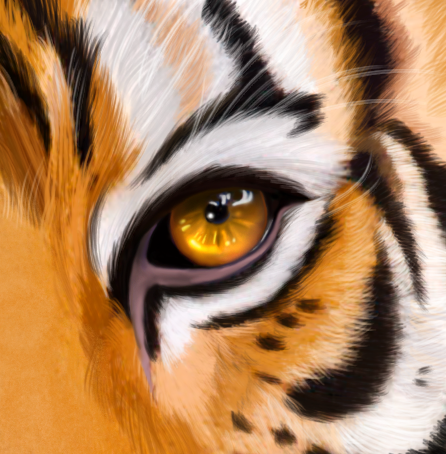
THis was a quick one , Wacom Graphire and PSPX , about 2.5 hours.Step 1: Quick sketch with airbrush and colors picked from reference photo.
Step 2: Using the Smudge tool (the little hand over to the left) I smear the colors around with the direction of the hairs til I have them , generally , where I want them
Step 3:A- I have used the Burn tool , (the dark dot on the left) to darken the base of the hairs and to bring out the definition of the total piece.
B- THen using the Dodge tool (the opposite of burn for those unfamiliar) I bring out the ligh in the hairs and create the highlights in the eye.
4: FInal piece , I continued to use the dodge and burn till I get the level of detail I am happy with , soften the whole picture 1 level , to remove any artifacts , then sharpen.
It was fun for a little-detailed quick piece.
Related content




Comments: 4


Thanks , it was pretty fun , I kinda like this digital stuff!!
👍: 0 ⏩: 0