HOME | DD
 stylehacks — Favorite Links Gradient

Published: 2008-10-26 18:13:58 +0000 UTC; Views: 6148; Favourites: 15; Downloads: 800
Redirect to original
Description
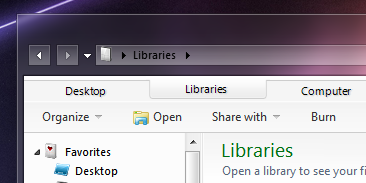
Adds a gradient (blue) to the Favorite Links panel in an Explorer window.Values located in Explorer & Shell > Shell > CommonPlaces > Toolbar
To install open VSB, click StyleHacks, then click Browse for a StyleHack file.
Related content








Comments: 11

something new for windows 7 ? and to make this change with restorator ?
👍: 0 ⏩: 1

Requires VSB. Can't do it with a reshacker.
👍: 0 ⏩: 0


very nice.
-----------------
is it possible finding a condition for making the icons of the navigation pane from 16 x 16 to be 32x 32 ?
[i have succeed to do only setting, Fonts,Colors and SystemMetrics > Fonts and SystemMetrics > captionbarwidth/height:size = 24 but this modification change the overall shape of the window as it affects also to other parts [as the size of folderband etc]which we dont like to change.]
thanks in advance.
👍: 0 ⏩: 1
see [link] setting Fonts,Colors and SystemMetrics > Fonts and SystemMetrics > captionbarwidth/height:size = 26 [not 24 as i wrote before]we have 32x32 icon on navigation pane, but also streching on taskbar , adressbar [also problems with adressbars icons, dont appear], min,max, close buttons normal[=96ppi]streched and also! mixed with those of 196 ppi, folderband becomes bigger etc [infact the visual style appears as when we setted 120dpi font size] see also [link]
thanks
👍: 0 ⏩: 1
Yeah doing things like that will cause the change to mimic the dpi. All the DPI setting does is multiply the SysMetrics. Maybe some other things too.
I think it might be possible. Not entirely sure, but I'll look into it.
👍: 0 ⏩: 1
thank u.
[as i said i tried to find how can we make enable the icons on navigation pane which are 16x16 pixels to be 32x32 pixels like the icons exist on the prog list of the left side of the menu]
👍: 0 ⏩: 0