HOME | DD
 TheComicStream — Digital Semi-Realism Skin Tutorial

Published: 2012-04-09 17:54:58 +0000 UTC; Views: 81871; Favourites: 2107; Downloads: 920
Redirect to original
Description
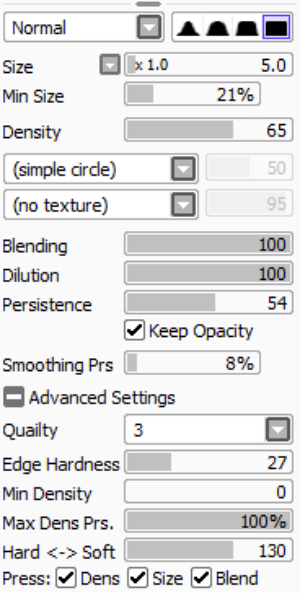
UPDATE:This is the main tool for blending I used, also used this solely for step E.
 ---> [link]
 I've updated it since then, but this is how it was when I used it for this tutorial. Hope that helps.

A friend of mine kept telling me about how they were unsatisfied with their painting skills. And so I was inspired to do this, even though I'm not so sure I should be giving advice in this depth to anyone. ono" I'm still learning how to paint myself. My friend isn't the only reason I decided to do this, however. I remember when I first tried my hand in semi-realism and I went scouring the world wide web looking for tutorials. I found very few, and the one that had the most potential didn't make a whole lot of sense to me and my paintings came out horrible because of my lack of understanding. This tutorial has obvious facial errors and isn't of the highest quality, but hopefully it's easy to understand (assuming you can understand my chicken scratch) and gives you a proper grasp of the basics. It's, in short, just a sketch rendered in skin tone, colored in, then blended. A process repeated with different colors until it looks natural. I did a mysteriously gendered character for you in Paint Tool Sai, but I'm more than certain that this process can be completed with any other digital medium as well. Happy painting, I hope my derpy drawing helped! :]
Related content






Comments: 246

This is cool 
Just a question - Going from step F to G, what layer mode did you use on F when you combined the two? Just normal layer mode and blend, or did you do overlay or multiply for the layer mode on F?
👍: 0 ⏩: 1

Thank you, glad it could help you! My process is a bit different now, but the basics are the same.
I used normal layers for the entire thing.
👍: 0 ⏩: 1
Thank you for sharing your methodology!
👍: 0 ⏩: 1
No problem! Happy to help.
👍: 0 ⏩: 0

Featured here: [link]
Thanks for the helpfull tutorial
👍: 0 ⏩: 0

Very lovely and helpful. Although I am a Photoshop user I think that this can be easily translated. So thank you very much. ^^
👍: 0 ⏩: 1
Yep, should be I think. 

👍: 0 ⏩: 1
Thank you very much. You are so kind. ^^
👍: 0 ⏩: 0

Sweet tutorial Can't wait to try this out. Thanks so much!
👍: 0 ⏩: 1

I absolutely HATED painting skin when I first got into digital art, and was completely lost on how to go about it. I remember this being the first tutorial that finally made it click for me. Now I actually like painting skin! So I thought I'd say thank you once more c:
👍: 0 ⏩: 1
You're very welcome! Your art is amazing! ouo -stalks-
👍: 0 ⏩: 1
haha thank you! your tut is part of the reason I was able to progress! skin was what I used to bitch most about xD
👍: 0 ⏩: 1
I feel so moved right now, haha. xD I'm glad I could help!
👍: 0 ⏩: 1
Aww I'm glad too c:
👍: 0 ⏩: 1

I know this is obviously for Paint Tool SAI, but do you know of a way to blend in the same style in PS? I've tried using the smudge tool, but it just ends up pushing the colours away and blur tool doesn't blend the colours well. Is there another way that you know of? Thank you~~
👍: 0 ⏩: 1
I don't use Photoshop at all. 
I also don't even use these blending settings anymore, I add color to blend. Maybe that will help. I take two colors, use them against each other, then take the color they create and use it between them to create a blended look manually. Hope this helps!
👍: 0 ⏩: 1
Ah, thank you anyway
👍: 0 ⏩: 1
Try the trail! Free for a month. After that, you can still use it but you can't save or open files.
👍: 0 ⏩: 1
Ah, that's a very good idea
👍: 0 ⏩: 1

I've been trying to do some semi-realism lately, and this tutorial is helping immensely. Still, how do you get your edges to be so clean and sharp? I just blur my lineart with the skin tones no matter what I do. Any suggestions?
👍: 0 ⏩: 1
It takes a practice to be able to do it on the same layer, but if you use separate layers it might help.
This is what I do, I do a sketch. Then I make a layer beneath that and add the flats. Then I make another layer, in front of the sketch layer, and shade over it. THEN, as I go along, I darken the faded lines that was once the sketch lines. If you're going to a more real look, too dark could fail what you're going for, so try to lighten it up a little with the skin tones you used.
👍: 0 ⏩: 0


i find this entirely helpful. thank you for the tutorial!
👍: 0 ⏩: 1
No problem, glad it helped! =]
👍: 0 ⏩: 0

That's really awesome, but I think the highlights are a bit too hard, I don't know ._. He looks too oily in my opinion 

👍: 0 ⏩: 1
I agree with you, to be honest. P= I've been thinking about making a new one. :]
👍: 0 ⏩: 0

An idea how can I blending in CS6 ? Play with the flow ?
👍: 0 ⏩: 1
I've never used PS for coloring, so I really have no idea.
Maybe try looking things up on different websites? Including YouTube? There's always good video tutorials on there.
I do know something that could work. (I do this Sai)Take your two colors and apply them as if you're cell-shading. Then take the color you used for your shading and on a more transparent layer, color some more. Then water-drop the created softer blend of the two and on combined layers color in. Keep doing stuff like that until it looks painted. Blending without actually having to smudge anything. Works pretty well. If you do that with a slightly harder brush on a smaller size, I find it can come out looking like pencil color. Depending on your settings. :] The opposite makes it look like paint.
👍: 0 ⏩: 0


This was so helpful! I used it for the skin and applied it to the hair in this picture!
[link]
👍: 0 ⏩: 1
It did! And it helped rekindle my love for art and coloring art!
I think Digital Painting is gonna stick~
👍: 0 ⏩: 1
I know! I'm slowly getting better at it too!
👍: 0 ⏩: 0


At step E where you say to combine the layers and blend I feel it would be super helpful if you just said how you blended, like what brush settings you use. Sorry I'm just a super newbie when it comes to digital painting >.< Regardless of that, still an awesome tutorial!
👍: 0 ⏩: 1
I have my settings up in my gallery already, I posted a link to them in the artist comments to this tutorial now! Thanks for the tip, and I hope that helps.
[link]
👍: 0 ⏩: 0


Oh man, I've been trying to figure out how to digitally paint semi-realistically for such a long time, and this DEFINITELY helps!! Thank you!

👍: 0 ⏩: 1
| Next =>