HOME | DD
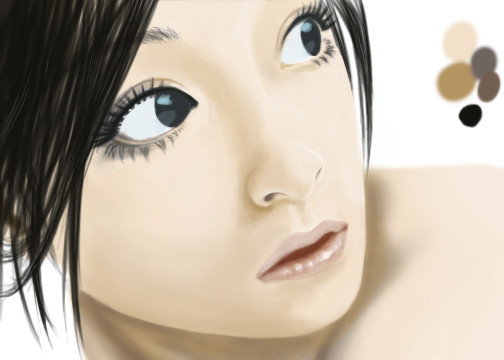
 twin-tail — Skin and Realistic Hair Tutorial

Published: 2013-08-23 09:52:28 +0000 UTC; Views: 44973; Favourites: 983; Downloads: 0
Redirect to original
Description
Today's tutorial is in 2 parts~ ^^PART 1 -- Skin www.drawcentral.com/2013/08/ho…
PART 2 -- Hair www.drawcentral.com/2013/08/ho…
I loved making this tutorial, because the hair part is so so easy to get a good result ^^ You have to try it!
This was originally only going to be a hair tutorial but I decided to do a walk-through of her skin as well. But the skin takes a lot more steps than the hair. v v
The program I used as always is Clip Studio Paint but you can do this tutorial in Sai, Photoshop, openCanvas and Mangastudio etc etc etc ^^ You need layer capability (lock layer transparency) and I also use color balance tools but they aren't totally necessary.
If you can not set a brush blend mode in your program, you can get the same effect by:
1. Make a new layer
2. Set the clipping group
3. Change the layer blend mode
4. Paint like normal
5. Merge the layer down 1
I will be uploading the full pic of the result as well ^^ I hope you enjoy it
Related content







Comments: 28

👍: 0 ⏩: 0


I may have to learn from these thank you very much for taking the time to make these!
👍: 0 ⏩: 0


Thank you!! These explanations are going to help me so much!!

👍: 0 ⏩: 0

link worked for me. that is a really interesting way to do skin. I def am going to try it.
👍: 0 ⏩: 0


Theres so many talented artists like you. It's a beautiful picture, and a amazing tutorial. Thank you.
👍: 0 ⏩: 0


Very Helpful! And just overall a beautiful piece of work!
👍: 0 ⏩: 0

Thx that you offer something like this to everyone.
This will help me alot, i am sure of it.
👍: 0 ⏩: 0

After looking at your tutorial for skin, everything made sense! Thank you!
👍: 0 ⏩: 0

there is something I don't understand how much saturation has each color have.
I understand the middle tone should be the least saturated but what about the higlights and shadows?
How do you know how much saturation each tone should have?
👍: 0 ⏩: 0


air brush and water brush. I do not remember what ones exactly. it has been a while since i make this sorry ^ ^ ;;
when i remake this tutorial i will show the exact tool + tool settings.
But~~ it should be similar across different programs as a default brush.
the water brush is a round paint/watercolor brush that has low blending settings~ air brush is a standard round.
you will adjust your settings depending on how much pressure and speed you use normally ^ ^
👍: 0 ⏩: 1

SSSUUUUPPPERRRRR helpful! Thank you so much! :3
👍: 0 ⏩: 1
Np glad you found it useful ^^
👍: 0 ⏩: 0


