HOME | DD
 twosilverstars — butterfly wing tutorial
Published: 2005-02-08 03:05:12 +0000 UTC; Views: 43196; Favourites: 475; Downloads: 9119
Redirect to original
Description
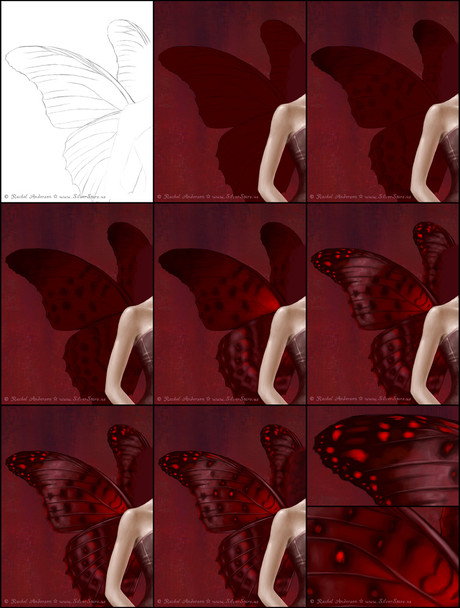
This is a quick tutorial / walkthrough for my queen of hearts butterfly wings. You can see the tutorial for the queen of hearts here .Tools i used ~ Adobe Photoshop 6, Corel Painter 8, Wacom Intuos2 graphics tablet, and two butterfly wing references.
Please note that i explain my techniques and brush settings in the queen of hearts tutorial, so i wont be repeating those here. Make sure you read that one first before you ask me any questions in case i answer it there. Also, i hate making people download huge files, so this is kinda small. I linked to the full picture for each step which should help clarify things since i also didn't number each picture - i am not very organized

---------------------------------------------------------------------------------------
1. First we have the sketch. I put the sketch layer on a white background because it is easier to see than when it is on a red background. I used the same method of sketching as i explained in the first step of the queen of hearts tutorial.
2. Pretty simple, i just block in the main colour.
3. I wanted to get an idea of where i would have spots of dark colour, so i just paint those in using my typical brush settings in PS.
4. Just darkening the spots

5. Now i take the file into Painter, and i use the Round Camelhair and Opaque Round oil paint brushes to add colour. I used pure red and a pinkish-lavender colour for the highlights.
6. Added some spots, more highlights, etc.
7. Now that i have most of the colouring done, i add some of the light pinkish-lavender to the edges of the lines so they look more 3d. Especially to the part that comes out of her back and runs along the top of the wing - there may be a technical term for it but i don't know what it is
8. I added a few more spots since part of the wing looked empty, and i added some red spots to the black ones. At this point i am happy with how they turned out, so i just zoom in and go over the edges to refine things. Here is a detail of the brush texture on the wings.
9. Some close ups.
Hope that helps someone. If you have questions that aren't answered by this, or the queen of hearts tutorial, please let me know.
Related content




Comments: 49


Thank you so much for submitting this! It's really helpful!!
👍: 0 ⏩: 0

Just to let you know that this is featured in my latest journal
if you do not wish to have it there please let me know.
Thank you for your outstanding work.
[link]

👍: 0 ⏩: 0


That's some wicked drawing you can do there. Thanks for the tuts!
👍: 0 ⏩: 0

ups, that was the wrong smiley... I wanted to send you this : )
👍: 0 ⏩: 0
this is really great... your mother´s surely been very happy about such a present!! How nice of you 
👍: 0 ⏩: 0

omg...I'm more a fan of bat-like wings than faerie ones, but your tutorials are the best! <3
👍: 0 ⏩: 1

yay!! thanky!! i luv how u make butterflySs wingSs :3!!!
👍: 0 ⏩: 0

One of these days I want to learn how to do this! So I will fave for when I'm ready to learn! So beautiful!
👍: 0 ⏩: 0

Your tutorial looks great, but the links don't work!! 

👍: 0 ⏩: 2

Thanks for letting me know by the way
👍: 0 ⏩: 1
You're welcome! 


👍: 0 ⏩: 1
Yep, it's mine, thank you
👍: 0 ⏩: 1
Oh no, i re-did my website a while back and i must have changed the directory
👍: 0 ⏩: 0


even your tutorials are pretty ... ohhh..... Im so green with envy ... LOL
👍: 0 ⏩: 0

I've got a faerie or three that have been after me to give them proper wings for a while now. I think what'll help most is just the bare sketch to get the veination in the wings looking close to corect.
👍: 0 ⏩: 1
Yeah, fairy wings are tricky. You should try looking up insect stock photos here, there are tons and they really help as reference for fairy wings
👍: 0 ⏩: 0

Thank you so much. Although I didn't get near the same effect as you, it got me a lot farther than I would have if I just used my own skills

👍: 0 ⏩: 1
No problem, i am glad i could help
👍: 0 ⏩: 0


Wahhh~~~!!! GREAT!!!!! I´m pretty sure that I´ll use it some time!!!
Thank you!!!!
👍: 0 ⏩: 0

This is fascinating - I just wish I could draw now...
Dave
👍: 0 ⏩: 0


Ooh nice frame tutorial... always wanted to do one of those butterfly fairy wings you make, now I might have to try it out!! Got to get over my fear of painter though. -_-. I have a lot of problems blending in painter for some reason, maybe Im just using the wrong brushes.
👍: 0 ⏩: 1
Thanks
Opaque Round oil brush
Size: whatever you want
Opacity: aprox 5-30%
Resat: 49%
Bleed: 0%
Feature: 3.0
Round Camelhair oil brush
Size: default (19.8%)
Opacity: aprox 5-30%
Resat: default (17%)
Bleed: default (92%)
Feature: default (2.9)
I use the opaque round brush for larger areas like backgrounds and clothing, and the round camelhair brush for smaller things. If you make the round camelhair brush bigger or smaller, be sure to adjust the feature a bit higher or lower respectively or you wont get the same effect. Hard to explain, just play with the settings till you find something you like
👍: 0 ⏩: 1
Aww thanks!
Anyway, Im excited to try those ones out with those settings, especially since I admire your texturing (I think I get whatcha mean about the feature setting).
*goes to find her buried copy of painter*
👍: 0 ⏩: 1
Yeah, Painters complexity is what kept me from using it for so long as well. And i still can't do a picture from start to finish in it to save my life. I think the best thing to do is to go wild and experiment with all the different brushes and settings till you luck out and find something that works. That is how i do my backgrounds. The texture part in the background isn't from those two brushes though. It is mostly from using papers and that part is a bit more complicated - i can take screen shots for you if you didn't understand what i meant in the tutorial. I really don't mind
👍: 0 ⏩: 1
No honest! I really do understand making the brush settings larger if I make the brush size larger (for feature) or at least thats my guess! I promise to come bug you if I get lost though. I think where I've gone wrong in painter is by trying to duplicate the brushes in photoshop and they are not set right (because im guessing) so they are not working the same and then dont blend the way Im used to. The papers sounds confusing, but it would be really interesting to see how you make background textures, or textures in general... *poke poke*, its always cool to see how you do stuff, it looks like magic!! XD.
👍: 0 ⏩: 0

THat's so cool. I think it's awesome how you actually help people understand how you made such a beautiful work of art and help them to understand how to go about doing something like that on there own. Verry cool.

👍: 0 ⏩: 0

*wants photoshop or art program software*
Maybe I'll just borrow twosilverstars, and hug her til she draws mew a purple faerie. *giggle*
👍: 0 ⏩: 0


Once again... THANKS!!! You're really great showing us how you make it.
lex
👍: 0 ⏩: 0


Very nice tutorial. Do you actually save all these steps? That's a lot of files for a pair of wings. Haha!
👍: 0 ⏩: 1
Yeah, i know. I tend to go about things in a really silly way. I like saving stages for things like the wings, hair, skin, etc. But i end up with way too many versions since i work on one area for a long time. I ended up with over 30 for this one!
👍: 0 ⏩: 0


I commented on this when the preview pic was diff, gave me a scare when it wouldn't let me post lol
Well yes, excellent job.. great to know how a master like yourself can do things like tha ^.^ thanks very much
👍: 0 ⏩: 1
Eep, i know, i uploaded the wrong ones 
👍: 0 ⏩: 0
