HOME | DD
 UkIntel — TitleBar + Caption Button Mod
Published: 2008-05-22 00:15:28 +0000 UTC; Views: 17424; Favourites: 33; Downloads: 1841
Redirect to original
Description
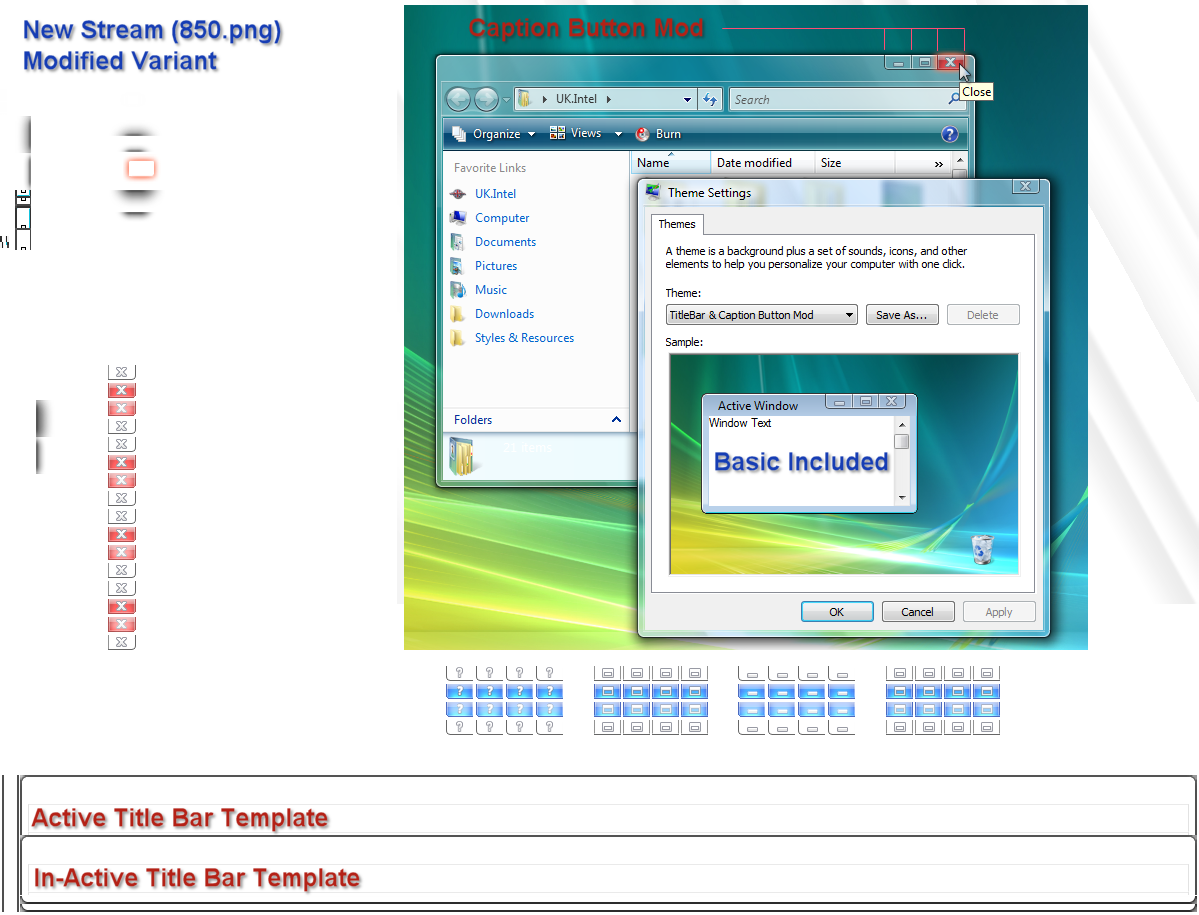
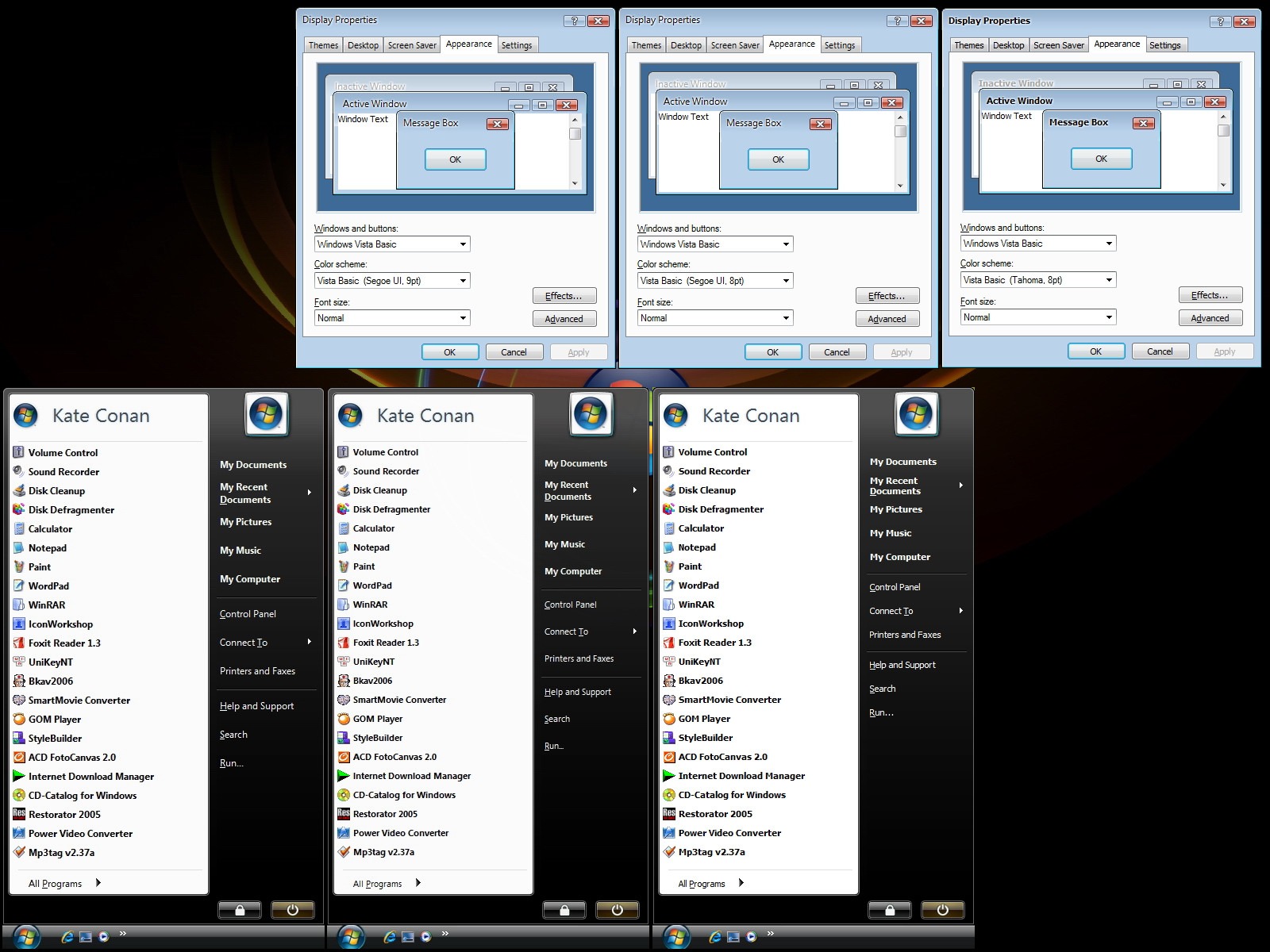
Title Bar & Caption Button Mod - for Vista Basic and Aero---------------------------------------------------------
Modified Template aero.msstyle
What does the Title Bar Modification do?
---------------------------------------
You will not see any big changes to the TitleBar when first applied.
This Modification has been designed as a template for people who want to create there own Visual style.
In the past one of the biggest limitations in the aero.mssstyle is the aero Titlebar.
The Original Stream image only has a very small area assigned to the Titlebar, therefore making it very difficult to create a detailed Titlebars.
Most windows blinds themes have detailed titlebar images, now this can be applied to the aero.msstyle
The important part of this edit is the new arrangement of the Stream 850.png which is governed by the variant.
The new Stream has a large Title bar area ready to be edited.
Also I have increased the Images margins for both aero and Basic Titlebars.
Left = 50px right= 50px Top=30px Bottom= 0px
So for example the left hand 50px will remain a fixed image in the titlebar when you resize a browser window.
Anything in between the left and right margins will be used for stretching.
These Tutorials will help you identify the image margins for the titlebars if you wish to make adjustments.
Vista-Image-Content-Margins [link]
Vista-TitleBar-Stream-Mod [link]
What does the Caption Button Modification do?
---------------------------------------------
As required for most xp style themes Min/max/close buttons appear closer together.
UNFORTUNATLY THIS EDIT HAS MINOR BUGS.
Bug 1: Aero "Close" Button is shared for both small Windows (Theme Properties) and Large windows (Browser).
Bug 2: Aero Buttons only have one state for active and in-active windows.
NOTE: The reason for these bugs is because we have used the button glyphs as the actual buttons.
At the moment this is the only known method to achieve this effect, and I am "Guessing" it is as good as it gets
because Deviant Psycob (Variant Know-it-all) Used the same method for his AeroBister Style.
But that’s not all... Hex editing has taken place to achieve this. The location of the Glyphs (now buttons)
in the stream have been moved to a bigger area for easier editing. Image Properties have been changed to re-align buttons. Title Bar Padding is now set to 20.
This Particular Modification is a combination of Hex-editing and Image Trickery. Its a compromise. But for now its our best option

Requires UxTheme Patch
Install at own risk
Happy Skinning!
UK.Intel
Related content

















Comments: 17

👍: 0 ⏩: 0

can you help me?
i wanna know how to change windows 7 caption buttons?
👍: 0 ⏩: 1

well i don't use windows 7 anymore.. i use windows vista sp2 so you can't. sorry.
👍: 0 ⏩: 0
can you help me?
i wanna know how to change windows 7 caption buttons?
👍: 0 ⏩: 0


First, thank you a zillion for giving the effort and time to write these tutorials. Theme-ing in vista was unimaginable prior to your hex tutorials. I have been following your work for quite some time now, and it has been a very enjoyable time theme-ing. Many people theme wonderfully, but many more could enjoy the fun, if only finding the hex values were a bit less difficult. I understand that taking time out just to write a tutorial is really difficult (boring?), and that's what endears you to me and thousands of others like me, who apart from their daily work wants to be creative just for the fun of creating. So, don't stop man YOU ARE REALLY GREAT.
However as I work mostly in photoshop, the variant file is still shrouded in mystery for me. Thanks to your image margin tutorial, I can now find any image in the Variant and modify it's stretch and content areas. But it feels like I am doing it blindly.....there must be a way to make sense of the file, isnt there? for example which code decides the default size of any picture? which code decides the default position? what maps an image to a specific box. Also you and PsychoB often add data to Variant? why? on what premise do you make the assumption that adding data will make the change?
On a different note, in your tutorials you have said that in vista basic the image 616 is used as overlay in the right panel of start menu, but sadly I found that (Vista basic) the start menu right panel items are used like any other folder items and hence use the images 565,566,567 for various mouse over states.(Again using your technique of colouring various pngs as red blue etc). Changing these pngs make system-wide changes. Similarly changing individual hex reference of these images makes somewhat lesser but still system-wide changes. Is there any way to use a different (set of) png(s) for the right start menu items, (like in aero)?
And please don't stop writing tutorials. "May the goodwill of all free-folk guide you".
👍: 0 ⏩: 0

Woah, this will be usefull, you're a genius.
Just one question which could look dumb, but I can't find how to get off the white glow behind the text of the titlebar.
Any help?
Thanks in advance.
👍: 0 ⏩: 1

hey,
i dont skin vista but i like your idea, great work
👍: 0 ⏩: 0

How did you hide File Menu? I tried Reshack and registry editing, but no success...
👍: 0 ⏩: 0

***UPDATE***
Again I appologise to anybody who downloaded this mod before 23rd May 2008.
- Fixed a bug with left and right aero frames.
- Improved the Stream Template
Sorry for any in-convenience. PLEASE RE-DOWNLOAD.
Regards
UK.Intel
👍: 0 ⏩: 0


congratulations Terry.
i hope pdf hex values adding comes on future.
:thumb86341579:
👍: 0 ⏩: 1

