HOME | DD
 Uriy1966 —
Absolute
Uriy1966 —
Absolute
Published: 2013-05-10 04:52:05 +0000 UTC; Views: 50507; Favourites: 349; Downloads: 9803
Redirect to original
Description
Update!For those who are used to more conservative font, added variants with Calibri
Hello friends and other deviants

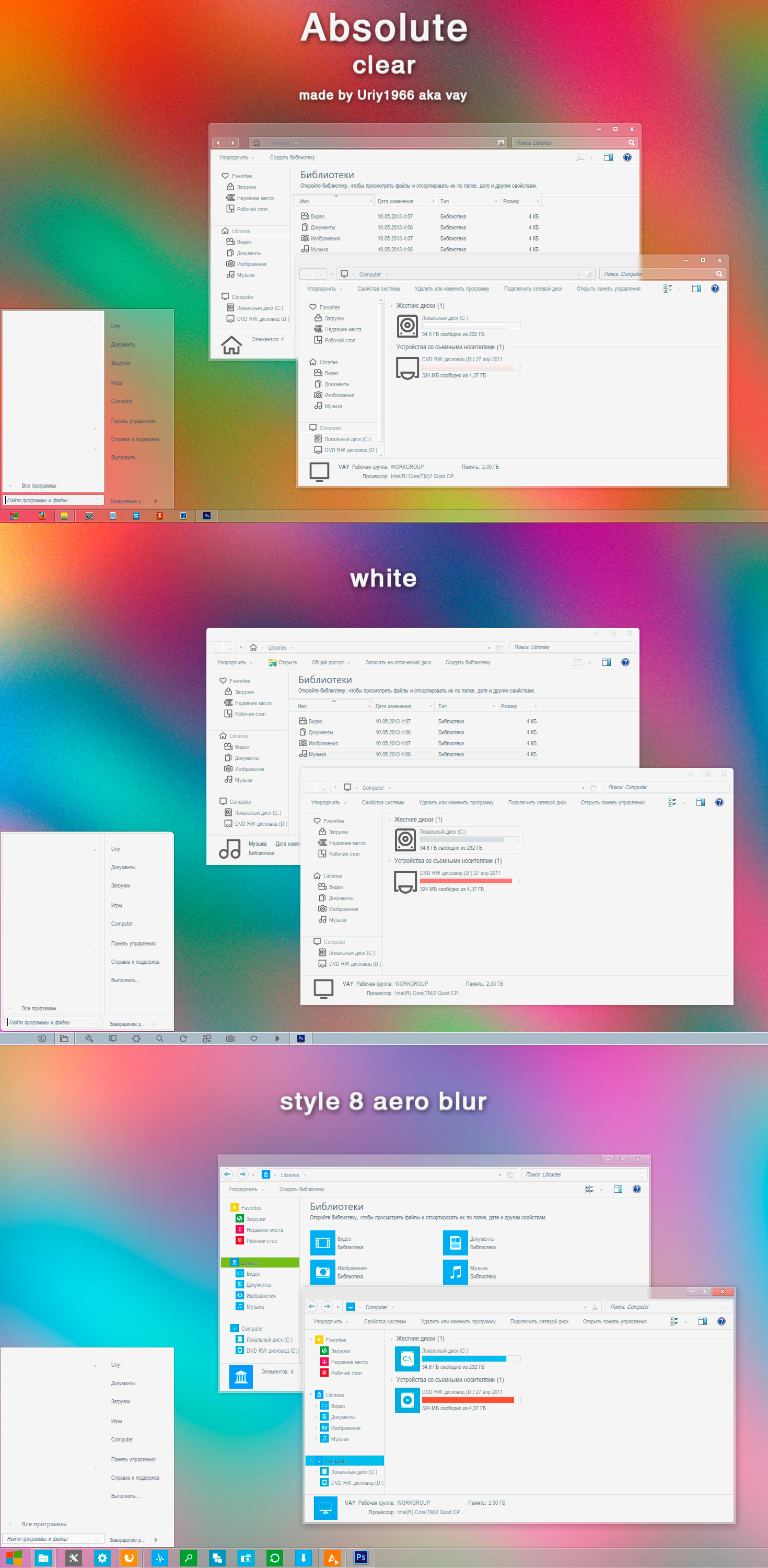
Present to you his latest visual style, named Absolute

There are three types
1. Absolute clear
2. Absolute white
3. Absolute style 8 aero blur
in the archive:
Visual style
ExplorerFrame.dll x86 & x64 and PNG & BMP
Font: arialnarrow
In folder wallpaper are three different kinds, made by me.
Preview
The idea buttons for the vs Absolute white, taken from here [link]
icons and Start Orb for vs Absolute style 8 aero blur : Metro UI Icon Set - 725 Icons
icons for vs Absolute clear Q-oob for SuperBar
other icons Meego
Attention! for correct display of visual style, be sure to set the font.
Comments are welcome

 Warning!!!
I do not allow to modify their visual styles without first asking my permission. and only if the modification of at least undergo 70%.
Related content





Comments: 161


I do not have windows 8
Thank U!
👍: 0 ⏩: 1

👍: 0 ⏩: 0

I love this theme and I really like the icons on this theme.They look very butterful together. But the installation does not replace these icons. I wonder if you have these icons package by IP or not? I hope to you can share one.I want the icons of [white]. Thank you very mach.
👍: 0 ⏩: 1
Icons here fabounet03.free.fr/Cairo-Dock/…
Thanks

👍: 0 ⏩: 1
Thank you~ My dear computer is more butterful now ~~
👍: 0 ⏩: 0


sory sir can you help me, how to change all icon in windows 7 ?..
👍: 0 ⏩: 1
I do not have icons in the entire system. Only the left sidebar in Windows Explorer, in the taskbar, drive icons and icons of the main folders, such as - Program files, Windows, Games, People, Music, Movies, Personal, Books, Pictures and Documents and so on. Everyone else in the system, I never change.
👍: 0 ⏩: 1
ouu, how to change the left sidebar or replace all icons in windows explorer
👍: 0 ⏩: 0

Отличная тема получилась 
👍: 0 ⏩: 1
Спасибо! 8 - ка есть у самого, но не прикалывает ни как
👍: 0 ⏩: 0

Congratulations on the DD! And I think your icon is trying to hypnotize me...
👍: 0 ⏩: 1

So how would I use a theme of yours for my computer?

👍: 0 ⏩: 1
then I advise you to look into this tutorial neiio.deviantart.com/art/How-t…
👍: 0 ⏩: 1

Thanks didn't know you could do this before today
👍: 0 ⏩: 0


I've been staring at your avatar for quite a few time ._.
great job anyways, well deserved dd
👍: 0 ⏩: 1

You have the best avatar ever.
Congrats on the DD!
👍: 0 ⏩: 1


You talk about not changing themes o.O and this theme I've seen in a lot of places..
👍: 0 ⏩: 2
I'm now doing a theme on which you and all your "pink brothers and sisters" will squeak with delight. But I will not give you. expect screenshots soon

👍: 0 ⏩: 0
I do not care where you've seen it, this is my theme, I spent a month of its creation. And if I see a modification here on deviantart, i will make every effort that would have deleted it.
👍: 0 ⏩: 1
Sure
👍: 0 ⏩: 0


иконпак 1й и второй можно? перешел с 8ки снова на 7, постав ил тему она просто vay
👍: 0 ⏩: 1
А в описании же есть где я брал иконки, я же икон-паками не ставлю, сам заменяю через ресторатор, да и тех уже имаджерес длл нету)) а вот похожий на восьмёрку инсталлер где то здесь видел.
Спасибо что понравилась
👍: 0 ⏩: 1
на черный первый иконпак ссылка описании тоже есть? не найду, хоть иконки и если можно инструкцию для ресторатора на замену, буде заниматься
👍: 0 ⏩: 1
Забирай [link] только сконвертируй сам, лучше здесь [link]
А про ресторатор почитай здесь [link] в двух словах как работать с ним ( очень легко ) запустил, в левую половину перетащил imageres.dll, открываешь "иконка", смотришь те ресурсы которые хочешь заменить, например 1002, 1003, 1004, 1005, - это библиотеки, документы, изображения, музыка, видео, 1023 иконка самой либралис ( библиотеки ) 1024 - иконка фаворитов ( Избранное ) 109 - компьютер......дальше сам смотри ( не помню, а ковыряться лень, надо готовить тему для релиза, сегодня ночью выложу новую ))))))
Да, забыл написать как менять, в левой половине как и писал закидываешь длл-ку, а в правой ишешь и выбираешь ту, что хочешь заменить, потом в правой половине нажимаешь "Файловый проводник" и как в тол-командэре ищешь путь где у тебя лежат иконки в формате ico, и просто мышкой перетягивай на заменяемый ресурс, поверх, когда заменишь все тебе нужные, в верху жми на "Файл" сохранить...и всё
👍: 0 ⏩: 2
| Next =>