HOME | DD
 WalterMB — Windows XP - WalterMB edition
by-nc-nd
WalterMB — Windows XP - WalterMB edition
by-nc-nd
Published: 2006-01-12 11:28:12 +0000 UTC; Views: 23181; Favourites: 29; Downloads: 6647
Redirect to original
Description
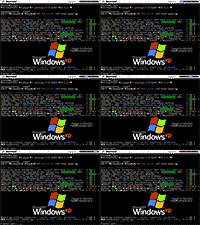
 VGA† 640x480x16 Boot Screen for Microsoft® Windows® XP.
It emulates a verbose Windows® XP kernel loading process, for a slightly modified version of the Operating System including a possible pre-loading of a O3S -compatible terminal for Intel® processors. References to computer hardware and software were kept to an acceptable minimum in order for the Boot Screen to be as “portable” as possible.
To use it as a boot screen you have to re-compile the protected system file \ntoskrnl.exe to replace the standard bitmaps used by XP. You can either do this manually‡ or by using a software package like BootXP, Resource Hacker™ or StyleXP.
In either case, you can't use the electronic Flash animation above (e.g. by right-click-saving or drag-n-dropping it), but rather download the .ZIP archive you can find in the WinXP :: O3S . WalterMB edition deviation page via “Download ” button on that page and extract the two bitmap images (.BMP). They are the static boot screen and the progress bar bitmaps used by the kernel executable*.
DISCLAIMER:
This electronic image/animation is released under a Creative Commons license — Noncommercial, No Derivative Works.
This means that anyone can use it as is for conversion and/or integration in their own Operative System software (e.g. installers, kernels, boot loaders, boot starters, etc.), that is without modifying the bitmap contents of the still images as a whole.
The author (~WalterMB ) is not responsible for any damage to software or hardware components due (or suspected to be due) to improper use of this electronic animation/image or the integration procedures operated for it.
Parts of this art are proprieties of their respective owners, whose Copyright notice is reported below.
Copyright © 2006 WalterMß
Copyright © 1985–2002 Microsoft Corporation
All Rights Reserved.
† Video Graphics Array (VGA ): A standard 80 x86 video architecture to properly display text and graphics on PCs, compatible with all modern BIOSs and graphics adapters/accelerators. It provides the following video modes:
- Text (rows x columns):
- Graphics (pixel width x height):
- 640x350 (EGA); 16 colors, indexed RGB/2 palette;
- 640x480 (VGA); 16 colors, indexed RGB/6 palette;
- 320x200 (MCGA ); 256 colors, indexed RGB/6 palette.
Since all modern PCs support the aforementioned VGA BIOS modes, whereas higher-resolution, broader-palette video modes§ have to be set using additional, hardware-specific low-level code , currently up-to-date Operating Systems employ them for their installers and boot loaders/screens. This happens both for compatibility issues with every possible video hardware and for code compactness' sake of such delicate, early-execution programs.
For example, Windows® 9x uses Mode-X 320x240x256 graphics mode; Windows® 200x/ME/XP and most Linux distributions use VGA 640x480x16 graphics (used for the Linux FrameBuffer) and 80x50 text modes.
‡ e.g. consult [link] and [link]
* Technical note: Remember that such bitmaps, as they are stored within \ntoskrnl.exe, both have the palette set to “all black” (i.e. all 16 colours set to #00000016), whereas their unique palette is stored in a separate object within the executable (cfr. previous note links for more information). The reason for that is because the boot screens fades in at the beginning from an all-black screen, so the bitmap palette is loaded separately.
§ Such as those video modes with more simultaneously-displayable colors, like HiColor or TrueColor RGB/8, RGBA/8 and better modes (with either 15, 16, 24 or 32 bits per pixel instead of 8bpp).
p.s.: Thanks to Wikipedia for bibliographic cross-references throughout these notes.
Related content









Comments: 17

don't move the progress bar at upper right one, this is for bootskin by stardock. because the progress bar is diltered.
👍: 0 ⏩: 0

Hi i like this one but now i have one problem.
I use rehack to open ntoskrnl.exe but how do i get the progresbar in the right place ?
👍: 0 ⏩: 1

I can't recall what is the best choice right now, but some hack tools for XP don't allow the correct repositioning of the progressbar, they just implement the substitution on the progress-bar bimap. Maybe ResHack is one of them.
👍: 0 ⏩: 1
you can use bootskin.
👍: 0 ⏩: 0

oddio!!! finalmente un pò di italiano in questo sito
Comunque complimenti... davvero carino!

👍: 0 ⏩: 1

wow you know about those things, very impressive your work
👍: 0 ⏩: 0

C'è quasi più gusto a leggere la descrizione che ad ammirare il fantastico boot eheheheh
Complimenti Walter, userò la tua idea per realizzare la jpeg del mio prossimo bootloader (che adesso mi carica quello di MacOS 
👍: 0 ⏩: 1
Ti ringrazio: già che c'ero, ho pensato, perché non approfittarne per dare qualche notizia storica sulla modalità VGA a chi potrebbe appassionarsi a questi aspetti tecnici (se non lo è già)?
Ho provato MacOS X 10.4 Tiger x86 qualche giorno fa..... emulato con VMware 5... sono rimasto stupito più che altro dall'estrema funzionalità di quest'ultimo che dalla versione x86 del celebre s.o. Apple.
E da li ho preso spunto per questo boot loader.
👍: 0 ⏩: 1
Infatti mi aspettavo di trovare qualche accenno al Tiger. Non l'ho mai visto, ma il boot come l'hai fatto tu ricorda molto quello classico dei sistemi unix-like, e da lì a pensare al MacOS X il passo è breve
👍: 0 ⏩: 1
In effetti questo boot screen è un pastiche di varie idee:
- La taskbar non-interattiva in alto è simile allo stile Apple MacOS. Lo si riconosce dagli angoli superiori smussati, un logo a sinistra, le voci-menù in grigio/nero ed una progress-bar simile a quella della batteria dei laptop sulla destra.
- I messaggi del caricamento del kernel sono spartani,* simili a quelli di UNIX/Linux: immaginando che, idealmente, un sistema operativo serio debba avere un kernel altrettanto stabile, leggero e sicuro come quello di Linux.
- I nomi DOS dei file di sistema (p.es. NTOSKRNL.EXE), la modalità grafica VGA ed i vaghi riferimenti al filesystem (p.es. il punto di monta multi(0)disk(0)rdisk(0)partition(1)\ che diventa la cartella C:\) sono infine presi dai sistemi operativi Microsoft®.
* Caratteri ASCII senza troppi fronzoli grafici: letti direttamente dal BIOS del modo testo di un'ipotetica motherboard. Modificati solo alcuni (come si faceva un tempo con le utility DOS per modo testo) per esigenze di comunicazione: p.es. carattere ‘®’ anziché usare la terna ‘(R)’..
👍: 0 ⏩: 1
Sì, avevo visto tutto 
E complimenti pure per il livello estetico dei commenti, mammamia che rifiniture
👍: 0 ⏩: 1


scusi...io nn ho capito cosa sto vedendo...cosa sto vedendo? (calcola che ho la febbre pure eh...)
👍: 0 ⏩: 1
Ah ah ah.... se usi Windows® XP riconoscerai che questa schermata è simile a quella di avvio del sistema operativo: stessa risoluzione, solo 16 colori, solo una piccola progress bar animata (in questo caso in alto a destra).
Trattasi di una schermata di caricamento alternativa per quel sistema operativo ("Boot Screen", per l'appunto). C'è una marea di gente a cui piace personalizzare la grafica del proprio computer, compresi questi tipi di schermate; ed ecco la mia versione
Rimetti e rimettiti
👍: 0 ⏩: 1
ahhhhhhhhhhhhhhhhhhhhhhhhhhhhhhhhhhhhhhh h...sorprendentemente...HO CAPITO!
grazie tenterò
👍: 0 ⏩: 0