HOME | DD
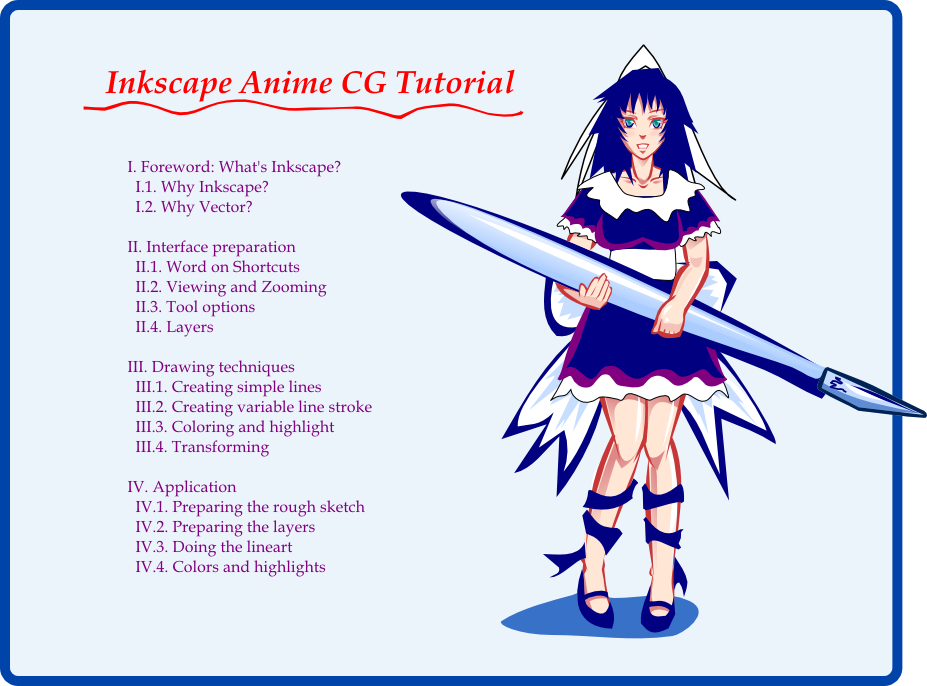
 White-Heron — Inkscape Tutorial Index
by
White-Heron — Inkscape Tutorial Index
by
Published: 2007-06-08 19:39:11 +0000 UTC; Views: 44220; Favourites: 103; Downloads: 1660
Redirect to original
Description
Yeah! I'm finally done with this! Now I can go back to doing lousy fanarts, or something!
To download the full .svg files, click the download button next to the image. Otherwise, you can view the .png versions online:
microUgly's Quick Guide to Inkscape (must-read before you use my tutorial)
Index
I. Foreword: why Inkscape?
II. Interface preparation
III. Techniques
IV. Application
Inkscape is a truly awesome little program. I do suggest you try it out. Hopefully this tutorial will help ease up the learning curve a bit without forcing you to read the whole manual first. While it might seem complicated at times, once you get used to it the workflow becomes extremely smooth.
I originally wanted to somehow base the girl off some Inkscape theme, but didn't in the end save for adopting a dark+light color scheme. Ah well.
To those of you who can program, free drawing for anyone who implements one of the following into the current SVN:
- a perspective grid
- this feature here
- or some derivative of the "mask" function that basically works like masks except it leaves all areas outside the selection as Opaque, not invisible. Have it code an object that turns otherwise transparent areas into opaque white, or something, without forcing me to cover the whole picture up first manually. I want my easy editable (and visible! I don't want to have to cover the whole thing up first) holes! >: O
Any suck...err... any takers?!?! XP (warning: don't expect a Leonardo Da Vinci)
This tutorial is under a Creative Common license. I allow reproduction, reuse and derivatives of any or all parts of this tutorial, with or without explicit crediting, as long as the two following conditions are met:
- that the work be something to help promote Inkscape (which is the original purpose of this tutorial): better tutorial, presentation, article...
- that you do not outright claim authorship of the end product (that'd be lying). I'm not dead-set on getting credit or recognition, but I really don't want to have other people accuse me of "plagiarizing" My work. :S
Hope it helped. ^^
Related content







Comments: 35

👍: 0 ⏩: 0

This makes a very good Inkscape tutorial. Thank you for taking time out of your day to share.
👍: 0 ⏩: 1

You're welcome, and thanks for the fave! Inkscape keeps getting more awesome too!
👍: 0 ⏩: 1


thank you, I just got inkscape and im having trouble getting used to it since I usually work with GIMP
👍: 0 ⏩: 1
You're welcome! Thanks for the fave! 
👍: 0 ⏩: 0

ummm can i ask.......... how to save an inkscape with some layer.?..i try save my work with svg file ...but when i opened it again ..the layer is gone,just 1 layer....
👍: 0 ⏩: 1
That's very strange, usually when you save as .svg, all the layers are preserved.
You access the layer panel by typing ctrl+shift+L , and there you can make new layers. You can also see which layer you're on at the bottom.
However, it Is very easy to switch layers by mistake: if you click on an object in another layer, you'd be automatically switching to that layer. That's why it's advised to lock all the layers you're not working on. Maybe you switched back to the first layer without knowing it?
Also, you'll occasionally find that some of your objects end up in a "layer" called "(root)". This is pretty annoying, and I usually resolve this by cutting all the objects in this "root" layer (select then ctrl+x), selecting the right layer, and pasting them back in the same location on the new layer (ctrl+alt+v).
👍: 0 ⏩: 1
oh thank for your respons ,but the problem is on saving file.. i allready saved in svg...but if i try to open it again,in just on 1 layer.. thas why im so confuse..i cant fokus on my work again, or maybe the layer can be separated again....or is there any tips that i dunno,about save the file with layer......not like in photoshop..save and open with some layer like last we saved...
oh and thanks before...help needed..T_T
👍: 0 ⏩: 1
.svg is supposed to preserve layers, so it's very strange if you saved an .svg file with Inkscape, but when you open it again with Inkscape, the extra layers disappear. Did you use some other program in-between?
Try this:
- Start a brand new file with Inkscape
- Make a layer, draw a circle
- Make another layer, draw another object
- Save
- Close
- Open again with Inkscape
Did the layers still disappear? They're supposed to still be there, just like in Photoshop.
👍: 0 ⏩: 1
i already do like what you said,but the other layer is still disappear..if i open it in the next day,..(of course my computer is off),and i opened it again..its disappear.just 1 layer only...
oh i forgot,if my computer i still on,the layer is complete...2 layer.i can see it.... opened in next day ,the other layer gone.....
👍: 0 ⏩: 1
Alright, can you upload an example file into your scraps gallery? I'm going to open it myself to have a look.
Also, which version of Inkscape are you using?
👍: 0 ⏩: 1
my innkscape ver 0,47.....
[link]
here's the link.....
oh is there any new ver of inkscape?
i just think...that, my inkscape could be crash,should i download and install on my com again?
👍: 0 ⏩: 1
That is weird, because I do see 2 layers:
- a Remember layer for the text
- a Layer 2 for the image
The latest version is 0.48, and it has even more shiny toys in it. 
👍: 0 ⏩: 1
my inkscape must be crash,,,T^T okay i'll try to install last ver..oh..and thanks alot ^^.
👍: 0 ⏩: 1


👍: 0 ⏩: 0

coool
-------
دليل مواقع عربية |دليل مواقع مصرية |دليل مواقع خليجية || دليل دردشات خليجيه |دليل مواقع اماراتية |دليل المواقع المغربية |مواقع قطرية |مواقع سوريه |مواقع كويتيه |دليل مواقع عالمية |دليل المواقع الفلسطينيه |دليل المواقع الجزائرية |دليل المواقع السودانية |شات عرب |شات توب |دردشة عرب توب |دردشه |محادثة | برامج |منتديات صور |شات صوتي |شات كامات || جات كامات |دردشة صوت وفيديو |غرف محادثة صوتية |منتديات سعوديه |منتديات امارتيه |منتدى توب |منتدى عرب توب |منتدى مصري |منتدى مغربي |منتديات بنات |دردشة , منتديات , دليل مواقع
👍: 0 ⏩: 0

I've been meaning to get into Inkscape. Thanks for the great tutorial!
👍: 0 ⏩: 1
It's a bit obsolete now that Inkscape 0.46 is out, though. XD The tweak tool is amazing! It makes things SO much easier!

👍: 0 ⏩: 1
Oooh, didn't know a new version was out! Thanks for the update! ^_^ The tutorial would still be a big help -- I'm still making my transition from Photoshop into Inkscape as my main vector program. 
👍: 0 ⏩: 1
I should probably make a new tutorial one day. *sigh* No time for it now.
With the tweak tool, the calligraphy tool is the tool to go to now. Use it for rough drawing, and use the tweak tool to adjust. ^^ Remember that the tweak tool only applies to the currently selected stroke (so you won't wonder why there isn't being an effect), and you'll be fine. :thumbs:
👍: 0 ⏩: 1
Thanks for the tip! I'm currently downloading Inkscape and can't wait to try it!

👍: 0 ⏩: 0


Maaaybe. XD Though I'm pretty sure others would be able to come up with nicer designs than this one. XP
👍: 0 ⏩: 0

Great tutorial. It is kind of you to mention my guide.
If you're not already a member of inkscapeforum.com (or don't intend to become a member) would you mind if I posted links to this tutorial?
👍: 0 ⏩: 1
It was not kindness. It was convenience. 
- do it all over myself (bleh)
- tell them to RTFM (whoo-hoo, like they'd appreciate That)
- just point to your guide.
I went for the option that was easier on everyone. 
I'm already a member at your forum, and I do believe I've already posted the tutorial there.
👍: 0 ⏩: 1
Ah, how embarrassing. I didn't see your name in members list and must have overlooked your post. Embarrassing since the forum isn't that active yet
👍: 0 ⏩: 1
No problem! ^^ The forum's only just starting. It's actually nice to have it start slow for now because things are so easy to find. XD It will grow eventually, hopefully.
And I really like the way it's been arranged!
👍: 0 ⏩: 1
Thanks. I've had one comment against the arrangement, and I'm prepared to be flexible with what forums and categories we have, but unless I see a trend in opinions it'll remain as is. I'm glad to hear someone likes it
👍: 0 ⏩: 0

Glad you liked it! Hope it helped!
👍: 0 ⏩: 0