HOME | DD
 xenium-ART — Vision Clock
by-nc-sa
xenium-ART — Vision Clock
by-nc-sa
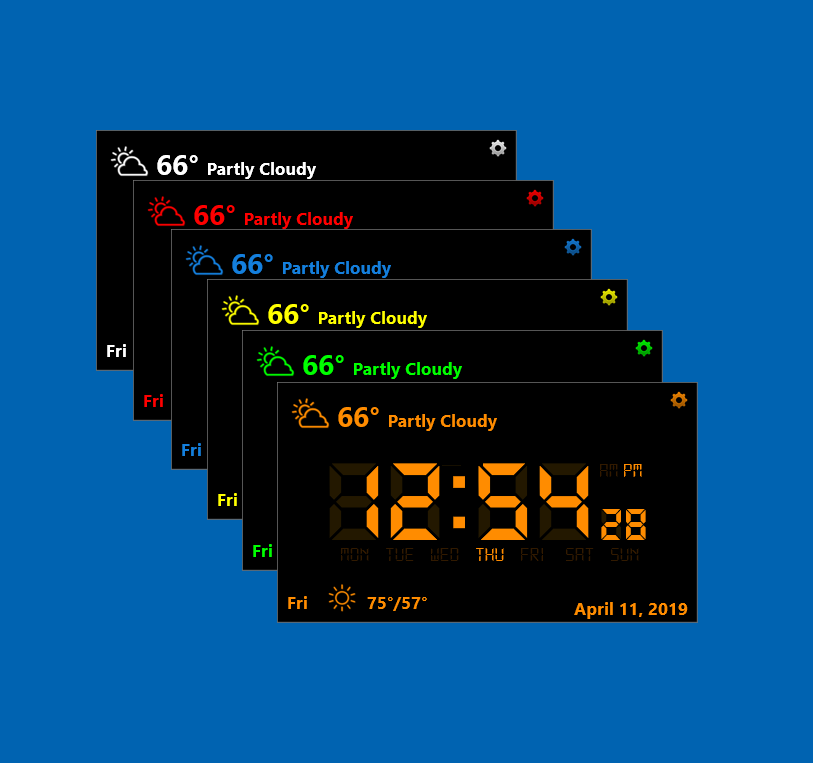
#clock #date #rainmeter #time #weather #rainmeterskin #customization #desktop #windows #desktopcustomization #rainmetercustomization #rainmeterskins #windows11 #windows10 #windows10themes #windows11themes
Published: 2019-04-11 17:48:12 +0000 UTC; Views: 321560; Favourites: 173; Downloads: 9014
Redirect to original
Related content






Comments: 89

👍: 1 ⏩: 1

👍: 0 ⏩: 0

👍: 0 ⏩: 1
👍: 0 ⏩: 0
👍: 0 ⏩: 1

👍: 0 ⏩: 1
👍: 0 ⏩: 0

👍: 0 ⏩: 0
👍: 0 ⏩: 0

👍: 0 ⏩: 1
👍: 0 ⏩: 1
👍: 0 ⏩: 0
You're welcome
Right-click on the skin and choose Edit skin.
In the ==Meters== section, add in front of [Bg] the semicolon ;
Save, Close.
Then Go to Rainmeter\Skins\VisionClock\Resources, open Variables.inc and change FontColorShadow and FontColorShadow2 to 0,0,0,1
Save, Close, Refresh skin
👍: 1 ⏩: 1

👍: 0 ⏩: 1
Thanks !
Not enough space to add Hi / Lo
On the right side, after to the weather condition, it cannot be because the length of the text for the condition varies.
👍: 0 ⏩: 1
👍: 0 ⏩: 1
ZIP No Preview
Go to Rainmeter \ Skins \ VisionClock and replace the VisionClock.ini file with the one in the archive.
Then Refresh skin
I added Hi / Lo temperatures for Today / Tonight
👍: 1 ⏩: 1
👍: 0 ⏩: 1

👍: 0 ⏩: 1
Yes.
1.Choose the second location and make the settings (clock color, time & temperature format, size).
2.Go to Documents \ Rainmeter \ Skins \ and make a copy of the VisionClock folder, for example VisionClock2.
3. Finally make the settings for the main location (VisionClock).
Then right click on the Rainmeter icon in the Notification Area and choose Refresh all.
Repeat the procedure if you want more clocks.
Remember:
For locations 2,3.... you can not make changes later in the settings menu.
You must delete the folder (VisionClock2, for example) and repeat the above procedure, always using the settings menu from the main location (VisionClock).
👍: 0 ⏩: 0

thank you for the skin
next step that I would like would be the translation of this one
for my part, I would be interested in the FR
thank you
👍: 0 ⏩: 1
Download and unzip the zip file :VisionClock FR
You will replace the existing files with the ones in the zip archive.
Go to Documents \ Rainmeter \ Skins \ VisionClock and replace VisionClock.ini
In the Resources folder, replace RegExp.inc and Variables.inc
Finally, refresh skin.
👍: 0 ⏩: 1
I have a 404 error when I want to download your file
👍: 0 ⏩: 1
It works for me
You are logged in when you want to download ?
Edit:
Use the new download link (if you still can't download from the old link):
easyupload.io/dr3kod
👍: 0 ⏩: 1
thanks for the french translation
little suggestion that I would have for the future
- Indicated how to translate your skin for other languages (failing to propose it)
- choose the color of the clock
I thought that by using the hexadecimal code, it would simplify the thing (each one would choose the color in a faciel)
- delete (choose the skin's dark complexion (% opacity)) to keep only the numbers
- choose the form of the date
currently MMMM DD YYYY
👍: 0 ⏩: 0


<= Prev |